Vlayout
- Java API: org.zkoss.zul.Vlayout
- JavaScript API: zul.box.Vlayout
Employment/Purpose
The vlayout component is a simple vertical oriented layout. Added components will be placed underneath each other in a column.
Notice that hlayout and vlayout do not support splitter, alignment and packing. If you need them, please use ZK Component Reference/Layouts/Hbox and ZK Component Reference/Layouts/Vbox instead.
Common Use Cases
- Simple vertical form layout — Place labels and input components inside
<vlayout>to stack them top-to-bottom without any CSS boilerplate; each child occupies its own row automatically. - Sidebar or panel with dynamic content — Combine
vflex="1"on vlayout withvflexchildren to fill available vertical space; vlayout redistributes height when child visibility changes at runtime. - Spacing control between stacked widgets — Use the
spacingattribute to tighten or widen the gap between children (e.g.spacing="0"for a flush card-style list,spacing="1em"for airy separation).
<!-- Vertical form: label + input pairs stacked in a column -->
<vlayout spacing="0.5em">
    <label value="Username:"/>
    <textbox/>
    <label value="Password:"/>
    <textbox type="password"/>
    <button label="Login"/>
</vlayout>
Example
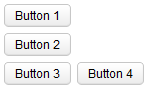
<zk>
     <vlayout>
         <button label="Button 1"/>
         <button label="Button 2"/>
     </vlayout>
     <hlayout>
         <button label="Button 3"/>
         <button label="Button 4"/>
     </hlayout>
</zk>
Spacing
The default spacing between two child components is 0.3em. You could
modify it if you like:
<hlayout spacing="0">
  <textbox/>
  <button label="Click Me"/>
</hlayout>
Resize Child Components’ Height Dynamically
When a Vlayout’s content changes (e.g. adding / removing components or component’s visibility changes), it will resize all its child components’ height dynamically.
The window’s height below (line 6) will grow when we hide the
blue-background div. This also works for vflex="min" which doesn’t
auto resize in a normal case.
    <vlayout height="400px" style="border: solid 1px">
        <button onClick="div.setVisible(false)" label="hide the blue box below"/>
        <div style="height: 400px;background-color: lightblue" id="div">
            box
        </div>
        <window border="normal" vflex="1">
            0px height at first
        </window>
    </vlayout>
Horizontal Alignment
The default align is left. You can change by specifying a CSS rule at
“style”: text-align:right, text-align:center
        <vlayout style="text-align:right">
            <button/>
            <button/>
            <button/>
        </vlayout>
Supported Events
Check inherited events
Supported Children
*ALL