Treerow
- Demonstration: Tree (Dynamic Styling)
- Java API: org.zkoss.zul.Treerow
- JavaScript API: zul.sel.Treerow
Employment/Purpose
Treerow is a single row in the tree. It is the main content of treeitem. Treerow can contains multiple treecell, each treecell represent one column in this row by sequencial. A treecell can contains any component in it, such as label, image, textbox etc.
Common Use Cases
Treerows are used whenever you need to display hierarchical data in a tree structure, such as folder hierarchies, organizational charts, category trees, or menu structures. Each treerow represents a single node and can contain multiple cells for displaying different properties of that node.
Example
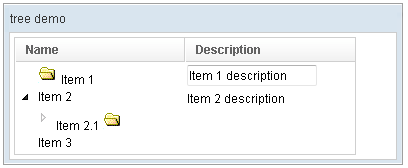
<window title="tree demo" border="normal" width="400px">
    <tree id="tree" width="90%">
        <treecols sizable="true">
            <treecol label="Name" />
            <treecol label="Description" />
        </treecols>
        <treechildren>
            <treeitem>
                <treerow>
                    <treecell>
                        <image src="/img/folder.gif" />
                        Item 1
                    </treecell>
                    <treecell>
                        <textbox value="Item 1 description" />
                    </treecell>
                </treerow>
            </treeitem>
            <treeitem>
                <treerow>
                    <treecell label="Item 2" />
                    <treecell label="Item 2 description" />
                </treerow>
                <treechildren>
                    <treeitem open="false">
                        <treerow>
                            <treecell label="Item 2.1">
                                <image src="/img/folder.gif" />
                            </treecell>
                        </treerow>
                        <treechildren>
                            <treeitem>
                                <treerow>
                                    <treecell label="Item 2.1.1" />
                                </treerow>
                            </treeitem>
                        </treechildren>
                    </treeitem>
                </treechildren>
            </treeitem>
            <treeitem label="Item 3" />
        </treechildren>
    </tree>
</window>
Properties
Label
Default Value: null
A convenience shortcut that sets the label of the first Treecell inside this treerow. If no treecell exists yet, one is created automatically.
since 5.0.8
<treeitem>
    <treerow label="Item 1" />
</treeitem>
Image
Default Value: null
A convenience shortcut that sets the image of the first Treecell inside this treerow. Accepts a URL string pointing to the image resource. If no treecell exists yet, one is created automatically.
since 5.0.8
<treeitem>
    <treerow label="Documents" image="/img/folder.gif" />
</treeitem>
Supported Events
- Inherited Supported Events: XulElement
Supported Children
* Treecell