Treecols
- Demonstration: Tree (Dynamic Styling)
- Java API: org.zkoss.zul.Treecols
- JavaScript API: zul.sel.Treecols
Employment/Purpose
A treecolsis main part of tree which a contains set of columns. The
set of columns is defined by a number of treecolcomponents. Each
column will appear as a column at the top of the tree.
Common Use Cases
- Sizable columns — set
sizable="true"on<treecols>to let users drag column borders at runtime to resize individual<treecol>elements. - Multi-column tree — place two or more
<treecol>children inside<treecols>to display parallel data fields alongside the hierarchical node label. - Frozen leading column — combine
<treecols>with a<frozen>sibling on the parent<tree>to pin the first column in place while the remaining columns scroll horizontally.
<tree width="500px">
    <frozen columns="1"/>
    <treecols sizable="true">
        <treecol label="Name" width="150px"/>
        <treecol label="Department"/>
        <treecol label="Status"/>
    </treecols>
    <treechildren>
        <treeitem>
            <treerow>
                <treecell label="Alice"/>
                <treecell label="Engineering"/>
                <treecell label="Active"/>
            </treerow>
        </treeitem>
    </treechildren>
</tree>
Example
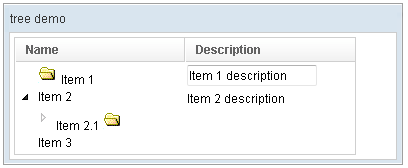
<window title="tree demo" border="normal" width="400px">
    <tree id="tree" width="90%">
        <treecols sizable="true">
            <treecol label="Name" />
            <treecol label="Description" />
        </treecols>
        <treechildren>
            <treeitem>
                <treerow>
                    <treecell>
                        <image src="/img/folder.gif" />
                        Item 1
                    </treecell>
                    <treecell>
                        <textbox value="Item 1 description" />
                    </treecell>
                </treerow>
            </treeitem>
            <treeitem>
                <treerow>
                    <treecell label="Item 2" />
                    <treecell label="Item 2 description" />
                </treerow>
                <treechildren>
                    <treeitem open="false">
                        <treerow>
                            <treecell label="Item 2.1">
                                <image src="/img/folder.gif" />
                            </treecell>
                        </treerow>
                        <treechildren>
                            <treeitem>
                                <treerow>
                                    <treecell label="Item 2.1.1" />
                                </treerow>
                            </treeitem>
                        </treechildren>
                    </treeitem>
                </treechildren>
            </treeitem>
            <treeitem label="Item 3" />
        </treechildren>
    </tree>
</window>
Supported Events
- Inherited Supported Events: HeadersElement
Supported Children
* Treecol