Gpolyline
- Demonstration: Gmaps
- Java API: in release zip
Employment/Purpose
Polyline drawn on the Google Maps per the given (latitude, longitude) points and visible zoom level (0–3).
Common Use Cases
Styling a Polyline
Combine color, weight, and opacity to match your map’s visual design:
<gmaps width="600px" height="400px">
    <gpolyline color="#1A73E8" weight="4" opacity="90"
               path="37.4284,-122.1400,37.4356,-122.1328,37.4242,-122.1144"/>
</gmaps>
Editable Polyline with Path Change Listener
Enable interactive vertex dragging and listen for coordinate updates. Use pathEncoded="false" for full precision when editing at high zoom levels:
<gmaps width="600px" height="400px">
    <gpolyline id="route" editable="true" pathEncoded="false"
               path="37.4284,-122.1400,37.4356,-122.1328"
               onPathChange="handlePathChange(event)"/>
</gmaps>
Example
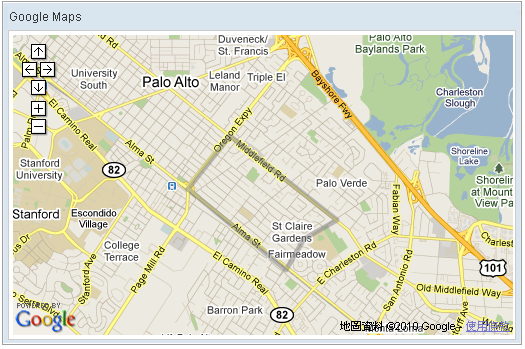
<script type="text/javascript" content="zk.googleAPIkey='Your-Google-API-Key'"/>
<gmaps id="mymap" width="500px" height="300px" showSmallCtrl="true">
    <gpolyline path="37.42838786,-122.13998795,
                     37.43561240,-122.13277816,
                     37.42416187,-122.11441040,
                     37.42157162,-122.12007522,
                     37.41734524,-122.12316513,
                     37.42838786,-122.13998795"/>
</gmaps>
Properties
Color
Default Value: #808080
Sets the stroke color of the polyline in #RRGGBB hexadecimal format. If null is passed the value resets to the default dark-gray #808080.
<gmaps width="500px" height="300px">
    <gpolyline color="#FF0000"
               path="37.4284,-122.1400,37.4356,-122.1328"/>
</gmaps>
Editable
Default Value: false
since 3.0.2
Allows the user to reshape the polyline interactively via mouse drag handles on each vertex. When editable="true" and the user moves a vertex, an onPathChange event is fired with the updated coordinates. For maximum coordinate precision when editing at high zoom levels, consider also setting pathEncoded="false".
<gmaps width="500px" height="300px">
    <gpolyline editable="true"
               path="37.4284,-122.1400,37.4356,-122.1328"/>
</gmaps>
Opacity
Default Value: 50
since 2.0_7
Sets the stroke opacity of the polyline as an integer from 0 (fully transparent) to 100 (fully opaque). Values outside this range throw a UiException. The default value of 50 renders the line at 50% opacity.
<gmaps width="500px" height="300px">
    <gpolyline opacity="80"
               path="37.4284,-122.1400,37.4356,-122.1328"/>
</gmaps>
Path
since 3.0.2
Sets the ordered sequence of coordinates that define the polyline. The value is a comma-separated string of alternating latitude and longitude values: "lat1,lng1,lat2,lng2,...". Each latitude must be in the range −90 to +90 and each longitude −180 to +180.
Alternatively, the path can be set programmatically from a List<LatLng> in a composer or ViewModel.
<gmaps width="500px" height="300px">
    <gpolyline path="37.4284,-122.1400,
                     37.4356,-122.1328,
                     37.4242,-122.1144"/>
</gmaps>
PathEncoded
Default Value: true
since 3.3.0
Toggles between lossy polyline encoding (compression, default) and raw LatLngLiteral coordinates (maximum precision). When pathEncoded="true" (default), coordinates are compressed before being sent to the client, reducing payload size but introducing minor rounding at high zoom levels. Set pathEncoded="false" when editing precision matters — for example when editable="true" at a high zoom level.
<gmaps width="500px" height="300px">
    <gpolyline pathEncoded="false" editable="true"
               path="37.4284,-122.1400,37.4356,-122.1328"/>
</gmaps>
Weight
Default Value: 5
Sets the stroke width (weight) of the polyline in pixels, from 1 (thinnest) to 10 (thickest).
<gmaps width="500px" height="300px">
    <gpolyline weight="3"
               path="37.4284,-122.1400,37.4356,-122.1328"/>
</gmaps>
Supported Events
| Name | Event Type | Description |
|——|————|————-|
| onPathChange | PathChangeEvent | Fired when the user finishes dragging a vertex of an editable polyline. The PathChangeEvent carries either the encoded polyline string (getEncodedPath()) or a raw JSONArray of LatLngLiteral objects (getRawPath()), depending on the pathEncoded setting.
since 3.0.2
|
- Inherited Supported Events: XulElement
Supported Children
*None