Rowchildren
- Demonstration: Rowchildren
- Java API: org.zkoss.zkmax.zul.Rowchildren
- JavaScript API: zkmax.layout.Rowchildren
Employment/Purpose
The column of Rowlayout.
Common Use Cases
- Responsive grid layouts: place a UI widget (form, chart, panel) inside a
<rowchildren>and setcolspanto control how many of the parent<rowlayout>grid columns it occupies, achieving fluid multi-column page layouts without CSS. - Offset / whitespace gaps: use
offsetto skip one or more columns before a cell, creating visual breathing room or right-aligning groups of cells within the grid row. - Mixed-width columns: combine multiple
<rowchildren>elements with differentcolspanvalues (e.g., 8 + 4, or 6 + 6) inside one<rowlayout>to build asymmetric two- or three-column arrangements.
Example
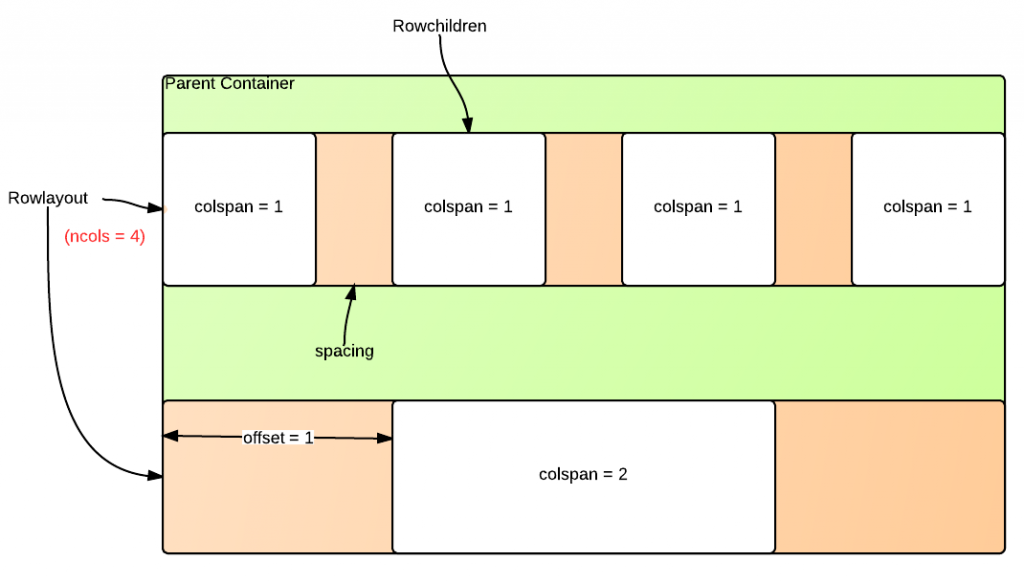
The following example places three <rowchildren> cells in a 12-column <rowlayout>. The first cell spans 4 columns, the second spans 4 columns with a 2-column offset, and the third spans the remaining 6 columns.
<rowlayout ncols="12">
    <rowchildren colspan="4" style="background-color: #aed6f1">
        <label value="colspan=4" />
    </rowchildren>
    <rowchildren colspan="4" offset="2" style="background-color: #a9dfbf">
        <label value="colspan=4, offset=2" />
    </rowchildren>
    <rowchildren colspan="6" style="background-color: #f9e79f">
        <label value="colspan=6" />
    </rowchildren>
</rowlayout>
Properties
Colspan
By default, the colspan of Rowchildren is 1.
<rowlayout>
    <rowchildren colspan="10">
        <window border="normal" title="colspan=10"/>
    </rowchildren>
</rowlayout>
Offset
By default, the offset of Rowchildren is 0.
<rowlayout>
    <rowchildren offset="10">
        <window border="normal" title="offset=10"/>
    </rowchildren>
</rowlayout>
Supported Events
Inherited Supported Events: XulElement
Supported Children
Exactly one child component of any type. <rowchildren> enforces a single-child constraint at runtime; attempting to add a second child throws an UiException.