Center
- Demonstration: Borderlayout
- Java API: org.zkoss.zul.Center
- JavaScript API: zul.layout.Center
Employment/Purpose
A center region of a border layout and only allows one component as its child.
Common Use Cases
- Main content panel — Place the primary page content (a grid, tree, or editor) inside
<center>so it expands to fill the space left by the surrounding regions. - Nested borderlayouts — Embed a second
<borderlayout>inside<center>to create multi-pane dashboards without needing a fixed pixel size on the inner layout. - Borderless display area — Set
border="none"(orborder="0") on<center>when surrounding regions already provide visible separators, keeping the content area clean.
<borderlayout height="500px">
    <west title="Navigation" size="20%" collapsible="true">
        <listbox />
    </west>
    <center border="none">
        <!-- Main content — grows to fill remaining width -->
        <grid />
    </center>
</borderlayout>
Example
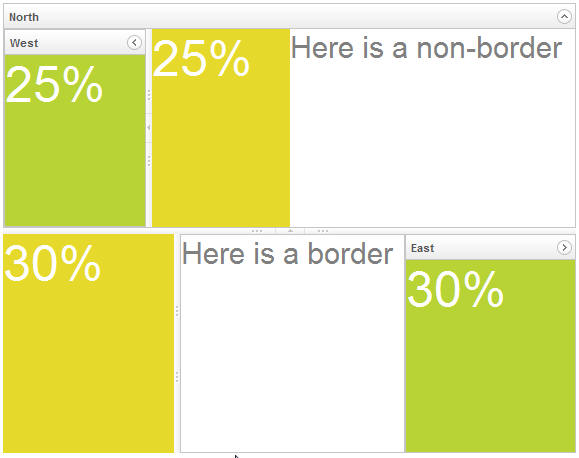
<borderlayout height="450px">
    <north title="North" maxsize="300" size="50%" splittable="true" collapsible="true">
        <borderlayout>
            <west title="West" size="25%" flex="true" maxsize="250" splittable="true" collapsible="true">
                <div style="background:#B8D335">
                    <label value="25%"
                        style="color:white;font-size:50px" />
                </div>
            </west>
            <center border="none">
                <div style="background:#E6D92C" vflex="1">
                    <label value="25%"
                        style="color:white;font-size:50px" />
                </div>
            </center>
            <east size="50%" border="none">
                <label value="Here is a non-border"
                    style="color:gray;font-size:30px" />
            </east>
        </borderlayout>
    </north>
    <center border="0">
        <borderlayout>
            <west maxsize="600" size="30%" border="0" splittable="true">
                <div style="background:#E6D92C" vflex="1">
                    <label value="30%"
                        style="color:white;font-size:50px" />
                </div>
            </west>
            <center>
                <label value="Here is a border"
                    style="color:gray;font-size:30px" />
            </center>
            <east title="East" size="30%" collapsible="true">
                <div style="background:#B8D335"  vflex="1">
                    <label value="30%"
                        style="color:white;font-size:50px" />
                </div>
            </east>
        </borderlayout>
    </center>
</borderlayout>
Properties
Size
Not supported. The size attribute cannot be set on <center> — the center region’s dimensions are determined by the surrounding North, South, West, and East regions. Setting this attribute throws UnsupportedOperationException at runtime.
Similarly, getSize() is not available on this component. Use the sibling region components (<north>, <south>, <west>, <east>) to control available space; the center fills the remainder automatically.
<!-- Do NOT set size on center — it has no effect and will throw an exception -->
<borderlayout height="400px">
    <north size="30%" />
    <west size="20%" />
    <center border="none">
        <div>Main content area</div>
    </center>
    <east size="20%" />
    <south size="30%" />
</borderlayout>
Caption
A layout region might have a caption, which is specified by declaring a child component called caption.
since 6.5.0
<borderlayout>
    <center>
        <caption label="search" image="/img/live.gif">
            <combobox>
                <comboitem label="item 1" />
                <comboitem label="item 2" />
                <comboitem label="item 3" />
                <comboitem label="item 4" />
            </combobox>
        </caption>
        <div>
        Content
        </div>
    </center>
</borderlayout>
How to Layout
For more details, please refer to Borderlayout.
Supported Events
| Name | Event Type | Description |
|---|---|---|
| onOpen | Event: OpenEvent | Sent when a layout region is collapsed or opened by a user. Not applicable to <center> (collapsible is unsupported), but inherited from LayoutRegion. |
| onSize | Event: SizeEvent | Sent when a layout region is resized by a user. Not applicable to <center> (size is unsupported). |
| onSlide | Event: SlideEvent | Sent when a collapsed layout region is slid (previewed) by a user. Not applicable to <center> (slidable is unsupported). |
Inherited Supported Events: LayoutRegion
Supported Children
*ALL