Row
- Demonstration: Grid (Simple Grid)
- Java API: org.zkoss.zul.Row
- JavaScript API: zul.grid.Row
Employment/Purpose
A single row in a Rows element. Each child of the Row element is placed in each successive cell of the grid. The row with the most child elements determines the number of columns in each row.
Default getSclass(): the same as grid’s sclass.
Common Use Cases
Aligning a Row’s Content
Use align and valign together to control both horizontal and vertical placement of cell content within a row:
<grid>
    <rows>
        <row align="center" valign="middle">
            <label value="Centered horizontally and vertically" />
            <button label="OK" />
        </row>
    </rows>
</grid>
Preventing Content Wrap
Set nowrap="true" when each cell must stay on a single line regardless of the grid width:
<grid width="200px">
    <rows>
        <row nowrap="true">
            <label value="Short" />
            <label value="This label will not wrap even in a narrow grid" />
        </row>
    </rows>
</grid>
Binding Application Data to a Row
Store a domain object in value so you can retrieve it without maintaining a separate map. The value is accessed in a click handler via row.getValue():
<zscript>
    import com.example.Order;
    List orders = new java.util.ArrayList();
    orders.add(new Order(1, "Laptop"));
    orders.add(new Order(2, "Keyboard"));
</zscript>
<grid>
    <rows>
        <row forEach="${orders}" value="${each}"
             onClick='alert("Selected: " + self.getValue().getName())'>
            <label value="${each.id}" />
            <label value="${each.name}" />
        </row>
    </rows>
</grid>
Example
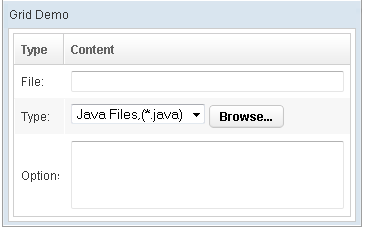
<window title="Grid Demo" border="normal" width="360px">
<zscript>
class Comp implements Comparator {
private boolean _asc;
public Comp(boolean asc) {
_asc = asc;
}
public int compare(Object o1, Object o2) {
String s1 = o1.getChildren().get(0).getValue(),
s2 = o2.getChildren().get(0).getValue();
int v = s1.compareTo(s2);
return _asc ? v: -v;
}
}
Comp asc = new Comp(true), dsc = new Comp(false);
</zscript>
<grid>
<columns sizable="true">
<column label="Type" sortAscending="${asc}"
sortDescending="${dsc}" width="50px"/>
<column label="Content" />
</columns>
<rows>
<row>
<label value="File:" />
<textbox width="99%" />
</row>
<row>
<label value="Type:" />
<hbox>
<listbox rows="1" mold="select">
<listitem label="Java Files,(*.java)" />
<listitem label="All Files,(*.*)" />
</listbox>
<button label="Browse..." />
</hbox>
</row>
<row>
<label value="Options:" />
<textbox rows="3" width="99%" />
</row>
</rows>
</grid>
</window>
Properties
Align
Default Value: null (system default: left unless CSS specified)
Sets the horizontal alignment of the whole row. The value is applied to every cell in the row.
| Value | Meaning |
|---|---|
left |
Align cell content to the left (default) |
center |
Center cell content horizontally |
right |
Align cell content to the right |
justify |
Stretch content to fill the cell width |
char |
Align content around a specific character |
<grid>
    <rows>
        <row align="center">
            <label value="Centered row" />
        </row>
        <row align="right">
            <label value="Right-aligned row" />
        </row>
    </rows>
</grid>
Nowrap
Default Value: false (content wraps by default)
When set to true, prevents the content of each cell in the row from wrapping to the next line.
<grid>
    <rows>
        <row nowrap="true">
            <label value="This long label will not wrap to the next line" />
            <label value="Another cell" />
        </row>
    </rows>
</grid>
Valign
Default Value: null (system default: top)
Sets the vertical alignment of cell content for the whole row.
| Value | Meaning |
|---|---|
top |
Align content to the top of the cell (default) |
middle |
Vertically center content in the cell |
bottom |
Align content to the bottom of the cell |
baseline |
Align content along the text baseline |
<grid>
    <rows>
        <row valign="middle">
            <label value="Vertically centered" />
            <textbox rows="3" />
        </row>
        <row valign="bottom">
            <label value="Bottom-aligned" />
            <textbox rows="3" />
        </row>
    </rows>
</grid>
Value
Default Value: null
Attaches an arbitrary application-defined object to this row. The value is not rendered to the browser; it is purely server-side data you can retrieve later (e.g., in an event listener) via row.getValue(). The type is generic (<T>), so you can store any object without casting.
The value is typically set in a composer or ViewModel rather than in ZUL markup. When set via ZUL, use an EL expression referencing an object constructed in <zscript> or provided by the data model:
<zscript>
    import com.example.Product;
    Product p = new Product("ZK", 100);
</zscript>
<grid>
    <rows>
        <row value="${p}">
            <label value="${p.name}" />
            <label value="${p.price}" />
        </row>
    </rows>
</grid>
Supported Events
- Inherited Supported Events: XulElement
Supported Children
*ALL