Bandpopup
- Demonstration: Bandbox
- Java API: org.zkoss.zul.Bandpopup
- JavaScript API: zul.inp.Bandpopup
Employment/Purpose
The popup that belongs to a Bandbox instance.
Developers usually listen to the onOpen event that is sent to
Bandbox and then creates proper components as children of this
component.
Common Use Cases
- Custom search popup: Place a
<textbox>and a<listbox>(or<grid>) inside<bandpopup>to let users filter and pick a value, then write the selection back to the parent<bandbox>and callbandbox.close(). - Lazy-loaded content: Listen to the
onOpenevent on the parent<bandbox>and populate<bandpopup>’s children programmatically only when the popup is first opened, avoiding unnecessary server work on page load. - Multi-field lookup: Embed a full form — labels, inputs, and a confirm button — inside
<bandpopup>when a single text field is not sufficient to express a complex value (e.g. a date range or an address).
<bandbox id="bd" readonly="true">
    <bandpopup>
        <vbox>
            <hbox>Search: <textbox id="kw"/></hbox>
            <listbox onSelect="bd.value = self.selectedItem.label; bd.close();">
                <listhead>
                    <listheader label="Name"/>
                </listhead>
                <listitem label="Alice"/>
                <listitem label="Bob"/>
            </listbox>
        </vbox>
    </bandpopup>
</bandbox>
Example
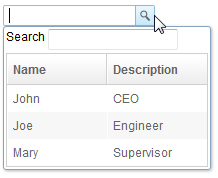
<bandbox id="bd">
    <bandpopup>
        <vbox>
            <hbox>
                Search
                <textbox />
            </hbox>
            <listbox width="200px"
                onSelect="bd.value=self.selectedItem.label;bd.close();">
                <listhead>
                    <listheader label="Name" />
                    <listheader label="Description" />
                </listhead>
                <listitem>
                    <listcell label="John" />
                    <listcell label="CEO" />
                </listitem>
                <listitem>
                    <listcell label="Joe" />
                    <listcell label="Engineer" />
                </listitem>
                <listitem>
                    <listcell label="Mary" />
                    <listcell label="Supervisor" />
                </listitem>
            </listbox>
        </vbox>
    </bandpopup>
</bandbox>
Supported Events
- Inherited Supported Events: XulElement
Supported Children
All