Calendar
- Demonstration: Calendar
- Java API: org.zkoss.zul.Calendar
- JavaScript API: zul.db.Calendar
Employment/Purpose
A calendar displays a ‘flat’ calendar and allows user to select a day from it.
The first day of the week is decided by the locale (actually the return
value of the getFirstDayOfWeek method in the java.util.Calendar).
Since 5.0.3, you can control the first day of the week by the use of the session attribute and the library property. Please refer to The First Day of the Week for details.
Common Use Cases
Pre-select a date from a ViewModel
Bind value (or valueInLocalDate for Java Time API) via EL from a ViewModel or composer:
<calendar value="@bind(vm.selectedDate)"/>
Restrict selectable dates
Use the constraint attribute to limit the range the user may select:
<!-- Allow only dates from 1 Jan 2024 to 31 Dec 2024 -->
<calendar constraint="between 20240101 and 20241231"/>

<!-- Disallow past dates -->
<calendar constraint="no past"/>

<!-- Disallow future dates -->
<calendar constraint="no future"/>
Show a today shortcut link
Enable the today link so users can quickly return to the current date:
<calendar showTodayLink="true" todayLinkLabel="Jump to today"/>
Synchronise calendar with a datebox
<calendar id="cal" onChange="db.value = cal.value"/>
<datebox id="db" onChange="cal.value = db.value"/>
Customization
Since 5.0.3, the rendering of the calendar can be customized at the client by providing JavaScript code that overrides zul.db.Renderer.
Example
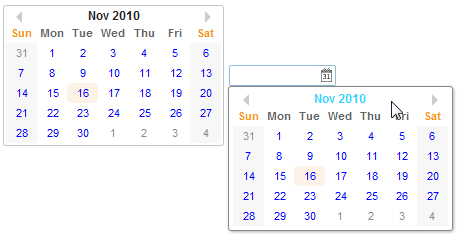
     <calendar id="cal" onChange="in.value = cal.value"/>
     <datebox id="in" onChange="cal.value = in.value"/>
Date Range Selector

Check calendar.zul
Calendar Day Renderer
This is achieved by overriding the default renderer at the client to customize the appearance of days on ZK’s Calendar. For example,
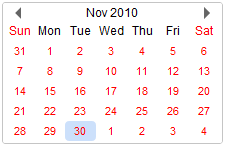
<zk>
    <script><![CDATA[
        zk.afterLoad('zul.db', function(){
            zul.db.Renderer.cellHTML = function (cal, y, m, day, monthofs) {
                return '<a href="javascript:;" style="color:red;">' + day + '</a>';
            };
        });
    ]]></script>
    <calendar/>
</zk>
since 5.0.3
Show Week Number
Calendar supports to show a week number of the year.
since 6.5.0
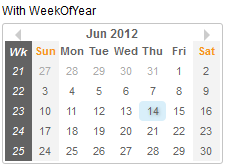
<calendar weekOfYear="true" />
2DigitYearStart
since 8.6.2
You can control the 2DigitYearStart by the use of the library property. Please refer to org.zkoss.web.preferred.2DigitYearStart for details.
Accessibility
since 9.5.0
Keyboard Support
| Key | Description | |—|—| | ArrowUp / ArrowDown / ArrowLeft / ArrowRight | Navigate the date. | | Enter / Spacebar | Select the date. | | PageUp / PageDown | since 10.0.0 Navigate the month. | | Shift+PageUp / Shift+PageDown | since 10.0.0 Navigate the year. |
Calendar Day AriaLabel Renderer
This is achieved by overriding the default renderer at the client to customize the aria-label of days on ZK’s Calendar.
<zk>
    <script><![CDATA[
        zk.afterLoad('zul.db', function(){
            zul.db.Renderer.cellAriaLabel = function (cal, y, m, day, monthofs, dayofweek) {
                var localizedSymbols = cal.getLocalizedSymbols();
                return day + ' ' + localizedSymbols.FMON[m] + ', ' + y; // dd MMMM, yyyy
            };
        });
    ]]></script>
    <calendar/>
</zk>
Labeling with ARIA
To name a component with ARIA attribute by adding the aria-label
client attribute to the component, please refer to
ZK Developer’s Reference/Accessibility#Specify_ARIA_Attributes
Properties
name
Default Value: null
The name of this component, used when submitting a form to a legacy (servlet-based) web application. If your application uses ZK’s event-driven model exclusively, do not set this attribute.
since 3.0.0
<calendar name="selectedDate"/>
showTodayLink
Default Value: false
When true, a “Today” link is shown at the bottom of the calendar’s day view. Clicking the link navigates the calendar to today’s date.
since 8.0.0
<calendar showTodayLink="true"/>
todayLinkLabel
Default Value: "Today" (localised)
Sets the label text of the today link shown when showTodayLink is true. Override this to localise the label or replace it with a custom string.
since 8.0.4
<calendar showTodayLink="true" todayLinkLabel="Go to today"/>
value
Default Value: today (start of day)
The currently selected date. Passing null resets the selection to today. The value is a java.util.Date object; construct it in <zscript> or a ViewModel and reference it via EL.
<zscript>
    import java.util.Date;
    Date selected = new Date(); // today
</zscript>
<calendar value="${selected}"/>
valueInLocalDate
Default Value: today
Gets or sets the selected date as a java.time.LocalDate. Useful when working with the Java Time API instead of the legacy Date type. Construct the value in <zscript> or a ViewModel and bind it via EL.
since 9.0.0
<zscript>
    import java.time.LocalDate;
    LocalDate startOfYear = LocalDate.of(2024, 1, 1);
</zscript>
<calendar valueInLocalDate="${startOfYear}"/>
valueInLocalDateTime
Default Value: today at midnight
Gets or sets the selected date-time as a java.time.LocalDateTime. Construct the value in <zscript> or a ViewModel and bind it via EL.
since 9.0.0
<zscript>
    import java.time.LocalDateTime;
    LocalDateTime dt = LocalDateTime.of(2024, 6, 15, 0, 0);
</zscript>
<calendar valueInLocalDateTime="${dt}"/>
valueInLocalTime
Note: Setting only a
LocalTimeon a calendar is not meaningful because the calendar always requires a full date. CallingsetValueInLocalTimethrowsUnsupportedOperationException. This accessor is provided for interface completeness; usevalueInLocalDate,valueInLocalDateTime, orvalueInZonedDateTimeinstead.
since 9.0.0
<!-- Reading the time portion of the selected date -->
<calendar id="cal"/>
<label value="${cal.valueInLocalTime}"/>
valueInZonedDateTime
Default Value: today at midnight in the server’s default time zone
Gets or sets the selected date-time as a java.time.ZonedDateTime. This is the internal representation used by Calendar; the zone is preserved across get/set calls. Construct the value in <zscript> or a ViewModel and bind it via EL.
since 9.0.0
<zscript>
    import java.time.ZonedDateTime;
    import java.time.ZoneId;
    ZonedDateTime zdt = ZonedDateTime.of(2024, 6, 15, 0, 0, 0, 0, ZoneId.of("America/New_York"));
</zscript>
<calendar valueInZonedDateTime="${zdt}"/>
constraint
since 8.5.2
This component also supports constraint like ZK Component Reference/Input/Datebox#Constraint
Supported Events
| Name | Event Type | Description |
|---|---|---|
| onChange | InputEvent | Denotes the value of the calendar has been changed by the user. |
| onWeekClick | Event | Denotes a user clicks upon a label of week of year. * |
*
- Inherited Supported Events: XulElement
Supported Children
*NONE