Frozen
- Demonstration: Spreadsheet Functionalities
- Java API: org.zkoss.zul.Frozen
- JavaScript API: zul.mesh.Frozen
Employment/Purpose
A frozen component to represent frozen “columns” in a Grid or a Listbox,
like MS Excel. Specify the start attribute to define the horizontal
scroll starting position.
Common Use Cases
- Freeze identifier columns — Set
columns="1"orcolumns="2"to keep row ID and name columns always visible while the user scrolls a wide grid of data columns (statuses, dates, metrics). - Restore a saved scroll position — Combine
columnswithstartto reopen a grid at a remembered scroll offset, so the user returns to the same view they left. - Freeze columns on the right — Use
rightColumns="1"to pin action or summary columns (e.g. a Delete button or a total) at the right edge while rows scroll horizontally. This requires EE in ZK 8.6.2 through 10.x and is available in all editions starting with ZK 11. - Track scroll position in a ViewModel — Listen for
onScrollPosin smooth mode to persist the current horizontal scroll offset in a backing bean. Smooth mode requires EE through ZK 10.x and is available in all editions starting with ZK 11.
Example
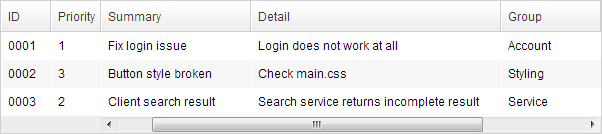
<grid width="600px">
    <frozen columns="2" start="1"/>
    <columns>
        <column width="50px">ID</column>
        <column width="50px">Priority</column>
        <column width="50px">Status</column>
        <column width="150px">Summary</column>
        <column width="250px">Detail</column>
        <column width="100px">Group</column>
        <column width="50px">Assign</column>
    </columns>
    <rows>
        <row>
            <cell>0001</cell>
            <cell>1</cell>
            <cell>closed</cell>
            <cell>Fix login issue</cell>
            <cell>Login does not work at all</cell>
            <cell>Account</cell>
            <cell>Bob</cell>
        </row>
        <row>
            <cell>0002</cell>
            <cell>3</cell>
            <cell>open</cell>
            <cell>Button style broken</cell>
            <cell>Check main.css</cell>
            <cell>Styling</cell>
            <cell>Alice</cell>
        </row>
        <row>
            <cell>0003</cell>
            <cell>2</cell>
            <cell>open</cell>
            <cell>Client search result</cell>
            <cell>Search service returns incomplete result</cell>
            <cell>Service</cell>
            <cell>Bob</cell>
        </row>
    </rows>
</grid>
Smooth Scrolling
| ZK version | Available editions |
|---|---|
| 8.5.0–10.x | EE |
| 11.0.0 and later | CE, PE, and EE |
since 8.5.0
The frozen columns remain in place while the other columns move with native CSS scrolling. ZK 11 moves this feature from EE to CE, making it available in every edition.
Column scrolling
The frozen columns positions are maintained, and the other columns are replaced while the scroll position is updated.
Scroll to Hide Columns
With smooth scrolling, the Grid does not add white space to the last column by default.
With column scrolling, Grid will render extra space
(larger width) after the last column. So that you can drag to hide all
columns except the last one. 
Frozen on the Right
| ZK version | Available editions |
|---|---|
| 8.6.2–10.x | EE |
| 11.0.0 and later | CE, PE, and EE |
since 8.6.2
ZK 11 moves smooth right-side freezing from EE to CE.
Make columns frozen at the right-hand side.
<listbox>
    <frozen rightColumns="1"/>
...
</listbox>
Properties
columns
Default Value: 0
Sets the number of columns to freeze from left to right. Must be a non-negative integer; a negative value throws a WrongValueException.
<grid width="600px">
    <frozen columns="2"/>
    <columns>
        <column width="100px">ID</column>
        <column width="100px">Name</column>
        <column width="200px">Description</column>
    </columns>
    ...
</grid>
rows
Default Value: 0
Sets the number of rows to freeze from top to bottom. Note: this feature is reserved and not yet implemented — the setter always throws UnsupportedOperationException. Do not set a non-zero value.
<!-- rows freezing is reserved for future use; do not set a non-zero value -->
<grid>
    <frozen rows="0"/>
    ...
</grid>
start
Default Value: 0
Sets the horizontal scroll starting position (column index). Determines which column is the first visible non-frozen column when the grid is rendered. Must be a non-negative integer; a negative value throws a WrongValueException.
<grid width="600px">
    <frozen columns="2" start="1"/>
    ...
</grid>
rightColumns
Default Value: 0
since 8.6.2
Sets the number of columns to freeze from right to left. It is available in ZK EE before 11.0.0 and in all editions starting with 11.0.0. It is effective only in smooth Frozen mode and browsers that support CSS position: sticky. It must be non-negative; a negative value throws a WrongValueException.
<listbox>
    <frozen rightColumns="1"/>
    ...
</listbox>
Supported Events
onScrollPos follows the availability of smooth Frozen: EE in ZK 8.5.0 through 10.x, and all editions starting with ZK 11.
| Name | Event Type | Description |
|---|---|---|
onScrollPos |
Event | Fired when the user scrolls the grid in smooth Frozen mode. The event data carries the current horizontal scroll position (left). |
Inherited Supported Events: XulElement
Supported Children
*ALL