Biglistbox
- Demonstration: Demo
- Java API: org.zkoss.zkmax.zul.Biglistbox
- JavaScript API: zkmax.big.Biglistbox
Employment/Purpose
A component to handle a huge data sets and provides the same and as many as the functionalities of Listbox including selection, sorting, keystroke navigation, ROD(rendering-on-demand), and so on..
Common Use Cases
- Trillion-row data grids — when a dataset is too large to hold in memory, implement
MatrixModelto fetch only the rows and columns visible in the current viewport (rendering-on-demand). - Spreadsheet-like displays — use frozen columns (
frozenCols) to lock identifier columns while the user scrolls a wide dataset horizontally. - Custom cell rendering — implement
MatrixRenderer(or use the<template name="rows">syntax) to render each cell as arbitrary HTML, including icons, progress bars, or hyperlinks. - Sortable large datasets — supply
sortAscending/sortDescendingMatrixComparatorProviderinstances so the component can request sorted data from the model without loading everything into memory.
Example
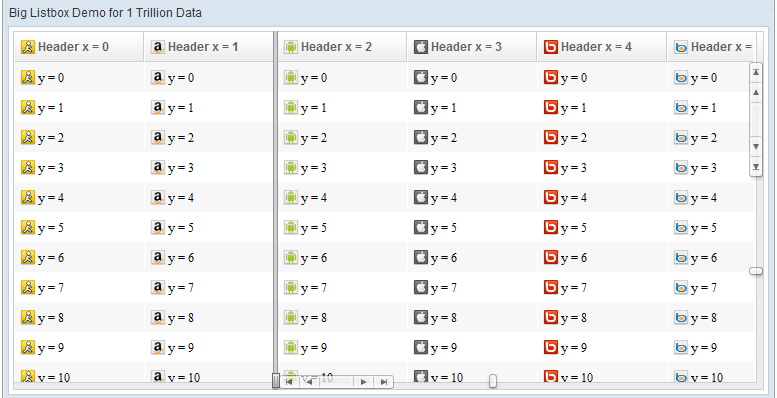
<biglistbox hflex="1" vflex="1">
    <!-- Template example
    <template name="heads">
        <html><![CDATA[
    <div class="images_${matrixInfo[0]%28}" title="x=${matrixInfo[0]},y=${matrixInfo[1]}">${each[matrixInfo[0]]}</div>
        ]]></html>
    </template>
    <template name="rows">
        <html><![CDATA[
     <div class="images_${matrixInfo[0]%28}" title="x=${matrixInfo[0]},y=${matrixInfo[1]}">${each[matrixInfo[0]]}</div>
        ]]></html>
    </template> -->
</biglistbox>
As you can see, we utilize two attributes - rowIndex & colIndex from the matrixInfo object to receive the current index during template rendering phase.
Mouseless Entry Listbox
- Press
UPandDOWNto move the selection up and down by one item. - Press
LEFTandRIGHTto move the selection left and right by one item. - Press
PgUpandPgDnto move the selection up and down by one page. - Press
HOMEto move the selection to the first item, andENDto move to the last item.
Model/Renderer
MatrixModel
By default, ZK does not provide a built-in model implementation class for org.zkoss.zkmax.zul.MatrixModel because Biglistbox is designed to handle unlimited data set, therefore, there is no need to handle model data in memory. This usage is application-dependent and varies from case to case. However, you can extend your own implementation from the org.zkoss.zul.AbstractListModel skeleton class. For more details, please refer to this smalltalk.
MatrixRenderer
Here is an implementation example of org.zkoss.zkmax.zul.MatrixRenderer
new MatrixRenderer<List<String>>() {

    @Override
    public String renderCell(Component owner, List<String> data,
            int rowIndex, int colIndex) throws Exception {
        String d = data.get(colIndex);
        d = d.replace("ZK", "<span class='red' title='ZK'>ZK</span>")
                .replace("Hello", "<span class='blue' title='Hello'>Hello</span>");
        return "<div class='images_" + (colIndex%28) + "' title='x=" +
        colIndex + ",y=" + rowIndex + "'>" + d + "</div>";
    }

    @Override
    public String renderHeader(Component owner, List<String> data,
            int rowIndex, int colIndex) throws Exception {
        return "<div class='images_" + (colIndex % 28) + "' title='"
                + images[colIndex % 28] + "'>" + data.get(colIndex)
                + "</div>";
    }
}
As you can see, we must implement two methods - renderCell and renderHeader defined by MatrixRenderer to generate the HTML output string for cells and headers. In the MatrixRenderer interface, the two methods we designed allow developers to generate any kind of HTML result for display, you can use either MatrixRenderer interface or Template function to render the content for Biglistbox.
Accessibility
since 9.5.0
Keyboard Support
| Key | Description |
|---|---|
| ArrowUp / ArrowDown | Select items or focus on headers. |
| ArrowLeft / ArrowRight | Focus on cell or headers. |
Labeling with ARIA
To name a component with ARIA attribute by adding the aria-label
client attribute to the component, please refer to
ZK Developer’s Reference/Accessibility#Specify_ARIA_Attributes
Properties
autoCols
Default Value: true
Sets whether to enable auto-adjusting the number of visible columns to fill the viewport width. When true, the cols value is recalculated automatically on resize.
<biglistbox autoCols="false" cols="10" hflex="1" vflex="1"/>
autoRows
Default Value: true
Sets whether to enable auto-adjusting the number of visible rows to fill the viewport height. When true, the rows value is recalculated automatically on resize.
<biglistbox autoRows="false" rows="20" hflex="1" vflex="1"/>
colWidth
Default Value: 60px
Sets the width of each column. Accepts a CSS length value (e.g. "60px", "4em").
<biglistbox colWidth="100px" hflex="1" vflex="1"/>
cols
Sets the number of columns within the viewport. This is the count of columns rendered at one time. Ignored when autoCols="true" (the default).
<biglistbox cols="20" autoCols="false" hflex="1" vflex="1"/>
fixFrozenCols
Default Value: false
When true, the frozen column boundary is fixed and the user cannot drag it to resize. Typically meaningful only when frozenCols is greater than zero.
<biglistbox frozenCols="2" fixFrozenCols="true" hflex="1" vflex="1"/>
frozenCols
Default Value: 0
Sets the number of columns to freeze on the left side of the grid. Frozen columns remain visible when the user scrolls horizontally.
<biglistbox frozenCols="3" hflex="1" vflex="1"/>
matrixRenderer
Sets the MatrixRenderer responsible for rendering each cell and header cell as an HTML string. The value is a Java object; assign it from a <zscript> block or a ViewModel.
<zscript><![CDATA[
import org.zkoss.zkmax.zul.MatrixRenderer;
import org.zkoss.zk.ui.Component;
import java.util.List;

MatrixRenderer<List<String>> renderer = new MatrixRenderer<List<String>>() {
    public String renderCell(Component owner, List<String> data, int row, int col) {
        return "<div>" + data.get(col) + "</div>";
    }
    public String renderHeader(Component owner, List<String> data, int row, int col) {
        return "<div>Col " + col + "</div>";
    }
};
]]></zscript>
<biglistbox matrixRenderer="${renderer}" hflex="1" vflex="1"/>
model
Sets the MatrixModel that supplies data to the biglistbox. The value is a Java object; assign it from a <zscript> block, a composer, or a ViewModel.
<zscript><![CDATA[
import org.zkoss.zkmax.zul.MatrixModel;
// MyMatrixModel implements MatrixModel
MatrixModel model = new MyMatrixModel();
]]></zscript>
<biglistbox model="${model}" hflex="1" vflex="1"/>
oddRowSclass
Sets a CSS style class applied to every odd-numbered row, enabling row striping.
<biglistbox oddRowSclass="z-row-stripe" hflex="1" vflex="1"/>
rowHeight
Default Value: 30px
Sets the height of each row. Accepts a CSS length value (e.g. "48px", "2em"). Setting it to an empty string resets it to 32px.
<biglistbox rowHeight="48px" hflex="1" vflex="1"/>
rows
Sets the number of rows within the viewport — the count of rows rendered at one time. Ignored when autoRows="true" (the default).
<biglistbox rows="30" autoRows="false" hflex="1" vflex="1"/>
sortAscending
Sets the MatrixComparatorProvider used to produce comparators for ascending-order sorting. When set, the component uses this provider when the user requests an ascending sort. You may also pass a fully-qualified class name as a string; the class must implement MatrixComparatorProvider.
The value is a Java object; construct it in a <zscript> block, a composer, or a ViewModel.
<zscript><![CDATA[
import org.zkoss.zkmax.zul.MatrixComparatorProvider;
// MyAscComparatorProvider implements MatrixComparatorProvider
MatrixComparatorProvider ascProvider = new MyAscComparatorProvider();
]]></zscript>
<biglistbox sortAscending="${ascProvider}" hflex="1" vflex="1"/>
Alternatively supply a class name string (the class will be instantiated reflectively):
<biglistbox sortAscending="com.example.MyAscComparatorProvider" hflex="1" vflex="1"/>
sortDescending
Sets the MatrixComparatorProvider used to produce comparators for descending-order sorting. When set, the component uses this provider when the user requests a descending sort. You may also pass a fully-qualified class name as a string; the class must implement MatrixComparatorProvider.
The value is a Java object; construct it in a <zscript> block, a composer, or a ViewModel.
<zscript><![CDATA[
import org.zkoss.zkmax.zul.MatrixComparatorProvider;
// MyDescComparatorProvider implements MatrixComparatorProvider
MatrixComparatorProvider descProvider = new MyDescComparatorProvider();
]]></zscript>
<biglistbox sortDescending="${descProvider}" hflex="1" vflex="1"/>
Alternatively supply a class name string (the class will be instantiated reflectively):
<biglistbox sortDescending="com.example.MyDescComparatorProvider" hflex="1" vflex="1"/>
Custom Attributes
org.zkoss.zkmax.zul.biglistbox.preloadSize
[default: 50]
[inherit: true]1
It specifies the number of items to preload when receiving the rendering request from the client. It is used only if live data (org.zkoss.zkmax.zul.Biglistbox#setModel(org.zkoss.zkmax.zul.MatrixModel)).
Supported Events
| Name | Event Type | Description |
|---|---|---|
onSelect |
org.zkoss.zk.ui.event.SelectEvent | Represents an event caused by the user’s list selection change at the client. |
onSort |
org.zkoss.zkmax.zul.event.SortEventExt | Represents an event that indicates a sorting request to data for Biglistbox and provides more information about the column index. |
onScroll |
org.zkoss.zkmax.zul.event.ScrollEventExt | Represents an event caused by the user scrolling or having scrolled at the client for Biglistbox component and provides more information about the position X and Y data. |
onScrollX |
org.zkoss.zkmax.zul.event.ScrollEventExt | Represents an event caused by the user scrolling or having scrolled the X-axis at the client for Biglistbox component and provides more information about the position X and Y data. |
onScrollY |
org.zkoss.zkmax.zul.event.ScrollEventExt | Represents an event caused by the user scrolling or having scrolled the Y-axis at the client for Biglistbox component and provides more information about the position X and Y data. |
onCellClick |
org.zkoss.zkmax.zul.event.CellClickEvent | Represents an event that indicates a click on a cell data for a matrix data component like Biglistbox, and provides more information about the row index and the column index. |
onAdjustRows |
org.zkoss.zk.ui.event.Event | Fired after the number of visible rows in the viewport is automatically adjusted (e.g. on component resize when autoRows="true"). |
onAdjustCols |
org.zkoss.zk.ui.event.Event | Fired after the number of visible columns in the viewport is automatically adjusted (e.g. on component resize when autoCols="true"). |
onAdjustFrozenCols |
org.zkoss.zk.ui.event.Event | Fired after the user drags the frozen column boundary to resize it (when fixFrozenCols="false"). |
- Inherited Supported Events: XulElement
Supported Molds
- The default mold
Supported Children
None
-
The custom attribute could be specified in this component, or any of its ancestor. In addition, it could be specified asa library propertyto enable or disable it for the whole application.↩