Navitem
Employment/Purpose
A single choice in a Navbar or Nav element. It acts much like a button but it is rendered on a navbar.
Common Use Cases
- Navigation link — set
hrefto navigate the browser directly to another page or external URL without a server round-trip. - Server-side navigation — omit
hrefand listen toonClickto perform server logic (e.g., switching a content pane or callingExecutions.sendRedirect). - Active-page indicator — bind
selectedto the current page state so the navbar always highlights the active item. - Notification badge — use
badgeTextto display a short counter or status label next to the item label. - Rich description — use
contentto embed a short HTML snippet (icon, color tag, or tooltip hint) beneath the label for richer presentation.
Example
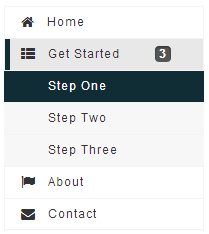
<navbar orient="vertical" width="200px">
    <navitem label="Home" iconSclass="z-icon-home" />
    <nav label="Get Started" iconSclass="z-icon-th-list" badgeText="3">
        <navitem label="Step One" />
        <navitem label="Step Two" />
        <navitem label="Step Three" />
    </nav>
    <navitem label="About" iconSclass="z-icon-flag" />
    <navitem label="Contact" iconSclass="z-icon-envelope"/>
</navbar>
Properties
Href
In addition to handling the onClick event, you could specify the URL in the href property (org.zkoss.zkmax.zul.Navitem#setHref(java.lang.String)), such that the browser will navigate to the URL you specified directly (without sending back any request to the server). If you prefer to visit the URL in another browser window, you could specify the name in org.zkoss.zkmax.zul.Navitem#setTarget(java.lang.String) (just like using a HTML A tag).
Notice that the end user could hold the Control key and click on the
navitem to visit the link in a new browser window (like a HTML A tag
does).
Href and the onClick Event
There are two ways to add behavior to a navitem. Firstly, you can
specify a listener for the onClick event. Secondly, you could specify
a URL for the href property
(org.zkoss.zkmax.zul.Navitem#setHref(java.lang.String)).
If both are specified, the href property has the higher priority,
i.e., the onClick event won’t be sent.
<navbar>
    <navitem label="click me" onClick="do_something_in_Java()"/>
    <navitem label="don't click that one, click me" href="/another_page.zul"/>
</navbar>
Href and SendRedirect
The href property is processed at the client. In other words, the
browser will jump to the URL specified in the href property, so your
application running on the server has no chance to process it.
If you have to process it on the server or you have to decide whether to jump to another URL based on certain condition, you could listen to the onClick event, process it, and then invoke org.zkoss.zk.ui.Executions#sendRedirect(java.lang.String) if it jumps to another URL.
For end users, there is no difference between the use of org.zkoss.zkmax.zul.Navitem#setHref(java.lang.String) and org.zkoss.zk.ui.Executions#sendRedirect(java.lang.String).
<navbar>
<navitem label="redirect" onClick="Executions.sendRedirect("another.zul")"/>
<navitem label="href" href="another.zul"/>
</navbar>
Since the onClick event is sent to the server for processing, you are able to perform additional tasks before invoking org.zkoss.zk.ui.Executions#sendRedirect(java.lang.String), such as redirecting to another page only if certain conditions are satisfied.
On the other hand, the href property is processed at the client side.
Your application won’t be notified when users click the navitem.
badgeText
since 9.6.0
Default Value: null
Sets the badge text for the Navitem, which presents supplementary details alongside the label.
<navitem label="Step One" badgeText="1"/>
selected
Default Value: false
Marks this navitem as the currently selected item. When the navitem belongs to a Navbar, the navbar automatically deselects the previously selected item so that at most one item is selected at a time.
<navbar orient="vertical" width="200px">
    <navitem label="Home" selected="true"/>
    <navitem label="About"/>
</navbar>
target
Default Value: null
Sets the target frame or window for the URL specified in href. Accepts any valid HTML frame name or the standard special values _blank, _self, _parent, and _top. This property has no effect when href is not set.
<navitem label="Visit Site" href="https://www.zkoss.org" target="_blank"/>
content
Default Value: ""
Sets embedded HTML content shown as supplementary description beneath the navitem label. The value is rendered directly to the browser without escaping, so never pass user-controlled input to avoid XSS. Since 10.0.0 the content is sanitized by default — do not use inline JavaScript inside the value.
<navitem label="Dashboard" content="<span style='color:red'>New!</span>"/>
Supported Events
| Name | Event Type | Description | |—|—|—|
- Inherited Supported Events: LabelImageElement
Supported Children
*NONE