Gimage
- Demonstration: Gmaps
- Java API: N/A
Employment/Purpose
Image anchored on two specified (latitude, longitude) points(south-west and north-east) which is zoomed and moved with the Google Maps.
Common Use Cases
Overlay a static image on the map
Place an image that stretches between two geographic coordinates by specifying the south-west and north-east corners directly as attributes:
<script type="text/javascript" content="zk.googleAPIkey='Your-Google-API-Key'"/>
<gmaps id="mymap" width="500px" height="300px" showSmallCtrl="true">
    <gimage src="/img/overlay.png"
            swlat="37.44215478" swlng="-122.14273453"
            nelat="37.45033195" nelng="-122.13191986"/>
</gmaps>
Set bounds as a LatLngBounds object
Use setBounds from a composer or <zscript> when the bounding box is computed at runtime:
<zscript>
    import org.zkoss.gmaps.LatLng;
    import org.zkoss.gmaps.LatLngBounds;
    LatLngBounds myBounds = new LatLngBounds(
        new LatLng(37.44215478, -122.14273453),
        new LatLng(37.45033195, -122.13191986));
</zscript>
<gmaps width="500px" height="300px">
    <gimage src="/img/overlay.png" bounds="${myBounds}"/>
</gmaps>
Supply an in-memory image via content
When the image data is generated at runtime (e.g., a chart rendered to a byte array), pass it via the content attribute instead of src:
<zscript>
    import org.zkoss.image.Image;
    // obtain an Image object from your service
    Image dynamicImg = myImageService.generate();
</zscript>
<gmaps width="500px" height="300px">
    <gimage content="${dynamicImg}"
            swlat="37.44" swlng="-122.14"
            nelat="37.45" nelng="-122.13"/>
</gmaps>
Example
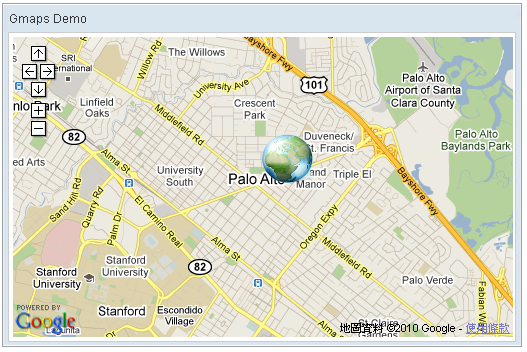
    <script type="text/javascript" content="zk.googleAPIkey='Your-Google-API-Key'"/>
    <gmaps id="mymap" width="500px" height="300px" showSmallCtrl="true">
        <gimage src="/img/Centigrade-Widget-Icons/Globe-128x128.png"
swlat="37.44215478" swlng="-122.14273453" nelat="37.45033195" nelng="-122.13191986"/>
    </gmaps>
Properties
Bounds
Default Value: a zero-size bounds at (37.4419, -122.1419)
Sets the geographic bounding rectangle that the image covers on the map. The value is a LatLngBounds object constructed from two LatLng corner points (south-west and north-east). The image is stretched to fit this rectangle and moves/zooms with the Google Map.
This property is available since ZK Gmaps 3.0.2. For convenience, you can set the four coordinates individually using swlat, swlng, nelat, and nelng instead of constructing a LatLngBounds object.
The value is a LatLngBounds Java object — construct it in <zscript>, a composer, or a ViewModel and reference it via EL:
<zscript>
    import org.zkoss.gmaps.LatLng;
    import org.zkoss.gmaps.LatLngBounds;
    LatLngBounds myBounds = new LatLngBounds(
        new LatLng(37.44215478, -122.14273453),
        new LatLng(37.45033195, -122.13191986));
</zscript>
<gmaps width="500px" height="300px">
    <gimage src="/img/overlay.png" bounds="${myBounds}"/>
</gmaps>
Content
Default Value: null
Sets the image content directly as an org.zkoss.image.Image object. When a non-null content is provided it takes higher priority than src — the src value is ignored and a dynamic media URL is generated automatically.
The value is an org.zkoss.image.Image Java object — construct or obtain it in <zscript>, a composer, or a ViewModel and reference it via EL:
<zscript>
    import org.zkoss.image.Image;
    // Obtain an Image from your service or load from a stream
    Image dynamicImg = myImageService.generate();
</zscript>
<gmaps width="500px" height="300px">
    <gimage content="${dynamicImg}"
            swlat="37.44215" swlng="-122.14273"
            nelat="37.45033" nelng="-122.13191"/>
</gmaps>
To revert to a URI-based image, call setSrc(uri) which clears the stored content.
Nelat
Default Value: 37.4419
Sets the north-east latitude of the image bounds. This is a convenience setter that updates only the north-east latitude of the underlying LatLngBounds while keeping the other three coordinates unchanged.
<gmaps width="500px" height="300px">
    <gimage src="/img/overlay.png"
            swlat="37.44215478" swlng="-122.14273453"
            nelat="37.45033195" nelng="-122.13191986"/>
</gmaps>
Nelng
Default Value: -122.1419
Sets the north-east longitude of the image bounds. This is a convenience setter that updates only the north-east longitude of the underlying LatLngBounds while keeping the other three coordinates unchanged.
<gmaps width="500px" height="300px">
    <gimage src="/img/overlay.png"
            swlat="37.44215478" swlng="-122.14273453"
            nelat="37.45033195" nelng="-122.13191986"/>
</gmaps>
Src
Default Value: null
Sets the URI of the image to overlay on the map. Accepts any URL resolvable by the ZK desktop (relative, absolute, or classpath-rooted with ~./). An empty string is treated as null.
If content has been set to a non-null org.zkoss.image.Image, content takes higher priority and src is ignored until setSrc(uri) is called, which clears any stored content.
<gmaps width="500px" height="300px">
    <gimage src="/img/Centigrade-Widget-Icons/Globe-128x128.png"
            swlat="37.44215478" swlng="-122.14273453"
            nelat="37.45033195" nelng="-122.13191986"/>
</gmaps>
Swlat
Default Value: 37.4419
Sets the south-west latitude of the image bounds. This is a convenience setter that updates only the south-west latitude of the underlying LatLngBounds while keeping the other three coordinates unchanged.
<gmaps width="500px" height="300px">
    <gimage src="/img/overlay.png"
            swlat="37.44215478" swlng="-122.14273453"
            nelat="37.45033195" nelng="-122.13191986"/>
</gmaps>
Swlng
Default Value: -122.1419
Sets the south-west longitude of the image bounds. This is a convenience setter that updates only the south-west longitude of the underlying LatLngBounds while keeping the other three coordinates unchanged.
<gmaps width="500px" height="300px">
    <gimage src="/img/overlay.png"
            swlat="37.44215478" swlng="-122.14273453"
            nelat="37.45033195" nelng="-122.13191986"/>
</gmaps>
Supported Events
Inherited Supported Events: XulElement
Supported Children
*None