Listgroupfoot
- Java API: org.zkoss.zul.Listgroupfoot
- JavaScript API: zkex.sel.Listgroupfoot
Employment/Purpose
GroupFooter serves as a summary listitem of listgroup.
Common Use Cases
- Group summary row: Place a
<listgroupfoot>as the last child of a<listgroup>to display aggregate information (counts, totals, averages) beneath the grouped rows. - Collapsible group footer: The footer collapses and expands together with its parent
<listgroup>, keeping summaries contextually visible only when the group is open. - Multi-column summaries: Add multiple
<listcell>children to align summary values with the corresponding<listheader>columns.
Example
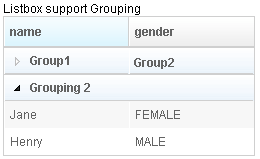
<?xml version="1.0" encoding="UTF-8"?>
 <zk>
     Listbox support Grouping
     <listbox id="listbox" width="250px">
         <listhead sizable="true" id="h">
             <listheader id="h1" label="name" sort="auto" />
             <listheader id="h2" label="gender" sort="auto" />
         </listhead>
         <listgroup id="gp1" open="false">
             <listcell label="Group1"/>
             <listcell label="Group2"/>
         </listgroup>
         <listitem>
             <listcell label="a Mary" />
             <listcell label="a FEMALE" />
         </listitem>
         <listitem>
             <listcell label="b Mary" />
             <listcell label="b FEMALE" />
         </listitem>
         <listitem id="li1">
             <listcell label="c Mary1" />
             <listcell label="c FEMALE1" />
         </listitem>
         <listitem>
             <listcell label="d Mary" />
             <listcell label="d FEMALE" />
         </listitem>
         <listitem>
             <listcell label="e John" />
             <listcell label="e MALE" />
         </listitem>
         <listgroupfoot id="f1">
             <listcell label="10 emails" />
             <listcell label="zk1" />
         </listgroupfoot>
         <listgroup id="g2" label="Grouping 2" />
         <listitem>
             <listcell label="Jane" />
             <listcell label="FEMALE" />
         </listitem>
         <listitem>
             <listcell label="Henry" />
             <listcell label="MALE" />
         </listitem>

     </listbox>
 </zk>
Properties
label
Default Value: null
Sets the text of the first <listcell> this footer contains. If no <listcell> exists yet, one is created automatically. Reading the property returns the cell’s text, or null when no cell is present.
<listgroupfoot label="10 items total" />
Supported Events
No own events — see Listitem Supported Events