Treecol
- Demonstration: Tree (Dynamic Styling)
- Java API: org.zkoss.zul.Treecol
- JavaScript API: zul.sel.Treecol
Employment/Purpose
A treecol is a top column of tree. Its parent must be Treecols.
Common Use Cases
Sortable column with auto comparator:
Use the sort="auto" shorthand to have ZK automatically create case-insensitive comparators for both ascending and descending order.
<treecols>
    <treecol label="Name" sort="auto" />
    <treecol label="Date" sort="auto(date)" />
</treecols>
Column with label length limit:
Use maxlength to prevent long labels from overflowing the column. This limit applies to the header and all tree cells in the same column.
<treecols>
    <treecol label="Description" maxlength="40" />
</treecols>
Programmatic sort direction reset:
When you want to reset the sort indicator (e.g., before sorting another column) set sortDirection to "natural".
<treecol id="nameCol" label="Name" sort="auto" sortDirection="natural" />
Example
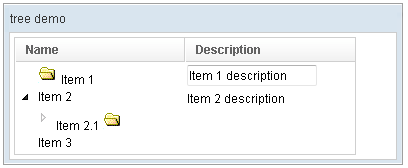
<window title="tree demo" border="normal" width="400px">
    <tree id="tree" width="90%">
        <treecols sizable="true">
            <treecol label="Name" />
            <treecol label="Description" />
        </treecols>
        <treechildren>
            <treeitem>
                <treerow>
                    <treecell>
                        <image src="/img/folder.gif" />
                        Item 1
                    </treecell>
                    <treecell>
                        <textbox value="Item 1 description" />
                    </treecell>
                </treerow>
            </treeitem>
            <treeitem>
                <treerow>
                    <treecell label="Item 2" />
                    <treecell label="Item 2 description" />
                </treerow>
                <treechildren>
                    <treeitem open="false">
                        <treerow>
                            <treecell label="Item 2.1">
                                <image src="/img/folder.gif" />
                            </treecell>
                        </treerow>
                        <treechildren>
                            <treeitem>
                                <treerow>
                                    <treecell label="Item 2.1.1" />
                                </treerow>
                            </treeitem>
                        </treechildren>
                    </treeitem>
                </treechildren>
            </treeitem>
            <treeitem label="Item 3" />
        </treechildren>
    </tree>
</window>
Properties
Maxlength
Default Value: 0 (no limit)
Sets the maximal length of each item’s label. When set to a positive integer, the label text in this column header and all tree cells in the same column will be truncated to that length. A value of 0 means no limit.
<treecols>
    <treecol label="Name" maxlength="20" />
    <treecol label="Description" />
</treecols>
SortAscending
since 5.0.6
Sets the ascending-order Comparator used when the user clicks this column header to sort ascending. Pass a Comparator<?> instance constructed in a <zscript> block or a composer / ViewModel, and reference it via EL.
<zscript>
    import java.util.Comparator;
    Comparator ascComp = new Comparator() {
        public int compare(Object o1, Object o2) {
            return o1.toString().compareToIgnoreCase(o2.toString());
        }
    };
</zscript>
<treecols>
    <treecol label="Name" sortAscending="${ascComp}" />
</treecols>
You can also pass the string "auto" via the sort attribute to let ZK create a default case-insensitive comparator automatically.
SortDescending
since 5.0.6
Sets the descending-order Comparator used when the user clicks this column header to sort descending. Pass a Comparator<?> instance constructed in a <zscript> block or a composer / ViewModel, and reference it via EL.
<zscript>
    import java.util.Comparator;
    Comparator dscComp = new Comparator() {
        public int compare(Object o1, Object o2) {
            return o2.toString().compareToIgnoreCase(o1.toString());
        }
    };
</zscript>
<treecols>
    <treecol label="Name" sortDescending="${dscComp}" />
</treecols>
SortDirection
since 5.0.6
Default Value: "natural"
Sets the sort direction indicator displayed on this column header. This attribute serves as a visual indicator and does not re-sort the data by itself, unless the parent <tree> has autosort="true". If you call sort(boolean) programmatically the direction is updated automatically.
Accepted values:
| Value | Meaning |
|---|---|
ascending |
Column is sorted in ascending order |
descending |
Column is sorted in descending order |
natural |
No sort applied (default) |
Passing any other value throws a WrongValueException.
<treecols>
    <treecol label="Name" sortDirection="ascending" />
    <treecol label="Date" sortDirection="natural" />
</treecols>
Supported Events
| Name | Event Type | Description |
|---|---|---|
onSort |
org.zkoss.zk.ui.event.Event | Denotes user has sorted the treeitem of this treecol. |
- Inherited Supported Events: HeaderElement
Supported Children
*ALL