Pdfviewer
- Demonstration: Embed PDF Documents in Your ZK Application
- Java API: org.zkoss.zkex.zul.Pdfviewer
- JavaScript API: zkex.pdfviewer.Pdfviewer
since 9.0.0
Employment/Purpose
The Pdfviewer component is based on Mozilla’s great work — PDF.js, that renders PDF documents in a browser.
Common Use Cases
Display a Static PDF by URL
Use the src attribute to point directly at a PDF resource served by your web application.
<pdfviewer src="/pdf/manual.pdf" width="100%" height="600px"/>
Display a Dynamically Generated PDF
When the PDF is produced at runtime (e.g. from a report engine), wrap it in an AMedia object and assign it to content via EL or data-binding.
<zscript>
    import org.zkoss.util.media.AMedia;
    byte[] pdfBytes = getReportBytes(); // your method
    org.zkoss.util.media.Media doc = new AMedia("report.pdf", "pdf", "application/pdf", pdfBytes);
</zscript>
<pdfviewer content="${doc}" width="100%" height="600px"/>
Open at a Specific Page
Set activePage (zero-based) to jump directly to a page on load.
<!-- opens at the third page (index 2) -->
<pdfviewer src="/pdf/manual.pdf" activePage="2" width="100%" height="600px"/>
Fit to Viewer Width
Use the fit-page-width keyword so the PDF fills the available horizontal space regardless of page size.
<pdfviewer src="/pdf/brochure.pdf" zoom="fit-page-width" width="100%" height="800px"/>
Rotate Pages
Display landscape PDFs or scanned documents in the correct orientation using rotation.
<!-- rotate 90° clockwise -->
<pdfviewer src="/pdf/scan.pdf" rotation="90" width="100%" height="600px"/>
Example
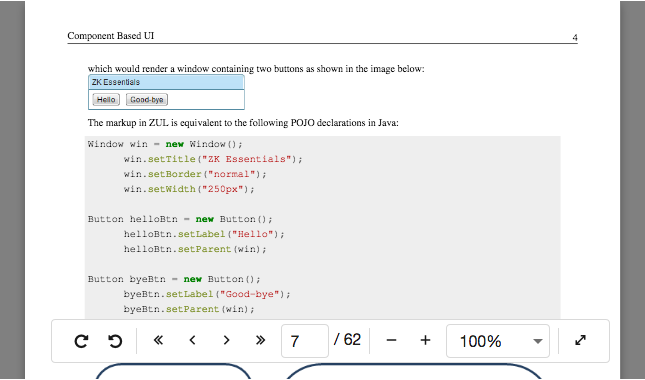
<pdfviewer src="/pdf/sample.pdf" />
Supported Browsers
It is compatible with HTML5-supported browsers, like IE 11, Edge, Firefox, Opera, Chrome and Safari.
Customize the Toolbar
Pdfviewer accepts only one child: <toolbar>. You can customize the toolbar by adding your own one. By default, the position of the toolbar is at the top. You can use CSS to do more tweaks.
<pdfviewer id="pv2">
  <toolbar>
    <toolbarbutton iconSclass="z-icon-fw z-icon-fast-backward"
                   onClick="pv2.firstPage()"/>
    <toolbarbutton iconSclass="z-icon-fw z-icon-chevron-left"
                   onClick="pv2.previousPage()"/>
    <toolbarbutton iconSclass="z-icon-fw z-icon-chevron-right"
                   onClick="pv2.nextPage()"/>
    <toolbarbutton iconSclass="z-icon-fw z-icon-fast-forward"
                   onClick="pv2.lastPage()"/>
  </toolbar>
</pdfviewer>
Zoom to Fit Page Width / Fit Page Height
since 9.6.0
You can call setZoom("fit-page-width") or setZoom("fit-page-height") now.
Or just specify it as an initial zoom level:
<pdfviewer id="pv" src="/pdf/sample.pdf" zoom="fit-page-width" />
Cross-Origin Resource Sharing (CORS)
If you want to load a remote PDF document, please make sure the response headers contain the necessary CORS headers or it won’t be allowed to be loaded.
Enable Fullscreen
Due to a specification limitation, this method must be called while responding to user interaction (e.g. event handlers). Therefore the component only provides a client-side method toggleFullscreen() to enable the full-screen mode.
<pdfviewer id="pv" src="/pdf/sample.pdf" />
<button xmlns:w="client" w:onClick="zk.$(‘$pv’).toggleFullscreen()" />
Underlying Library
This component depends on https://github.com/mozilla/pdf.js. To check the bundled pdfjs version, open a browser developer tool > Console tab, and run the code below:
pdfjsLib.version
Accessibility
since 9.5.0
Keyboard Support
| Key | Description |
|---|---|
| ArrowUp / ArrowDown PageUp / PageDown |
Scroll the vertical scrollbar if any. Navigate to the previous/next page if the scrollbar is on the topmost/bottommost. |
| ArrowLeft / ArrowRight | Scroll the horizontal scrollbar if any. Navigate to the previous/next page if the scrollbar is on the leftmost/rightmost. |
| Home / End | Scroll the vertical scrollbar if any. Navigate to the first/last page if the scrollbar is on the topmost/bottommost. |
Labeling with ARIA
To name a component with ARIA attribute by adding the aria-label
client attribute to the component, please refer to
ZK Developer’s Reference/Accessibility#Specify_ARIA_Attributes
Properties
Src
Default Value: null
Sets the source URI of the PDF file to display. Calling src clears any previously set content, and vice versa — the two attributes are mutually exclusive.
<pdfviewer src="/pdf/manual.pdf" width="100%" height="600px"/>
Content
Default Value: null
Sets the PDF content as a org.zkoss.util.media.Media object. Use this when the PDF is generated dynamically (e.g. from a byte array or stream) rather than served at a static URL. Calling content clears any previously set src. Construct the Media object in a <zscript> block, a composer, or a ViewModel.
<zscript>
    import org.zkoss.util.media.AMedia;
    byte[] pdfBytes = loadPdfBytes(); // your method
    org.zkoss.util.media.Media doc = new AMedia("report.pdf", "pdf", "application/pdf", pdfBytes);
</zscript>
<pdfviewer content="${doc}" width="100%" height="600px"/>
ActivePage
Default Value: 0
Sets the zero-based index of the page currently displayed. The value must be non-negative; a negative value throws a WrongValueException. Page indices start at 0 (first page).
<pdfviewer src="/pdf/manual.pdf" activePage="2" width="100%" height="600px"/>
Zoom
Default Value: 1.0
Sets the zoom level of the PDF viewer. Accepts either a positive double (where 1.0 = 100 %) or one of the special string keywords below. A value of 0 or less throws a WrongValueException.
since 9.6.0
The string keywords fit-page-width and fit-page-height are supported since 9.6.0.
| Value | Meaning |
|---|---|
1.0 (default) |
100 % zoom (actual size) |
any positive double |
proportional scale factor (e.g. 0.5 = 50 %) |
fit-page-width |
scales the page to fill the viewer width |
fit-page-height |
scales the page to fill the viewer height |
<!-- numeric zoom -->
<pdfviewer src="/pdf/manual.pdf" zoom="1.5" width="100%" height="600px"/>
<!-- fit-page-width keyword -->
<pdfviewer src="/pdf/manual.pdf" zoom="fit-page-width" width="100%" height="600px"/>
Rotation
Default Value: 0
Sets the rotation angle of the PDF pages in degrees. Only multiples of 90 in the range 0–270 are accepted; any other value throws a WrongValueException.
| Value | Meaning |
|---|---|
0 (default) |
no rotation |
90 |
90° clockwise |
180 |
upside down |
270 |
90° counter-clockwise (270° clockwise) |
<pdfviewer src="/pdf/manual.pdf" rotation="90" width="100%" height="600px"/>
PageSize
Default Value: 1
Returns the number of PDF pages displayed per view (always 1). This property is read-only in pdfviewer; calling the setter throws an UnsupportedOperationException.
<!-- pageSize is always 1; do not set it in ZUL -->
<pdfviewer src="/pdf/manual.pdf" width="100%" height="600px"/>
Supported Events
| Name | Event Type | Description |
|---|---|---|
onPaging |
org.zkoss.zul.event.PagingEvent | Notifies one of the pages is selected by the user. |
onRender |
org.zkoss.zk.ui.event.Event | Denotes the loading pdf file is finished rendering. |
onZoom |
org.zkoss.zkex.ui.event.ZoomEvent | Denotes user has changed the zoom level. |
onRotate |
org.zkoss.zkex.ui.event.RotationEvent | Denotes user has changed the rotation angle. |
- Inherited Supported Events: XulElement
Supported Children
*Toolbar