Intbox
- Demonstration: Intbox
- Java API: org.zkoss.zul.Intbox
- JavaScript API: zul.inp.Intbox
Employment/Purpose
An intbox is used to let users input integer data.
Common Use Cases
- Form integer fields — Collect whole-number input (quantities, counts, ages, year values) in a data-entry form. Pair with
constraint="no empty"to prevent blank submission. - Bounded numeric input — Apply
constraint="no negative,no zero"(or the EEmin/maxsyntax) to enforce a valid range without writing custom validators. - MVVM two-way binding — Use
value="@bind(vm.amount)"so the ViewModel receives a typedIntegerdirectly, avoiding manual string parsing. - In-place editing — Set
inplace="true"to render the intbox as a label until the user clicks it, keeping read-heavy UIs visually clean.
Example
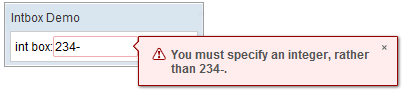
While input invalid data:
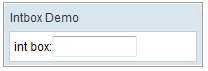
 <window title="Intbox Demo" border="normal" width="200px">
     int box:<intbox/>
 </window>
Properties
Value
Default Value: null
Sets the integer value displayed in the input field. The value is typed as Integer and may be null unless a constraint (such as no empty) prevents it. Binding this property via EL expression is the most common pattern.
<intbox value="42"/>
When bound to a ViewModel:
<intbox value="@bind(vm.quantity)"/>
Supported Events
- Inherited Supported Events: NumberInputElement
Supported Molds
Available molds of a component are defined in lang.xml embedded in zul.jar.
| Name | Snapshot |
|—|—|
| default | |
| rounded | 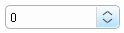 since 5.0.0
|
since 5.0.0
|
Supported Children
*NONE
Inherited Functions
Please refer to NumberInputElement for inherited functions.