Menu
- Demonstration: Menu
- Java API: org.zkoss.zul.Menu
- JavaScript API: zul.menu.Menu
Employment/Purpose
An element, much like a button, is placed on a menu bar. When the user
clicks the menu element, the child Menupopup of the menu will be
displayed. This element is also used to create submenus of Menupopup.
Common Use Cases
Submenu with Menupopup
Place a <menupopup> as the direct child of <menu> to create a submenu. Clicking the arrow on the right opens the popup; clicking the label fires onClick.
<menubar>
    <menu label="File">
        <menupopup>
            <menuitem label="New"/>
            <menuitem label="Open"/>
            <menuseparator/>
            <menuitem label="Exit"/>
        </menupopup>
    </menu>
</menubar>
Inline Color Picker via content
Set content to a #color=#RRGGBB string to embed a compact color-swatch. Handle onChange to react when the user picks a new color.
<menubar>
    <menu label="Color" content="#color=#336699"
          onChange="Clients.log(event.value)"/>
</menubar>
Handling onClick on the Top-Level Menu
The onClick event fires only when the user clicks the label side of the menu, not the popup-trigger arrow. This is useful for navigating directly without a submenu.
<menubar>
    <menu label="Dashboard" onClick='Executions.sendRedirect("/dashboard")'/>
</menubar>
Example
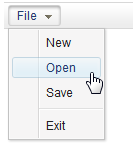
<menubar>
 <menu label="File">
     <menupopup>
         <menuitem label="New" onClick="alert(self.label)"/>
         <menuitem label="Open" onClick="alert(self.label)"/>
         <menuitem label="Save" onClick="alert(self.label)"/>
         <menuseparator/>
         <menuitem label="Exit" onClick="alert(self.label)"/>
     </menupopup>
 </menu>
</menubar>
Properties
content
Default Value: "" (empty string)
Sets the embedded HTML content shown as part of the menu item’s description area. Any valid HTML markup is accepted. Since 10.0.0, the content is sanitized automatically to prevent XSS — do not embed <script> or inline event handlers.
since 5.0.0
A special shorthand #color=#RRGGBB renders an inline color-swatch box. When content starts with #color=, the component fires onChange whenever the selected color changes.
<!-- plain HTML description -->
<menu label="Help" content="<b>Online Help</b> — press F1"/>
<!-- color swatch shorthand -->
<menu label="Foreground" content="#color=#FF0000"
onChange="alert(event.value)"/>
Supported Events
| Name | Event Type | Description |
|---|---|---|
| onClick | MouseEvent | Fired when the user clicks the main button area of the menu (the label/icon side, not the arrow that opens the popup). |
| onChange | InputEvent | Fired when the color value changes — only applicable when content is set to a #color=#RRGGBB value. The new color string is available via event.value. |
Inherited Supported Events: LabelImageElement