Absolutechildren
Employment/Purpose
A container component that can contain any other ZK component and can only be contained as direct child of Absolutelayout component. It can be absolutely positioned within Absolutelayout component by either setting “x” and “y” attribute or calling setX(int) and setY(int) methods.
Common Use Cases
- Overlay panels: Place multiple panels at exact pixel coordinates inside an
absolutelayoutto create dashboard-style or diagram layouts where each child occupies a fixed position. - Dynamic repositioning: Update
xandyat runtime from a composer or ViewModel to animate or drag components to new positions within the container. - Nested content: Because
absolutechildrenaccepts any ZK component as a child, it is commonly used to wrap complex content (windows, grids, charts) that must be pinned to a specific location.
Example
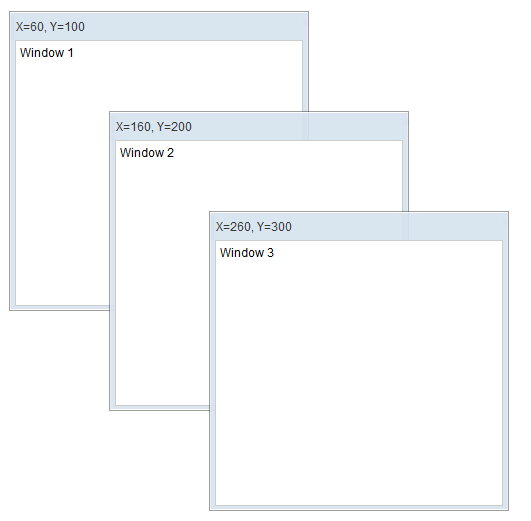
<?component name="window" extends="window" border="normal" width="300px" height="300px"?>
<zk>
    <absolutelayout>
        <absolutechildren id="w1" x="60" y="100">
            <window title="X=60, Y=100">
            Window 1
            </window>
        </absolutechildren>
        <absolutechildren id="w2" x="160" y="200">
            <window title="X=60, Y=100">
            Window 2
            </window>
        </absolutechildren>
        <absolutechildren id="w3" x="260" y="300">
            <window title="X=60, Y=100">
            Window 3
            </window>
        </absolutechildren>
    </absolutelayout>
</zk>
Properties
x
Default Value: 0
Sets the horizontal position (in pixels) of this absolutechildren within its parent absolutelayout container. The value is an integer measured from the left edge of the container.
<absolutelayout>
    <absolutechildren x="60" y="100">
        <window title="Panel">Content</window>
    </absolutechildren>
</absolutelayout>
y
Default Value: 0
Sets the vertical position (in pixels) of this absolutechildren within its parent absolutelayout container. The value is an integer measured from the top edge of the container.
<absolutelayout>
    <absolutechildren x="60" y="100">
        <window title="Panel">Content</window>
    </absolutechildren>
</absolutelayout>
Supported Events
- Inherited Supported Events: XulElement
Supported Children
All