Separator
- Java API: org.zkoss.zul.Separator
- JavaScript API: zul.wgt.Separator
Employment/Purpose
A separator is used to insert a space between two components. There are several ways to customize the separator.
- By use of the orient attribute, you are able to specify whether the separator is vertical or horizontal. By default it is a horizontal separator, which inserts a line break. On the other hand, a vertical separator inserts white space.
- By use of the bar attribute, you can control whether to show a horizontal or vertical line between components.
- By use of the spacing attribute, you can control the size of spacing.
Common Use Cases
- Visual Dividers: Use a horizontal separator with
bar="true"to create a visible dividing line between form sections or content groups. - Spacing Control: Use
orient="horizontal"(default) to insert whitespace and vertical rhythm between stacked components. - Inline Separators: Use
orient="vertical"to add horizontal whitespace between components displayed side-by-side without a visible line. - Custom Spacing: Combine
bar="true"with thespacingattribute to fine-tune the gap between components while showing a divider.
Example
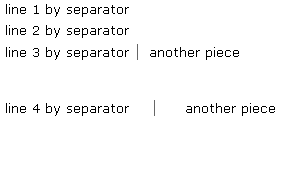
 line 1 by separator
 <separator />
 line 2 by separator
 <separator />
 line 3 by separator
 <space bar="true" />
 another piece
 <separator spacing="20px" />
 line 4 by separator
 <space bar="true" spacing="20px" />
 another piece
Properties
Bar
Default Value: false
Sets whether to display a visual bar (a visible line) between components. When false the separator inserts only whitespace; when true it renders a visible divider line whose orientation follows the orient attribute.
<separator bar="true" />
Orient
Default Value: "horizontal"
Sets the orientation of the separator. Accepted values:
| Value | Meaning |
|---|---|
horizontal |
Inserts a line break (block-level spacing). Default. |
vertical |
Inserts inline whitespace between side-by-side components. |
Any other value throws a WrongValueException.
<separator orient="vertical" />
Spacing
Default Value: null (determined by CSS)
Sets the amount of space the separator introduces. Accepts any valid CSS length string such as "0", "5px", or "3pt". Pass null or an empty string to reset to the CSS default.
<separator spacing="20px" />
Supported Events
- Inherited Supported Events: XulElement
Supported Children
*NONE