Listhead
- Demonstration: Listbox (Sorting)
- Java API: org.zkoss.zul.Listhead
- JavaScript API: zul.sel.Listhead
Employment/Purpose
A list headers used to define multi-columns and/or headers. Only Listheader components are accepted as children.
Common Use Cases
- Column visibility control — set
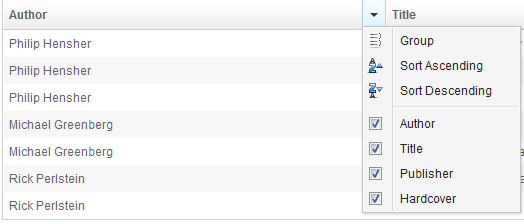
menupopup="auto"to let users show or hide individual columns at runtime via the header context menu. - Column grouping — set
menupopup="auto"to allow users to group list rows by a column’s value directly from the context menu. - Invisible header for alignment — omit labels on all
listheaderchildren to usehflexproportions for column sizing without rendering a visible header row. - Custom context menu — point
menupopupto a<menupopup id="...">to replace the auto-generated header menu with application-specific actions.
Example
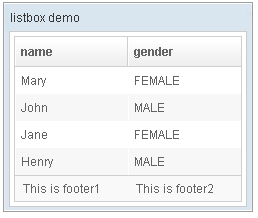
 <window title="listbox demo" border="normal" width="250px">
         <listbox id="box">
             <listhead sizable="true">
                 <listheader label="name" sort="auto"/>
                 <listheader label="gender" sort="auto"/>
             </listhead>
             <listitem>
                 <listcell label="Mary"/>
                 <listcell label="FEMALE"/>
             </listitem>
             <listitem>
                 <listcell label="John"/>
                 <listcell label="MALE"/>
             </listitem>
             <listitem>
                 <listcell label="Jane"/>
                 <listcell label="FEMALE"/>
             </listitem>
             <listitem>
                 <listcell label="Henry"/>
                 <listcell label="MALE"/>
             </listitem>
             <listfoot >
                 <listfooter><label value="This is footer1"/></listfooter>
                 <listfooter><label value="This is footer2"/></listfooter>
             </listfoot>
         </listbox>
 </window>
Properties
Menupopup
since 6.5.0
Default: none
auto: show a default menu for the listhead.auto-keep: since 8.6.1 the default menu will keep open after setting column visibility.
Or you can provide your own menupopup by specifying a menupopup’s ID.
Auto
<zk>
    <listbox>
        <listhead menupopup="auto">
            <listheader label="Author" sort="auto"/>
            <listheader label="Title" sort="auto"/>
            <listheader label="Publisher" sort="auto"/>
            <listheader label="Hardcover" sort="auto"/>
        </listhead>
        // omitted...
    </listbox>
</zk>
listItems will be categorized by the label of its children
(listcells). You could extend
(org.zkoss.zul.ListitemComparator) and assign to the
listheader (sorting properties)
to change this default behavior.
Customized Menupopup
    <menupopup id="editPopup">
        <menuitem label="Group" image="~./zul/img/grid/menu-group.png"/>
        <menuitem label="Sort Ascending" image="~./zul/img/grid/menu-arrowup.png"/>
        <menuitem label="Sort Descending" image="~./zul/img/grid/menu-arrowdown.png"/>
    </menupopup>
    <listbox>
        <listhead menupopup="editPopup">
            <listheader label="Author" sort="auto"/>
            <listheader label="Title" sort="auto"/>
            <listheader label="Publisher" sort="auto"/>
            <listheader label="Hardcover" sort="auto"/>
        </listhead>
        // omitted...
    </listbox>
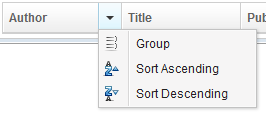
As you can see, the example above specifies a customized menu popup to the columns as its column menu.
Columnshide
since 6.5.0
Default Value: true
Sets whether the header context menu includes a hide/show option for each listheader. This option is only active when menupopup is set to auto or auto-keep.
Set to false to remove the hide column option from the auto-generated context menu.
<listbox>
    <listhead menupopup="auto" columnshide="false">
        <listheader label="Name" sort="auto"/>
        <listheader label="Status" sort="auto"/>
    </listhead>
</listbox>
Columnsgroup
since 6.5.0
Default Value: true
Sets whether the header context menu includes a group-by option for each listheader. This option is only active when menupopup is set to auto or auto-keep.
Set to false to remove the group-by option from the auto-generated context menu.
<listbox>
    <listhead menupopup="auto" columnsgroup="false">
        <listheader label="Name" sort="auto"/>
        <listheader label="Status" sort="auto"/>
    </listhead>
</listbox>
Value
since 3.6.0
Default Value: null
A generic, application-defined value attached to this listhead. ZK does not interpret the value in any way; it is available for the application to store arbitrary data associated with the header row (for example, a metadata object describing all columns).
The value is a Java object constructed in a <zscript> block or assigned via a composer / ViewModel, then referenced through EL.
<zscript>
    String headerMeta = "columnSet-A";
</zscript>
<listbox>
    <listhead value="${headerMeta}">
        <listheader label="Name"/>
        <listheader label="Status"/>
    </listhead>
</listbox>
Supported Events
- Inherited Supported Events: HeadersElement