Groupfoot
- Demonstration: Group
- Java API: org.zkoss.zul.Groupfoot
- JavaScript API: zkex.grid.Groupfoot
Employment/Purpose
A footer row that appears at the end of each group in a Grid. It displays aggregate or summary information for the group’s data, such as totals, counts, or averages. The footer cells align with the corresponding columns, providing a clean summary layout.
Common Use Cases
- Summary rows in grouped grids — place a
groupfootas the last child of agroupto show aggregate values (totals, counts, averages) for each group’s columns. - Column-aligned footers — add one
label(or other component) per column so the footer cells line up exactly with the column headers above. - Dynamic aggregation — bind each footer cell to a ViewModel property that computes the group subtotal, so the footer updates automatically when the underlying data changes.
Example
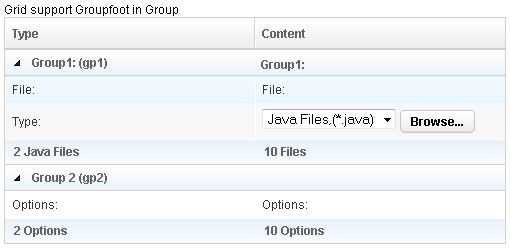
 <?xml version="1.0" encoding="UTF-8"?>
 <zk>
     Grid support Groupfoot in Group

     <grid id="grid" width="500px">
         <columns id="h" sizable="true">
             <column id="col1" label="Type"/>
             <column id="col2" label="Content"/>
         </columns>
         <rows id="rows">
             <group id="gp1">
             <label value="Group1: (gp1)"/>
             <label value="Group1:"/>
             </group>
             <row>
                 <label value="File:"/>
                 <label value="File:"/>
             </row>
             <row id="row1">
                 <label value="Type:"/>
                 <hbox>
                     <listbox rows="1" mold="select">
                         <listitem label="Java Files,(*.java)"/>
                         <listitem label="All Files,(*.*)"/>
                     </listbox>
                     <button label="Browse..."/>
                 </hbox>
             </row>
             <groupfoot>
                 <label value="2 Java Files"/>
                 <label value="10 Files"/>
             </groupfoot>
             <group id="gp2" label="Group 2 (gp2)" onOpen='alert("Group is open: "+self.open);'/>
             <row>
                 <label value="Options:"/>
                 <label value="Options:"/>
             </row>
             <groupfoot>
                 <label value="2 Options"/>
                 <label value="10 Options"/>
             </groupfoot>
         </rows>
     </grid>
 </zk>
Properties
label
Sets the text of the first Label child that groupfoot contains. If no Label child exists yet, one is created automatically.
This is a convenience shortcut: it reads and writes the value of the first child Label (or the first child of the first child Cell). When you need richer content (multiple cells, formatted text) place child components directly instead of using this attribute.
<groupfoot label="Total: 3 items"/>
Supported Events
Inherited Supported Events: XulElement
Supported Children
*ALL