Gscreen
- Demonstration: Gmaps
- Java API: in release zip
Employment/Purpose
A rectangular image on the Gmaps whose position remains fixed on the screen even you move the maps. It can be used in showing logos, heads-up display, etc.
Example
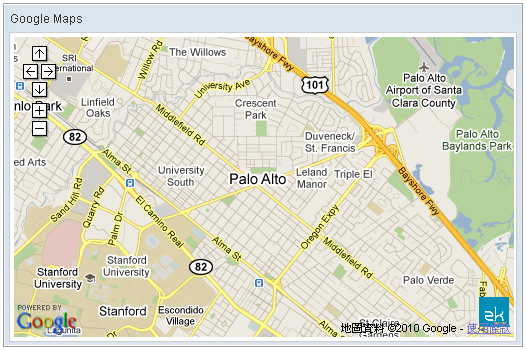
<window title="Google Maps" border="normal" width="520px">
    <script type="text/javascript" content="zk.googleAPIkey='Your-Google-API-Key'"/>
    <gmaps id="mymap" width="500px" height="300px" showSmallCtrl="true">
        <gscreen src="/img/ZK-Logo.gif" screenX="465" screenY="10" offsetX="0" offsetY="0" width="30" height="30"/>
    </gmaps>
</window>
Properties
Deprecated — As of release 3.0.2, Google Map v3 does not support
GScreenOverlay. This component is retained for backward compatibility only.
screenX
Default Value: "0"
Sets the X coordinate of the on-screen position where the image is placed, measured from the left-bottom corner of the map. Accepts an integer pixel value, a value with a px suffix, or a percentage of the map width (e.g. "465", "465px", "90%").
<gscreen src="/img/ZK-Logo.gif" screenX="465" screenY="10"
         offsetX="0" offsetY="0" width="30" height="30"/>
screenY
Default Value: "0"
Sets the Y coordinate of the on-screen position where the image is placed, measured from the left-bottom corner of the map. Accepts an integer pixel value, a value with a px suffix, or a percentage of the map height (e.g. "10", "10px", "5%").
<gscreen src="/img/ZK-Logo.gif" screenX="465" screenY="10"
         offsetX="0" offsetY="0" width="30" height="30"/>
offsetX
Default Value: "0"
Sets the X offset used to shift the image leftward from its screenX anchor. Accepts an integer pixel value, a value with a px suffix, or a percentage of the map width (e.g. "0", "10px", "5%").
<gscreen src="/img/ZK-Logo.gif" screenX="465" screenY="10"
         offsetX="10" offsetY="0" width="30" height="30"/>
offsetY
Default Value: "0"
Sets the Y offset used to shift the image downward from its screenY anchor. Accepts an integer pixel value, a value with a px suffix, or a percentage of the map height (e.g. "0", "10px", "5%").
<gscreen src="/img/ZK-Logo.gif" screenX="465" screenY="10"
         offsetX="0" offsetY="10" width="30" height="30"/>
src
Default Value: null
Sets the source URI of the image to display on the map overlay. Passing an empty string or null clears the image. If content is set to a non-null value it takes higher priority than src.
<gscreen src="/img/ZK-Logo.gif" screenX="465" screenY="10"
         offsetX="0" offsetY="0" width="30" height="30"/>
content
Default Value: null
Sets the image content directly as an org.zkoss.image.Image object. When non-null this takes higher priority than src. Typically assigned from a <zscript> block or a ViewModel.
<zscript>
    import org.zkoss.image.Image;
    import org.zkoss.zul.Fileupload;
    // Obtain an Image object, e.g. from a file upload or AImage:
    import org.zkoss.zul.AImage;
    Image logo = new AImage("/img/ZK-Logo.gif");
</zscript>
<gmaps width="500px" height="300px">
    <gscreen content="${logo}" screenX="465" screenY="10"
             offsetX="0" offsetY="0" width="30" height="30"/>
</gmaps>
Common Use Cases
Displaying a Logo on the Map
Place a company logo in the lower-right corner of the map using pixel coordinates. The screenX/screenY values position the anchor from the left-bottom corner of the map, while offsetX/offsetY fine-tune the placement.
<window title="Google Maps" border="normal" width="520px">
    <script type="text/javascript" content="zk.googleAPIkey='Your-Google-API-Key'"/>
    <gmaps id="mymap" width="500px" height="300px" showSmallCtrl="true">
        <gscreen src="/img/logo.png"
                 screenX="460" screenY="10"
                 offsetX="0" offsetY="0"
                 width="40" height="40"/>
    </gmaps>
</window>
Using Percentage-Based Positioning
Position the overlay relative to the map dimensions so it remains proportional at any map size.
<gmaps width="500px" height="300px">
    <gscreen src="/img/watermark.png"
             screenX="80%" screenY="5%"
             offsetX="0" offsetY="0"
             width="15%" height="10%"/>
</gmaps>
Supported Events
Inherited Supported Events: XulElement
Supported Children
*None