Treefoot
- Java API: org.zkoss.zul.Treefoot
- JavaScript API: zul.sel.Treefoot
Employment/Purpose
A treefoot is main part of tree which contains set of footers. The set of footers is defined by a number of treefooter components. Each column will appear as a footer at the bottom of the tree.
Common Use Cases
Adding a Footer Row to a Tree
Use <treefoot> as a direct child of <tree> to attach a summary or label row at the bottom. Pair it with one <treefooter> per column to align footer cells with their corresponding <treecol> columns.
<tree>
    <treecols>
        <treecol label="Name" />
        <treecol label="Count" />
    </treecols>
    <treechildren>
        <treeitem>
            <treerow>
                <treecell label="Item A" />
                <treecell label="3" />
            </treerow>
        </treeitem>
    </treechildren>
    <treefoot>
        <treefooter label="Total" />
        <treefooter label="3" />
    </treefoot>
</tree>
Each <treefooter> maps positionally to the <treecol> at the same index. The number of <treefooter> elements should match the number of <treecol> elements to keep columns aligned.
Example
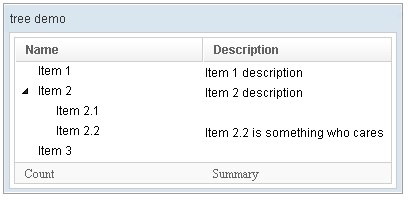
<window title="tree demo" border="normal" width="400px" >
    <tree id="tree" rows="5">
        <treecols sizable="true">
            <treecol label="Name" />
            <treecol label="Description" />
        </treecols>
        <treechildren>
            <treeitem>
                <treerow>
                    <treecell label="Item 1" />
                    <treecell label="Item 1 description" />
                </treerow>
            </treeitem>
            <treeitem>
                <treerow>
                    <treecell label="Item 2" />
                    <treecell label="Item 2 description" />
                </treerow>
                <treechildren>
                    <treeitem>
                        <treerow>
                            <treecell label="Item 2.1" />
                        </treerow>
                    </treeitem>
                    <treeitem>
                        <treerow>
                            <treecell label="Item 2.2" />
                            <treecell
                                label="Item 2.2 is something who cares" />
                        </treerow>
                    </treeitem>
                </treechildren>
            </treeitem>
            <treeitem label="Item 3" />
        </treechildren>
        <treefoot>
            <treefooter label="Count" />
            <treefooter label="Summary" />
        </treefoot>
    </tree>
</window>
Supported Events
- Inherited Supported Events: XulElement