Organigram
- Demonstration: Organigram
- Java API: org.zkoss.zkmax.zul.Organigram
- JavaScript API: zkmax.layout.Organigram
since 8.6.0
Employment/Purpose
Organigram displays an organizational chart using a tree data structure. It accepts a TreeModel to dynamically render hierarchical data, or you can declare the structure statically using Orgchildren, Orgitem, and Orgnode elements. The component supports single-item selection and Client Render on Demand for performance optimization. Note: IE 11+ is required due to CSS Flexbox dependency.
Common Use Cases
Displaying a Static Org Chart
Declare the hierarchy directly in ZUL using <orgchildren>, <orgitem>, and <orgnode> elements. This is the simplest approach and requires no Java code.
<organigram width="600px">
    <orgchildren>
        <orgitem label="CEO">
            <orgchildren>
                <orgitem label="CTO"/>
                <orgitem label="CFO"/>
            </orgchildren>
        </orgitem>
    </orgchildren>
</organigram>
Binding a Dynamic Model
Use a DefaultTreeModel (via the model attribute) to drive the chart from server-side data. This pattern works well with MVVM and MVC controllers.
<zscript><![CDATA[
    import org.zkoss.zul.DefaultTreeNode;
    import org.zkoss.zul.DefaultTreeModel;
    DefaultTreeNode root = new DefaultTreeNode(null, new DefaultTreeNode[]{
        new DefaultTreeNode("CEO", new DefaultTreeNode[]{
            new DefaultTreeNode("CTO"),
            new DefaultTreeNode("CFO")
        })
    });
    DefaultTreeModel model = new DefaultTreeModel(root);
    model.addOpenPath(new int[]{0});
]]></zscript>
<organigram width="600px" model="${model}"/>
Handling Selection
Listen to onSelect and read the selected item from the event or from getSelectedItem().
<organigram width="600px" onSelect="Clients.log(self.getSelectedItem().getLabel())">
    <orgchildren>
        <orgitem label="CEO">
            <orgchildren>
                <orgitem label="CTO" selected="true"/>
                <orgitem label="CFO"/>
            </orgchildren>
        </orgitem>
    </orgchildren>
</organigram>
For a custom appearance on each node, see Organigram Template and Organigram Renderer.
Example
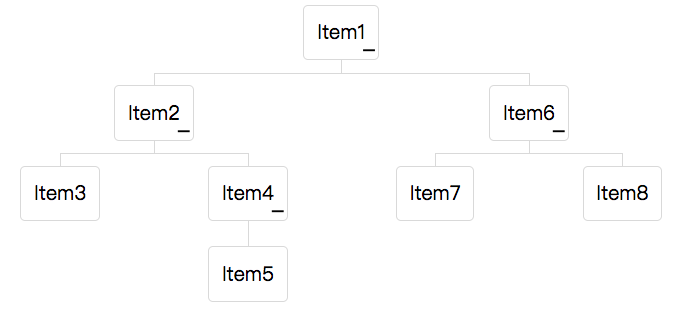
<organigram width="600px">
    <orgchildren>
        <orgitem label="Item1">
            <orgchildren>
                <orgitem label="Item2">
                    <orgchildren>
                        <orgitem label="Item3"/>
                        <orgitem label="Item4">
                            <orgchildren>
                                <orgitem label="Item5"/>
                            </orgchildren>
                        </orgitem>
                    </orgchildren>
                </orgitem>
                <orgitem label="Item6">
                    <orgchildren>
                        <orgitem label="Item7"/>
                        <orgitem label="Item8"/>
                    </orgchildren>
                </orgitem>
            </orgchildren>
        </orgitem>
    </orgchildren>
</organigram>
Accessibility
since 9.5.0
Keyboard Support
| Key | Description |
|---|---|
| ArrowUp | Moves focus to upper level item. / If an opened item is focused, close it. |
| ArrowDown | Moves focus to next level item. / If a closed item is focused, open it. |
| ArrowLeft | Moves focus to the previous sibling. |
| ArrowRight | Moves focus to the next sibling. |
| Enter / Spacebar | When the focus item is not selected, select it. When the focus item is selected, toggle its open/close. |
Labeling with ARIA
To name a component with ARIA attribute by adding the aria-label
client attribute to the component, please refer to
ZK Developer’s Reference/Accessibility#Specify_ARIA_Attributes
Properties
See also inherited properties from XulElement.
Model
Associates a TreeModel with this Organigram. When a model is set the component renders its items dynamically from the tree data rather than from statically declared <orgchildren> markup. The model must also implement TreeSelectableModel. Pass null to dissociate any previously bound model.
<zscript><![CDATA[
    import org.zkoss.zul.DefaultTreeNode;
    import org.zkoss.zul.DefaultTreeModel;
    DefaultTreeNode root = new DefaultTreeNode(null, new DefaultTreeNode[]{
        new DefaultTreeNode("CEO", new DefaultTreeNode[]{
            new DefaultTreeNode("CTO"),
            new DefaultTreeNode("CFO")
        })
    });
    DefaultTreeModel model = new DefaultTreeModel(root);
    model.addOpenPath(new int[]{0});
]]></zscript>
<organigram width="600px" model="${model}"/>
The model value is a TreeModel object — construct it in <zscript>, a composer, or a ViewModel and reference it via EL.
ItemRenderer
Sets the renderer used to render each Orgitem when a model is assigned. The renderer must implement OrgitemRenderer<T>. Changing the renderer while a model is active causes the Organigram to re-render immediately. Pass null to revert to the default renderer.
The renderer can also be specified as a fully-qualified class name string (ZUL attribute itemRenderer="com.example.MyRenderer") — the framework will instantiate it automatically.
<zscript><![CDATA[
    import org.zkoss.zkmax.zul.OrgitemRenderer;
    import org.zkoss.zkmax.zul.Orgitem;
    OrgitemRenderer myRenderer = new OrgitemRenderer() {
        public void render(Orgitem item, Object data, int index) {
            item.setLabel(data.toString().toUpperCase());
        }
    };
]]></zscript>
<organigram width="600px" model="${model}" itemRenderer="${myRenderer}"/>
The itemRenderer value is an OrgitemRenderer object — construct it in <zscript>, a composer, or a ViewModel and reference it via EL. See also Organigram Renderer for a full guide.
SelectedItem
Deselects the previously selected item and selects the given Orgitem. Organigram supports single selection only; passing null clears the current selection. Selecting an item programmatically does not fire the onSelect event.
<zscript><![CDATA[
    import org.zkoss.zkmax.zul.Orgitem;
    // Assume 'myItem' is a reference to an Orgitem child of the organigram
    Orgitem myItem = (Orgitem) fellows.get("ceoItem");
]]></zscript>
<organigram id="org" width="600px" selectedItem="${myItem}">
    <orgchildren>
        <orgitem id="ceoItem" label="CEO">
            <orgchildren>
                <orgitem label="CTO"/>
                <orgitem label="CFO"/>
            </orgchildren>
        </orgitem>
    </orgchildren>
</organigram>
The selectedItem value is an Orgitem object — obtain a reference via <zscript>, a composer, or a ViewModel and bind it via EL. Users can also select an item interactively; listen to the onSelect event and call getSelectedItem() to retrieve it.
Supported Events
| Name | Event Type | Description |
|---|---|---|
onSelect |
org.zkoss.zk.ui.event.SelectEvent | Notifies one that the user has selected a new item in the organigram. |
- Inherited Supported Events: XulElement