Orgitem
- Demonstration: Orgitem
- Java API: org.zkoss.zkmax.zul.Orgitem
- JavaScript API: zkmax.layout.Orgitem
since 8.6.0
Employment/Purpose
Orgitem contains a node (Orgnode) and an optional Orgchildren.
If the component doesn’t contain an Orgchildren, it is a leaf node that doesn’t accept any child items.
If it contains an Orgchildren, it is a branch node that might contain other items.
For a branch node, a +/− button appears at the bottom right of the node, allowing users to open and close the item by clicking the button.
Common Use Cases
- Organization charts: Display hierarchical structures like corporate hierarchies, team structures, or reporting chains.
- Dynamic data loading: Load child items on demand when the user expands a branch.
- Department or team visualization: Show organizational divisions and their subdivisions.
- Interactive trees with rich nodes: Combine images and labels to create visually detailed tree structures.
Example
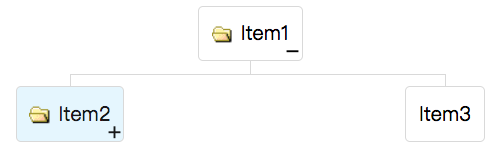
    <organigram width="600px">
        <orgchildren>
            <orgitem image="img/folder.gif" label="Item1">
                <orgchildren>
                    <orgitem image="img/folder.gif" label="Item2" selected="true" open="false">
                        <orgchildren>
                            <orgitem label="Item4"/>
                        </orgchildren>
                    </orgitem>
                    <orgitem label="Item3"/>
                </orgchildren>
            </orgitem>
        </orgchildren>
    </organigram>
Convenience Label and Image Properties
Orgitem provides convenience properties to simplify assignment of image and label to the contained Orgnode. However, these properties are actually placed in the node (the child Orgnode). If the Orgnode is not created yet, it is created automatically.
Once label or image is set via these convenience properties, you cannot attach a separate <orgnode> child—doing so raises an exception. This is because Orgitem maintains a one-to-one relationship with its Orgnode.
When your Organigram only contains image and text, this is a convenient way to create the structure without Orgnode tags. If you want to place other components inside the node, you must create the Orgnode explicitly without using these convenience properties:
<zscript><![CDATA[
    Orgchildren orgchildren;
    void newItem(String label) {
        if (orgitem.getOrgchildren() == null) {
            orgchildren = new Orgchildren();
            orgchildren.setParent(orgitem);
        }
        new Orgitem(label).setParent(orgchildren);
    }
]]></zscript>
<organigram>
    <orgchildren>
        <orgitem id="orgitem">
            <orgnode>
                <textbox onOK="newItem(self.value)"/>
            </orgnode>
        </orgitem>
    </orgchildren>
</organigram>
Properties
Image
Default Value: null
Sets the image path for the Orgnode that this Orgitem contains. If no Orgnode exists yet, one is created automatically. Note that once image or label is set this way, you cannot attach a separate <orgnode> child—doing so raises an exception.
<orgitem image="~./img/user.png" label="Alice"/>
Label
Default Value: null
Sets the text label for the Orgnode that this Orgitem contains. If no Orgnode exists yet, one is created automatically. As with image, once label is set you cannot attach a separate <orgnode> child.
<orgitem label="Engineering"/>
Open
Default Value: true
Controls whether this item’s child items (its Orgchildren) are visible. When set to false, the subtree is collapsed. A +/− button appears on branch nodes; clicking it fires the onOpen event and toggles the open state.
<orgitem label="Region" open="false">
    <orgchildren>
        <orgitem label="Office A"/>
    </orgchildren>
</orgitem>
Selectable
Default Value: true
Determines whether a user can select this item by clicking it. When set to false, the item cannot be selected, and any existing selection on it is cleared automatically. For a visually prominent disabled style, prefer the disabled attribute instead.
<orgitem label="Read-only Node" selectable="false"/>
Selected
Default Value: false
Marks this item as the currently selected item in the Organigram. Because Organigram accepts only one selected item at a time, setting selected="true" on one item deselects any previously selected item. The item must be selectable (selectable="true") for this property to take effect.
<orgitem label="CEO" selected="true"/>
Value
Default Value: null
Attaches an arbitrary server-side object to this item. The value is never sent to the browser, so it can be any Java object. It is typically set from a composer or ViewModel and retrieved in event handlers to avoid a separate map lookup.
Assign the value in a <zscript> block and reference it via EL, or set it programmatically in a composer/ViewModel:
<zscript><![CDATA[
    import com.example.Employee;
    Employee emp = new Employee("Alice", 42);
]]></zscript>
<orgitem label="Alice" value="${emp}"/>
Supported Events
| Name | Event Type | Description |
|---|---|---|
onOpen |
org.zkoss.zk.ui.event.OpenEvent | Denotes user has opened or closed a component. It is useful to implement load-on-demand by listening to the onOpen event and creating components the first time the component is opened. |
- Inherited Supported Events: XulElement