Treechildren
- Demonstration: Tree (Dynamic Styling)
- Java API: org.zkoss.zul.Treechildren
- JavaScript API: zul.sel.Treechildren
Employment/Purpose
Treechildren contains a collection of treeitem components. It is the main body of the Tree and also the main body of a Treeitem’s children.
Common Use Cases
- Root-level tree body — Place a single
<treechildren>directly inside<tree>to hold the top-level<treeitem>elements that form the visible tree. - Nested subtrees — Nest an additional
<treechildren>inside any<treeitem>to create a collapsible child branch; the parent item’s open/close toggle controls visibility of that<treechildren>. - Paged large trees — To limit how many rows render at once, enable paging on the enclosing
<tree>via itspagingmold (<tree mold="paging" pageSize="..."/>); paging is a property ofTree, not of<treechildren>.
Example
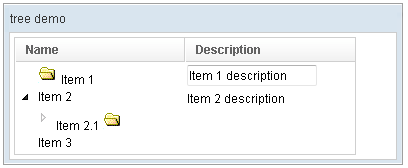
<window title="tree demo" border="normal" width="400px">
    <tree id="tree" width="90%">
        <treecols sizable="true">
            <treecol label="Name" />
            <treecol label="Description" />
        </treecols>
        <treechildren>
            <treeitem>
                <treerow>
                    <treecell>
                        <image src="/img/folder.gif" />
                        Item 1
                    </treecell>
                    <treecell>
                        <textbox value="Item 1 description" />
                    </treecell>
                </treerow>
            </treeitem>
            <treeitem>
                <treerow>
                    <treecell label="Item 2" />
                    <treecell label="Item 2 description" />
                </treerow>
                <treechildren>
                    <treeitem open="false">
                        <treerow>
                            <treecell label="Item 2.1">
                                <image src="/img/folder.gif" />
                            </treecell>
                        </treerow>
                        <treechildren>
                            <treeitem>
                                <treerow>
                                    <treecell label="Item 2.1.1" />
                                </treerow>
                            </treeitem>
                        </treechildren>
                    </treeitem>
                </treechildren>
            </treeitem>
            <treeitem label="Item 3" />
        </treechildren>
    </tree>
</window>
Supported Children
* Treeitem