Sliderbuttons
- Demonstration:
- Java API: Sliderbuttons
- JavaScript API: Sliderbuttons
since 9.0.0
Employment/Purpose
A pair of draggable buttons defining the start value and the end value in a Multislider.
Common Use Cases
- Range filtering in data grids — Place a
<sliderbuttons>inside a<multislider>to let users narrow a dataset to a numeric range (e.g., price between $20 and $80). ReadstartValueandendValuein anonRangeValueChangelistener to refilter the backingListModel. - Multi-range visualisation — Stack several
<sliderbuttons>within one<multislider>to represent distinct segments on a shared axis (e.g., scheduled work shifts across a 24-hour timeline). - Minimum/maximum threshold control — Use a single pair to enforce soft bounds inside a configuration form, keeping both handles within the valid operating range enforced by the parent slider’s
minandmax.
Example
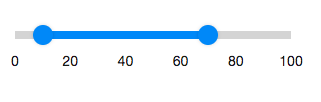
<zk>
  <multislider>
    <sliderbuttons startValue="10" endValue="70"/>
  </multislider>
</zk>
Properties
StartValue
Default Value: 0
Represents the start value of the range in a sliderbuttons.
<multislider>
  <sliderbuttons startValue="10" endValue="70"/>
</multislider>
EndValue
Default Value: 0
Represents the end value of the range in a sliderbuttons.
<multislider>
  <sliderbuttons startValue="10" endValue="70"/>
</multislider>
Supported Events
| Name | Event Type | Description |
|---|---|---|
onRangeValueChange |
org.zkoss.zkex.zul.event.RangeValueChangeEvent | Denotes the range value of a component has been changed by the user. |
- Inherited Supported Events: XulElement
Supported Children
*None