Treecell
- Demonstration: Tree (Dynamic Styling)
- Java API: org.zkoss.zul.Treecell
- JavaScript API: zul.sel.Treecell
Employment/Purpose
Treecell represents one column in a treerow by sequencial. Treecell can contain any components in it, such as label, image, textbox etc.
Common Use Cases
- Embedding child components: Place a
<label>,<image>,<textbox>, or any ZK component directly inside<treecell>to build rich cell content beyond a plain text label. - Column spanning: Use
spanto make a cell cover multiple columns in the same<treerow>, useful for summary rows or header-like rows inside the tree body. - Custom styling per cell: Apply
styleorsclasson individual<treecell>elements to highlight specific data cells (e.g., overdue items, errors) without affecting the entire row.
Example
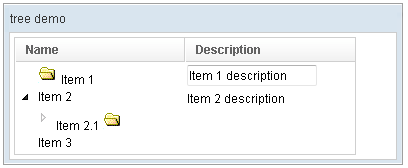
<window title="tree demo" border="normal" width="400px">
    <tree id="tree" width="90%">
        <treecols sizable="true">
            <treecol label="Name" />
            <treecol label="Description" />
        </treecols>
        <treechildren>
            <treeitem>
                <treerow>
                    <treecell>
                        <image src="/img/folder.gif" />
                        Item 1
                    </treecell>
                    <treecell>
                        <textbox value="Item 1 description" />
                    </treecell>
                </treerow>
            </treeitem>
            <treeitem>
                <treerow>
                    <treecell label="Item 2" />
                    <treecell label="Item 2 description" />
                </treerow>
                <treechildren>
                    <treeitem open="false">
                        <treerow>
                            <treecell label="Item 2.1">
                                <image src="/img/folder.gif" />
                            </treecell>
                        </treerow>
                        <treechildren>
                            <treeitem>
                                <treerow>
                                    <treecell label="Item 2.1.1" />
                                </treerow>
                            </treeitem>
                        </treechildren>
                    </treeitem>
                </treechildren>
            </treeitem>
            <treeitem label="Item 3" />
        </treechildren>
    </tree>
</window>
Properties
Span
Default Value: 1
Sets the number of columns this cell spans across, equivalent to the HTML colspan attribute on a <td>. A value of 1 means no spanning (the cell occupies a single column). Set a higher integer to make the cell absorb the following columns in the same row.
<tree>
    <treecols>
        <treecol label="Name" />
        <treecol label="Status" />
        <treecol label="Description" />
    </treecols>
    <treechildren>
        <treeitem>
            <treerow>
                <!-- span the first cell across the first two columns -->
                <treecell label="Item 1" span="2" />
                <treecell label="A wide description" />
            </treerow>
        </treeitem>
    </treechildren>
</tree>
Supported Events
- Inherited Supported Events: LabelImageElement
Supported Children
*ALL