Comboitem
- Demonstration: Combobox
- Java API: org.zkoss.zul.Comboitem
- JavaScript API: zul.inp.Comboitem
Employment/Purpose
An item of a combo box.
Common Use Cases
- Static option list — declare
<comboitem>elements directly in ZUL when the choices are known at design time (e.g. country codes, status values). - Rich descriptions — use
descriptionto add a second line of hint text under each label, orcontentfor HTML-formatted supplemental information. - Value-label separation — assign a domain object or an ID to
valueso the application works with the real object after selection, while users see a human-readablelabel. - Model-driven population — combine
<combobox model="…">with aListModel; individualComboiteminstances are then created by the renderer, and you setlabel,description, andvalueprogrammatically.
Example
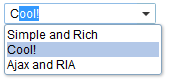
 <combobox>
     <comboitem label="Simple and Rich"/>
     <comboitem label="Cool!"/>
     <comboitem label="Ajax and RIA"/>
 </combobox>
Properties
Description
Default Value: "" (empty string)
A short text shown below the item label in the dropdown list, helping users identify the item.
<combobox>
    <comboitem label="Java" description="A general-purpose programming language"/>
    <comboitem label="Kotlin" description="A modern JVM language"/>
</combobox>
Content
Default Value: "" (empty string)
Embedded HTML markup rendered as part of the item description. Use this when plain text is insufficient and richer formatting is needed in the dropdown entry.
Security Note: The content is rendered directly in the browser. Since ZK 10.0.0 the value is sanitized by default to prevent XSS — do not embed user-supplied JavaScript. Prefer
descriptionfor plain text.
since 3.0.0
<combobox>
<comboitem label="Bold Item" content="<b>Important</b> — use with caution"/>
</combobox>
Value
An application-defined object associated with this item. The type is generic (<T>), so it can hold any Java object — a domain entity, an ID, an enum constant, and so on.
The value is not displayed; retrieve it at runtime via combobox.getSelectedItem().getValue(). When the value is a plain String it is also sent to the client and round-tripped on selection.
Construct the object in <zscript> or a ViewModel/Composer and bind it via EL:
since 2.4.0
<zscript>
    import java.util.Currency;
    Currency usd = Currency.getInstance("USD");
    Currency eur = Currency.getInstance("EUR");
</zscript>
<combobox>
    <comboitem label="US Dollar" value="${usd}"/>
    <comboitem label="Euro"      value="${eur}"/>
</combobox>
Supported Events
| Name | Event Type | Description |
|---|---|---|
| (inherited) | — | Inherited Supported Events from LabelImageElement |
Supported Children
*NONE