Tbeditor
since 8.0.0
Employment/Purpose
Tbeditor is a rich text editor to be used inside web pages. It’s a WYSIWYG editor, which means that the text being edited on it looks as similar as possible to the results users have when publishing it.
The component wraps Trumbowyg
Common Use Cases
- Blog and CMS authoring — embed
tbeditorwherever users compose HTML content (blog posts, product descriptions, announcements) and bindvalueto a ViewModel property to persist the HTML markup. - In-line comment / note fields — drop
tbeditorinto a form alongside structured fields when the note field needs lightweight rich-text formatting (bold, italic, links) without the weight of a full document editor. - Configurable toolbar — use the
configproperty to restrict the toolbar to exactly the buttons relevant to your use-case (e.g. onlybold,italic,link) so the editor stays uncluttered.
Bundled Versions
| ZK | Trumbowyg |
|---|---|
| 10.3.0 | 2.31 |
| 9.6.0 | 2.7.2 |
| 8.5.0 | 2.6 |
| 8.0.0 | 2.0.0-beta.2 |
Example
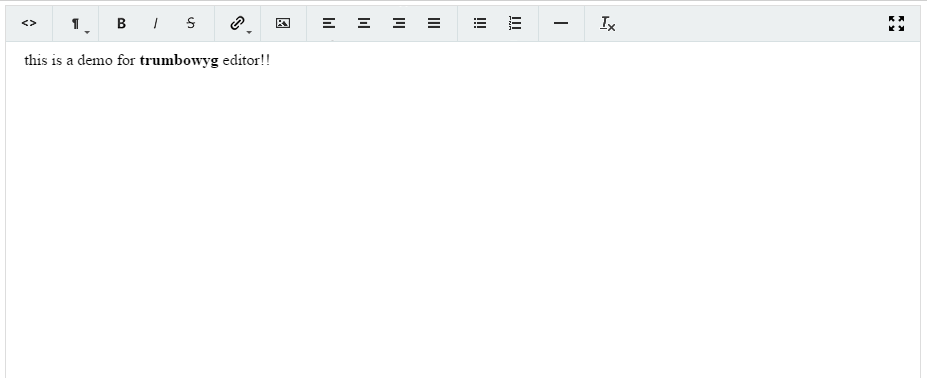
<tbeditor id="tb" value="this is a demo for <b>trumbowy</b> editor!!" />
Properties
value
Default Value: "" (empty string)
Sets the editor’s HTML content. You may include HTML tags to decorate the text; the editor renders them as formatted output. The current content is returned by getValue() as an HTML string.
<tbeditor value="Hello, <b>world</b>!"/>
config
Default Value: null (uses the default Trumbowyg configuration)
Tbeditor lets you customize the underlying editor through Trumbowyg’s own options. Set this property to a java.util.Map whose keys are Trumbowyg option names and whose values are the corresponding option values. Not all options are supported — for example, localization and custom skin are not supported.
Because the configuration is applied before the widget binds, changing config after the component is rendered invalidates the component (a full re-render) rather than performing a smart update.
Since the value is a Java object, construct the map in a <zscript> block (or a composer / ViewModel) and reference it via EL:
<zscript>
    import java.util.HashMap;
    Map editorConfig = new HashMap();
    editorConfig.put("btns", new String[]{"bold", "italic", "link"});
    editorConfig.put("closable", Boolean.TRUE);
</zscript>
<tbeditor config="${editorConfig}"/>
Most option values can be passed directly as strings, numbers, booleans, or arrays. If an option expects a raw JavaScript value (such as a function), wrap it in an org.zkoss.json.JavaScriptValue so it is emitted as JavaScript instead of a quoted string.
Supported Events
| Name | Event Type | Description |
|---|---|---|
onChange |
org.zkoss.zk.ui.event.InputEvent | Denotes that the content of the component has been modified by a user |
onChanging |
org.zkoss.zk.ui.event.InputEvent | Denotes that a user is changing the content of an input component. Notice that the component’s content (at the server) won’t be changed until onChange is received. Thus, you have to invoke the getValue method in the InputEvent class to retrieve the temporary value. |
Supported Children
*NONE