Fisheyebar
- Demonstration: Fisheyebar
- Java API: org.zkoss.zkex.zul.Fisheyebar
- JavaScript API: zkex.menu.Fisheyebar
Employment/Purpose
A fisheye bar is a bar of fisheye that is a menu similar to the fish eye menu on the Mac OS.
Common Use Cases
Horizontal Toolbar (default)
A standard horizontal fisheye bar placed at the bottom of a container. Items zoom upward on hover using attachEdge="bottom" and labels appear above the icon with labelEdge="top".
<div height="300px">
    <fisheyebar style="position:absolute;bottom:10px;"
        attachEdge="bottom" labelEdge="top"
        itemWidth="60" itemHeight="60"
        itemMaxWidth="120" itemMaxHeight="120">
        <fisheye label="Documents" image="/img/docs.png" onClick="alert('Documents')"/>
        <fisheye label="Downloads" image="/img/downloads.png" onClick="alert('Downloads')"/>
        <fisheye label="Settings" image="/img/settings.png" onClick="alert('Settings')"/>
    </fisheyebar>
</div>
Vertical Sidebar
A vertical fisheye bar placed on the left side of a container. Items zoom rightward using attachEdge="left" and labels appear to the right of each icon.
<div height="400px">
    <fisheyebar orient="vertical"
        style="position:absolute;left:10px;top:50px;"
        attachEdge="left" labelEdge="right"
        itemWidth="60" itemHeight="60"
        itemMaxWidth="120" itemMaxHeight="120">
        <fisheye label="Home" image="/img/home.png" onClick="alert('Home')"/>
        <fisheye label="Profile" image="/img/profile.png" onClick="alert('Profile')"/>
        <fisheye label="Logout" image="/img/logout.png" onClick="alert('Logout')"/>
    </fisheyebar>
</div>
Example
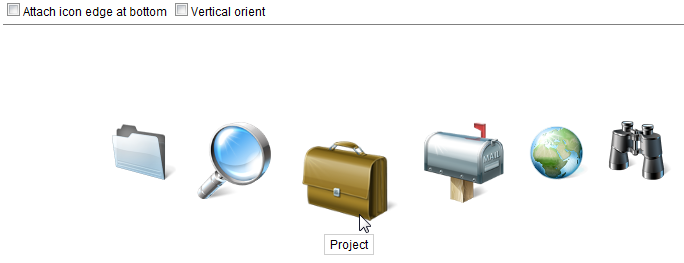
<zk>
    <div height="450px">
        <checkbox label="Attach icon edge at bottom"
            onCheck='fsb.attachEdge=self.checked?"bottom":"top"' />
        <checkbox label="Vertical orient"
            onCheck='fsb.orient=self.checked?"vertical":"horizontal"' />
        <separator bar="true" />
        <fisheyebar id="fsb" style="position:absolute;margin:80px 150px;"
            attachEdge="top" itemWidth="80" itemHeight="80" itemMaxHeight="160" itemMaxWidth="160">
            <fisheye image="/img/Centigrade-Widget-Icons/FolderABlue-128x128.png" label="Folder"
                onClick="alert(self.label)" />
            <fisheye image="/img/Centigrade-Widget-Icons/ReadingGlass-128x128.png" label="Reading Glasses"
                onClick="alert(self.label)" />
            <fisheye image="/img/Centigrade-Widget-Icons/Briefcase-128x128.png" label="Project"
                onClick="alert(self.label)" />
            <fisheye image="/img/Centigrade-Widget-Icons/MailboxFlag-128x128.png"
                label="Email" onClick="alert(self.label)" />
            <fisheye image="/img/Centigrade-Widget-Icons/Globe-128x128.png"
                label="Globe" onClick="alert(self.label)" />
            <fisheye image="/img/Centigrade-Widget-Icons/Spyglass-128x128.png" label="Spyglass"
                onClick="alert(self.label)" />
        </fisheyebar>
    </div>
</zk>
Properties
ItemWidth
Default Value: 50
Sets the normal (un-zoomed) width in pixels of each <fisheye> item. Must be a positive integer.
<fisheyebar itemWidth="80">
    <fisheye label="Home" image="/img/home.png"/>
</fisheyebar>
ItemHeight
Default Value: 50
Sets the normal (un-zoomed) height in pixels of each <fisheye> item. Must be a positive integer.
<fisheyebar itemHeight="80">
    <fisheye label="Home" image="/img/home.png"/>
</fisheyebar>
ItemMaxWidth
Default Value: 200
Sets the maximum (fully-zoomed) width in pixels that a <fisheye> item can grow to when the mouse hovers over it. Must be a positive integer and should be greater than itemWidth.
<fisheyebar itemWidth="80" itemMaxWidth="160">
    <fisheye label="Home" image="/img/home.png"/>
</fisheyebar>
ItemMaxHeight
Default Value: 200
Sets the maximum (fully-zoomed) height in pixels that a <fisheye> item can grow to when the mouse hovers over it. Must be a positive integer and should be greater than itemHeight.
<fisheyebar itemHeight="80" itemMaxHeight="160">
    <fisheye label="Home" image="/img/home.png"/>
</fisheyebar>
ItemPadding
Default Value: 10
Sets the padding in pixels around each <fisheye> item. Must be a positive integer.
<fisheyebar itemPadding="15">
    <fisheye label="Home" image="/img/home.png"/>
</fisheyebar>
Orient
Default Value: horizontal
Sets the orientation of the fisheye bar. Use vertical to arrange items top-to-bottom instead of left-to-right.
| Value | Meaning |
|---|---|
horizontal |
Items are arranged in a row (default) |
vertical |
Items are arranged in a column |
<fisheyebar orient="vertical">
    <fisheye label="Home" image="/img/home.png"/>
    <fisheye label="Mail" image="/img/mail.png"/>
</fisheyebar>
AttachEdge
Default Value: center
Sets the edge from which each item zooms outward when hovered. The valid values depend on orient; a value that does not match the orientation is treated as center.
| Value | Meaning |
|---|---|
center |
Items expand symmetrically from the center (default) |
top |
Items expand downward from the top edge (horizontal only) |
bottom |
Items expand upward from the bottom edge (horizontal only) |
left |
Items expand rightward from the left edge (vertical only) |
right |
Items expand leftward from the right edge (vertical only) |
<fisheyebar attachEdge="bottom">
    <fisheye label="Home" image="/img/home.png"/>
</fisheyebar>
LabelEdge
Default Value: bottom
Sets the edge where the item label is displayed relative to each <fisheye> icon. The label is always placed outside the icon; there is no overlay position. The valid values depend on orient:
| Value | Meaning |
|---|---|
bottom |
Label appears below the icon (default; horizontal only) |
top |
Label appears above the icon (horizontal only) |
left |
Label appears to the left of the icon (vertical only) |
right |
Label appears to the right of the icon (vertical only) |
Other values fall back as follows: center is treated as top; on a horizontal bar, left and right are treated as top; on a vertical bar, top and bottom are treated as left. So a vertical bar with the default labelEdge shows labels on the left.
<fisheyebar labelEdge="top">
    <fisheye label="Home" image="/img/home.png"/>
</fisheyebar>
Supported Events
- Inherited Supported Events: XulElement
Supported Children
* Fisheye