TableChildren
- Demonstration: Tablelayout
- Java API: org.zkoss.zkmax.zul.Tablechildren
- JavaScript API: zkmax.layout.Tablechildren
since 6.0.0
Employment/Purpose
The cell of Tablelayout. Since ZK 6.0.0, the child component of Tablechildren can be any ZK component, not only Panel.
Common Use Cases
- Spanning columns or rows — use
colspanandrowspanto merge cells across multiple columns or rows, mirroring HTML table semantics. - Any child component — since ZK 6.0.0 any ZK component (not only
Panel) may be placed insidetablechildren, enabling rich mixed-content layouts. - Suppressing flex — set
hflex="false"orvflex="false"when you need the cell to maintain a fixed size and ignore the parenttablelayout’s flex distribution.
Example
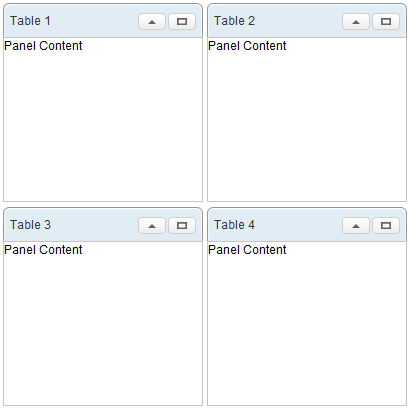
<tablelayout columns="2">
    <tablechildren>
        <panel title="Table 1" border="normal" maximizable="true"
            collapsible="true" width="200px" height="200px">
            <panelchildren>Panel Content</panelchildren>
        </panel>
    </tablechildren>
    <tablechildren>
        <panel title="Table 2" border="normal" maximizable="true"
            collapsible="true" width="200px" height="200px">
            <panelchildren>Panel Content</panelchildren>
        </panel>
    </tablechildren>
    <tablechildren>
        <panel title="Table 3" border="normal" maximizable="true"
            collapsible="true" width="200px" height="200px">
            <panelchildren>Panel Content</panelchildren>
        </panel>
    </tablechildren>
    <tablechildren>
        <panel title="Table 4" border="normal" maximizable="true"
            collapsible="true" width="200px" height="200px">
            <panelchildren>Panel Content</panelchildren>
        </panel>
    </tablechildren>
</tablelayout>
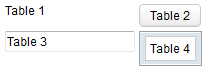
    <tablelayout columns="2">
        <tablechildren>
            <label value="Table 1" />
        </tablechildren>
        <tablechildren>
            <button label="Table 2" />
        </tablechildren>
        <tablechildren>
            <textbox value="Table 3" />
        </tablechildren>
        <tablechildren>
            <window border="normal">
                Table 4
            </window>
        </tablechildren>
    </tablelayout>
Properties
Colspan
Default Value: 1
Specifies the number of columns this cell should span — equivalent to the HTML colspan attribute on a <td> element. The value must be a positive integer; passing zero or a negative number throws a WrongValueException.
<tablelayout columns="3">
    <tablechildren colspan="2">
        <label value="Spans two columns" />
    </tablechildren>
    <tablechildren>
        <label value="Single column" />
    </tablechildren>
</tablelayout>
Hflex
since 7.0.2
Sets the horizontal flex hint for this cell. Only the following values are accepted; any other value throws an IllegalArgumentException.
| Value | Meaning |
|---|---|
min |
Shrink the cell to its minimum content width |
0 |
Equivalent to min; disables flex growth |
false |
Disables horizontal flex entirely |
This property is setter-only (no corresponding getter). Use vflex for the vertical direction.
<tablelayout columns="2">
    <tablechildren hflex="min">
        <label value="Min width cell" />
    </tablechildren>
    <tablechildren hflex="false">
        <label value="No horizontal flex" />
    </tablechildren>
</tablelayout>
Rowspan
Default Value: 1
Specifies the number of rows this cell should span — equivalent to the HTML rowspan attribute on a <td> element. The value must be a positive integer; passing zero or a negative number throws a WrongValueException.
<tablelayout columns="2">
    <tablechildren rowspan="2">
        <label value="Spans two rows" />
    </tablechildren>
    <tablechildren>
        <label value="Row 1, Col 2" />
    </tablechildren>
    <tablechildren>
        <label value="Row 2, Col 2" />
    </tablechildren>
</tablelayout>
Vflex
since 7.0.2
Sets the vertical flex hint for this cell. Only the following values are accepted; any other value throws an IllegalArgumentException.
| Value | Meaning |
|---|---|
min |
Shrink the cell to its minimum content height |
0 |
Equivalent to min; disables flex growth |
false |
Disables vertical flex entirely |
This property is setter-only (no corresponding getter). Use hflex for the horizontal direction.
<tablelayout columns="2">
    <tablechildren vflex="min">
        <label value="Min height cell" />
    </tablechildren>
    <tablechildren vflex="false">
        <label value="No vertical flex" />
    </tablechildren>
</tablelayout>
Supported Events
- Inherited Supported Events: XulElement
Supported Children
* Any