Jasperreport
- Demonstration: Jasperreport
- Java API: org.zkoss.zkex.zul.Jasperreport
- JavaScript API: zkex.utl.Jasperreport
Employment/Purpose
The JasperReport component is based on a 3rd party JasperReports Library, a report generator (e.g. XML generator, PDF generator etc.). This component is used to generate a Jasper report into an inline frame.
Including Dependency
since 9.6.0 ZK doesn’t include jasperreports by default. If you need to use this component, you have to include the dependency manually like:
<dependency>
    <groupId>net.sf.jasperreports</groupId>
    <artifactId>jasperreports</artifactId>
    <version>6.17.0</version>
</dependency>
3rd Party Vulnerability Notice
Jasperreport uses another external library called itext 2, and there are
some vulnerabilities
reported on org.bouncycastle:bcprov-jdk15on, which is a dependency of
itext 2. If you are concerned, you can exclude that dependency, it does
not affect the use or the PDF exporting of this component.
Alternatively, Jasperreport does provide a separate PDF Exporter with a
newer version of itext which does not contain the affected bouncycastle
lib. For more information, please check JasperReports PDF Exporter Lib Seven.
Example
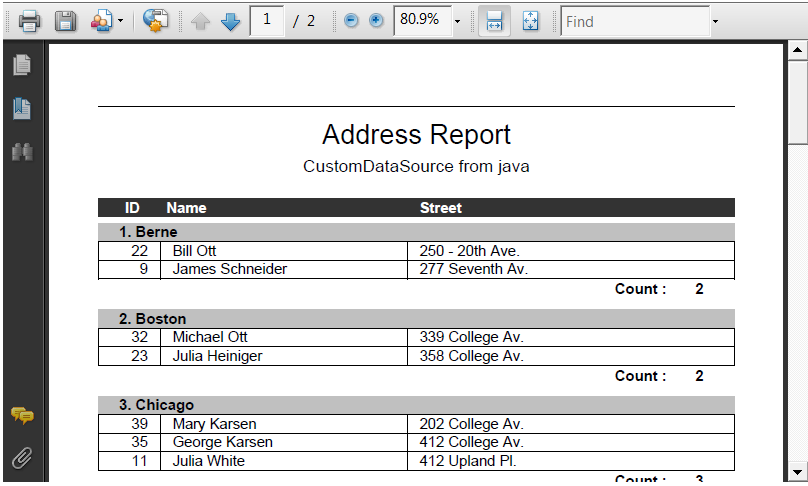
    <jasperreport id="report" height="360px" />

    <zscript>
        import org.zkoss.zkdemo.userguide.CustomDataSource;

            //Preparing parameters
            Map parameters = new HashMap();
            parameters.put("ReportTitle", "Address Report");
            parameters.put("DataFile", "CustomDataSource from java");

            report.setSrc("/data/jasperreport.jasper");
            report.setParameters(parameters);
            report.setDatasource(new CustomDataSource());
            report.setType("pdf");
    </zscript>
Common Use Cases
Display a PDF Report from a Datasource
The most common use of <jasperreport> is to compile and display a report directly in the browser. Provide the path to the compiled .jasper file via src, a datasource or JDBC connection, optional fill parameters, and a type to select the output format.
<jasperreport id="report" height="400px" width="100%" />

<zscript>
    import org.zkoss.zkdemo.userguide.CustomDataSource;

    Map parameters = new HashMap();
    parameters.put("ReportTitle", "Sales Report");
    parameters.put("Author", "ZK Demo");

    report.setSrc("/WEB-INF/reports/sales.jasper");
    report.setParameters(parameters);
    report.setDatasource(new CustomDataSource());
    report.setType("pdf");
</zscript>
Export the Report as a Named Download
Set exportName so the browser download dialog shows a meaningful filename (the full filename becomes exportName + "." + type):
<jasperreport src="/WEB-INF/reports/sales.jasper" exportName="SalesReport" type="xls" height="400px" />
Use a JDBC Connection
When the report data comes directly from a database, pass a java.sql.Connection via setDataConnection. The connection is used by the JasperReports engine to run embedded SQL queries inside the report.
<jasperreport id="dbReport" src="/WEB-INF/reports/orders.jasper" height="400px" />

<zscript>
    import java.sql.DriverManager;
    import java.sql.Connection;

    Connection conn = DriverManager.getConnection(
        "jdbc:mysql://localhost/mydb", "user", "pass");
    dbReport.setDataConnection(conn);
</zscript>
Supported Events
- Inherited Supported Events: Iframe
Properties
content
Default Value: null
Sets the report content directly from a org.zkoss.util.media.Media object, bypassing the src file path. Calling setContent clears any previously set src. When both src and content are set, content (the Media object) takes priority. Use this when the compiled JasperReport output is already available as an in-memory Media instance (for example, from a file upload or a programmatic export).
since 5.0.0
The value is a Java object; construct it in <zscript>, a composer, or a ViewModel, then pass it via EL:
<zscript>
    import org.zkoss.util.media.AMedia;
    // obtain media from an upload or stream:
    org.zkoss.util.media.Media rptMedia = getReportMedia(); // your method
</zscript>
<jasperreport content="${rptMedia}" height="400px" />
dataConnection
Default Value: null
Sets the JDBC java.sql.Connection that JasperReports uses to run the SQL queries embedded in the report design. Use this when the .jasper file contains its own SQL and should fetch data directly from the database rather than from a pre-built JRDataSource.
since 5.0.1
The value is a Java object; construct it in <zscript>, a composer, or a ViewModel, then pass it via EL:
<zscript>
    import java.sql.DriverManager;
    import java.sql.Connection;

    Connection conn = DriverManager.getConnection(
        "jdbc:mysql://localhost/mydb", "user", "secret");
</zscript>
<jasperreport src="/WEB-INF/reports/orders.jasper"
              dataConnection="${conn}"
              height="400px" />
datasource
Default Value: null
Sets the net.sf.jasperreports.engine.JRDataSource used to fill the report. Use this when the report data is available as an in-memory object (for example, a JRBeanCollectionDataSource wrapping a list of beans) rather than a database connection.
The value is a Java object; construct it in <zscript>, a composer, or a ViewModel, then pass it via EL:
<zscript>
    import net.sf.jasperreports.engine.data.JRBeanCollectionDataSource;
    import java.util.Arrays;

    List rows = Arrays.asList(new MyBean("Alice", 42), new MyBean("Bob", 35));
    JRBeanCollectionDataSource ds = new JRBeanCollectionDataSource(rows);
</zscript>
<jasperreport src="/WEB-INF/reports/people.jasper"
              datasource="${ds}"
              height="400px" />
exportName
Default Value: "report"
Specifies the export file name for the download. The full file name becomes exportName + "." + type.
since 8.6.1
<jasperreport exportName="SalesReport" type="pdf" height="400px" />
hibernate
Default Value: false
Sets whether to enable the Hibernate data source for filling the report. When set to true, the JasperReports Hibernate integration is activated so the report can use a Hibernate session as its data provider.
since 5.0.1
<jasperreport src="/WEB-INF/reports/sales.jasper" hibernate="true" height="400px" />
jasperreporteExporterFactory
Default Value: null (built-in exporter is used)
Sets a custom org.zkoss.zkex.zul.JasperreportExporterFactory that the component uses to create the JasperReports exporter for a given output type. Implement this interface when you need to override the default exporter — for example, to apply custom export parameters or to substitute a different exporter implementation.
since 5.0.8
The value is a Java object; construct or inject it in a composer or ViewModel, then pass it via EL:
<zscript>
    import com.example.MyExporterFactory;
    MyExporterFactory factory = new MyExporterFactory();
</zscript>
<jasperreport src="/WEB-INF/reports/custom.jasper"
              jasperreporteExporterFactory="${factory}"
              type="pdf" height="400px" />
locale
Default Value: null (falls back to the ZK current locale via Locales.getCurrent())
Sets the java.util.Locale used when generating the report output. The locale controls number formatting, date formatting, and resource bundles inside the report. When locale is set it takes precedence over a JRParameter.REPORT_LOCALE entry in the parameters map; when both are null the ZK default locale is used.
since 3.0.4
The value is a Java object; construct it in <zscript>, a composer, or a ViewModel, then pass it via EL:
<zscript>
    import java.util.Locale;
    Locale reportLocale = Locale.forLanguageTag("fr-FR");
</zscript>
<jasperreport src="/WEB-INF/reports/summary.jasper"
              locale="${reportLocale}"
              height="400px" />
parameters
Default Value: null
A Map<String, Object> containing fill parameters for the report. Common uses include setting report title, author, and custom data that the report template references by parameter name.
Provide Export Parameters
You can specify export parameters by putting a Map containing export parameters within the parameters Map, with key "exportParameter":
<zscript>
    Map parameters = new HashMap();
    Map exportParams = new HashMap();
    exportParams.put("net.sf.jasperreports.export.mypropertyname", true);
    parameters.put("exportParameter", exportParams);
</zscript>
<jasperreport src="/WEB-INF/reports/sales.jasper"
              parameters="${parameters}"
              height="400px" />
One-Page-Per-Sheet Property
In the JasperReports engine, one-page-per-sheet is false by default. However, the ZK component sets it to true, causing one sheet per page when exporting to Excel. To override this:
<zscript>
    Map parameters = new HashMap();
    Map exportParams = new HashMap();
    exportParams.put(JRXlsAbstractExporterParameter.PROPERTY_ONE_PAGE_PER_SHEET.toString(), false);
    parameters.put("exportParameter", exportParams);
</zscript>
<jasperreport src="/WEB-INF/reports/sales.jasper"
              parameters="${parameters}"
              height="400px" />
src
Default Value: null
The path to the compiled JasperReport .jasper file. This is typically a relative path from the web root (e.g., /WEB-INF/reports/myreport.jasper). If both src and content are set, content takes priority.
<jasperreport src="/WEB-INF/reports/sales.jasper" height="400px" />
type
Default Value: "pdf"
The output format for the generated report. Choose from: pdf, xml, html, rtf, xls, jxl, csv, odt.
since 5.0.8
also supports: xlsx, docx, graphic2d, ods, pptx, txt, xhtml.
<jasperreport src="/WEB-INF/reports/sales.jasper" type="xls" height="400px" />
Supported Children
*NONE
Supported JasperReport Version
| ZK | JasperReport | Transitive Dependency |
|---|---|---|
| 9.6.0 | 6.14.0 | optional (net.sf.jasperreports:jasperreports needs to be added manually on demand) |
| 9.5.0 | 6.14.0 | added by default |
| 9.0.0 | 6.6.0 | added by default |
| 8.6.0 | 6.5.1 | added by default |
| 7.0.0 | 4.5.1 | added by default |
| 6.0.0 | 4.0.1 | added by default |
Troubleshooting
Linux
Jasperreport depends on the fonts you use in the report. For more information, please refer to ZK Installation Guide: Linux.