Listheader
- Demonstration: Listbox (Sorting)
- Java API: org.zkoss.zul.Listheader
- JavaScript API: zul.sel.Listheader
Employment/Purpose
The list header which defines the attributes and header of a columen of
a list box. Its parent must be Listhead.
Common Use Cases
- Auto-sorting columns — Set
sort="auto"to let ZK create comparators automatically. UsesortDirectionto mark which column is the initial sort key without re-sorting the data on page load. - Custom comparator sorting — Assign
sortAscendingandsortDescendingwith your ownComparator(orGroupComparator) instances to implement case-insensitive, locale-aware, or multi-field sort logic. - Client-side sorting — Use
sort="client"(string sort) orsort="client(number)"(numeric sort) to sort entirely in the browser without a server round-trip. Note: client sorting is incompatible with aListModel. - Truncating long cell labels — Set
maxlengthto cap the number of characters shown in the header and all cells in that column, keeping the layout compact for wide data. - Storing column metadata — Use the
valueattribute to attach a field name or identifier to each header, then read it back in anonSortlistener to drive a server-side query. - Responsive design — Leave a secondary column out of the cards of a stacking listbox with
responsiveVisible="false"(EE).
Example
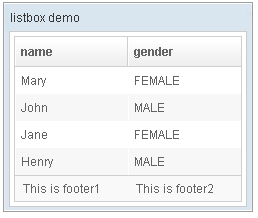
 <window title="listbox demo" border="normal" width="250px">
         <listbox id="box">
             <listhead sizable="true">
                 <listheader label="name" sort="auto"/>
                 <listheader label="gender" sort="auto"/>
             </listhead>
             <listitem>
                 <listcell label="Mary"/>
                 <listcell label="FEMALE"/>
             </listitem>
             <listitem>
                 <listcell label="John"/>
                 <listcell label="MALE"/>
             </listitem>
             <listitem>
                 <listcell label="Jane"/>
                 <listcell label="FEMALE"/>
             </listitem>
             <listitem>
                 <listcell label="Henry"/>
                 <listcell label="MALE"/>
             </listitem>
             <listfoot >
                 <listfooter><label value="This is footer1"/></listfooter>
                 <listfooter><label value="This is footer2"/></listfooter>
             </listfoot>
         </listbox>
 </window>
Multiline Listheader
   <listheader id="lh_usrAccountnonlocked" sort="auto">
	<label value="none &'#'10;&'#'13; locked &'#'10;&'#'13; "
	width="85%" sclass="word-wrap" multiline="true">
	</label>
   </listheader>
Properties
Maxlength
Default Value: 0 (no limit)
Sets the maximum number of characters displayed for each item’s label in the column. A value of 0 means no limit. The maxlength constraint applies to both this header label and all listcell elements in the same column.
<listbox>
  <listhead>
    <listheader label="Description" maxlength="20"/>
  </listhead>
</listbox>
ResponsiveVisible
since 11.0.0
Default Value: true
Sets whether this column is visible when the listbox is in responsive (stacking) mode. Set to false to leave the column out of the cards while keeping it visible in normal table mode. The hiding behaviour requires ZK EE (zkmax); in CE the value is stored but not enforced. For more information, see Responsive Stacking Listbox.
If the column hosts the selection checkbox of a checkmark listbox, the checkbox is still shown in each card; only the column’s value is hidden.
<listbox responsive="stacking" checkmark="true">
    <listhead>
        <listheader label="Name"/>
        <listheader label="Detail" responsiveVisible="false"/>
    </listhead>
</listbox>
SortAscending
Assigns a java.util.Comparator for ascending-order sorting. When set, clicking the header sorts list items in ascending order using this comparator. Pass an instance of GroupComparator if you need to control grouping behaviour separately from item ordering within a group.
The value is a Comparator object; construct it in a <zscript> block or a ViewModel and reference it via EL.
<zscript>
    import java.util.Comparator;
    Comparator myAscComparator = (a, b) -> a.toString().compareToIgnoreCase(b.toString());
</zscript>
<listbox>
  <listhead>
    <listheader label="Name" sortAscending="${myAscComparator}"/>
  </listhead>
</listbox>
SortDescending
Assigns a java.util.Comparator for descending-order sorting. When set, clicking the header a second time (or after a natural reset) sorts list items in descending order using this comparator. Pass an instance of GroupComparator for fine-grained group-level control.
The value is a Comparator object; construct it in a <zscript> block or a ViewModel and reference it via EL.
<zscript>
    import java.util.Comparator;
    Comparator myDscComparator = (a, b) -> b.toString().compareToIgnoreCase(a.toString());
</zscript>
<listbox>
  <listhead>
    <listheader label="Name" sortDescending="${myDscComparator}"/>
  </listhead>
</listbox>
SortDirection
Default Value: "natural"
Sets the current sort-direction indicator on this header. This attribute does not sort the data itself — it only marks which direction the column is visually sorted (unless the parent listbox has autosort="true", in which case setting this attribute triggers an actual sort).
When you call sort(boolean) programmatically the direction is maintained automatically; set this manually only when you sort via a custom mechanism.
| Value | Meaning |
|---|---|
ascending |
Column is sorted in ascending order |
descending |
Column is sorted in descending order |
natural |
No active sort (default) |
<listbox>
  <listhead>
    <listheader label="Name" sortDirection="ascending" sort="auto"/>
  </listhead>
</listbox>
Value
since 3.6.0
Attaches an arbitrary application-defined value to this header. ZK does not interpret or display this value; it is purely for developer use (for example, storing a field name or metadata object to reference in an onSort event listener).
The value is a generic object (<T>); set it from a composer or ViewModel and reference it via EL.
<zscript>
    String fieldName = "lastName";
</zscript>
<listbox>
  <listhead>
    <listheader label="Last Name" sort="auto" value="${fieldName}"/>
  </listhead>
</listbox>
Supported Events
| Name | Event Type | Description |
|---|---|---|
onSort |
org.zkoss.zk.ui.event.SortEvent | Denotes user has sorted the row of this column. |
onGroup |
org.zkoss.zk.ui.event.SortEvent | Denotes user has grouped all the cells under a column. *(1) *(2) |
onUngroup |
org.zkoss.zk.ui.event.SortEvent | Denotes user has ungrouped all the cells under a column. *(1) *(2) |
*(1)
*(2) since 6.5.0
- Inherited Supported Events: HeaderElement
Supported Children
*ALL