Listfoot
- Java API: org.zkoss.zul.Listfoot
- JavaScript API: zul.sel.Listfoot
Employment/Purpose
Like Listhead, each
listbox has at most one Listfoot.
Common Use Cases
- Footer row for a Listbox — Place a single
<listfoot>inside a<listbox>to render a persistent footer row that spans the full width of the list. Each column footer cell is a<listfooter>child. - Summary or aggregate values — Use the footer to display column totals, averages, or other summary information that supplements the data rows above it.
- Static annotations — Add non-interactive labels (e.g. data source notices, unit legends) that should remain visible regardless of how many rows the listbox contains.
<listbox>
    <listhead>
        <listheader label="Item"/>
        <listheader label="Amount"/>
    </listhead>
    <listitem>
        <listcell label="Widget A"/>
        <listcell label="100"/>
    </listitem>
    <listfoot>
        <listfooter label="Total"/>
        <listfooter label="100"/>
    </listfoot>
</listbox>
Example
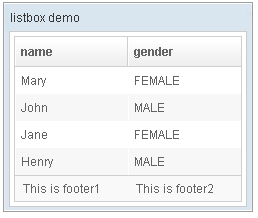
 <window title="listbox demo" border="normal" width="250px">
         <listbox id="box">
             <listhead sizable="true">
                 <listheader label="name" sort="auto"/>
                 <listheader label="gender" sort="auto"/>
             </listhead>
             <listitem>
                 <listcell label="Mary"/>
                 <listcell label="FEMALE"/>
             </listitem>
             <listitem>
                 <listcell label="John"/>
                 <listcell label="MALE"/>
             </listitem>
             <listitem>
                 <listcell label="Jane"/>
                 <listcell label="FEMALE"/>
             </listitem>
             <listitem>
                 <listcell label="Henry"/>
                 <listcell label="MALE"/>
             </listitem>
             <listfoot >
                 <listfooter><label value="This is footer1"/></listfooter>
                 <listfooter><label value="This is footer2"/></listfooter>
             </listfoot>
         </listbox>
 </window>
Supported Events
- Inherited Supported Events: XulElement