Listfooter
- Java API: org.zkoss.zul.Listfooter
- JavaScript API: zul.sel.Listfooter
Employment/Purpose
A column of the footer of a list box (Listbox). Its parent must be
Listfoot. Unlike Listheader, you could place any child in a list
footer.
Note: Listcell also accepts children.
Common Use Cases
- Summary footer row: Place a
<listfooter>in each column of a<listfoot>to display aggregate values (totals, averages, counts) beneath the data rows — e.g. a “Total” label in the first column and a computed sum in the amount column. - Spanning footnotes: Set
span(inherited fromFooterElement) to merge multiple footer cells into one wide annotation, useful for a single remark that applies to the whole listbox. - Rich content footers: Because
<listfooter>accepts*ALLchildren, embed buttons, links, or progress bars directly in the footer — for example, a “Load more” button spanning all columns.
Example
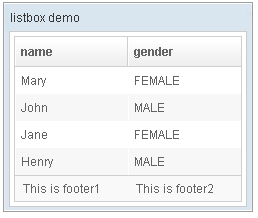
 <window title="listbox demo" border="normal" width="250px">
         <listbox id="box">
             <listhead sizable="true">
                 <listheader label="name" sort="auto"/>
                 <listheader label="gender" sort="auto"/>
             </listhead>
             <listitem>
                 <listcell label="Mary"/>
                 <listcell label="FEMALE"/>
             </listitem>
             <listitem>
                 <listcell label="John"/>
                 <listcell label="MALE"/>
             </listitem>
             <listitem>
                 <listcell label="Jane"/>
                 <listcell label="FEMALE"/>
             </listitem>
             <listitem>
                 <listcell label="Henry"/>
                 <listcell label="MALE"/>
             </listitem>
             <listfoot >
                 <listfooter><label value="This is footer1"/></listfooter>
                 <listfooter><label value="This is footer2"/></listfooter>
             </listfoot>
         </listbox>
 </window>
Supported Events
| Name | Event Type | Description | |——|————|————-|
No additional events; all applicable events are inherited.
Inherited Supported Events: FooterElement
Supported Children
*ALL