Absolutelayout
since 6.0.0
Employment/Purpose
An Absolutelayout component can contain absolute positioned multiple absolutechildren components.
Example
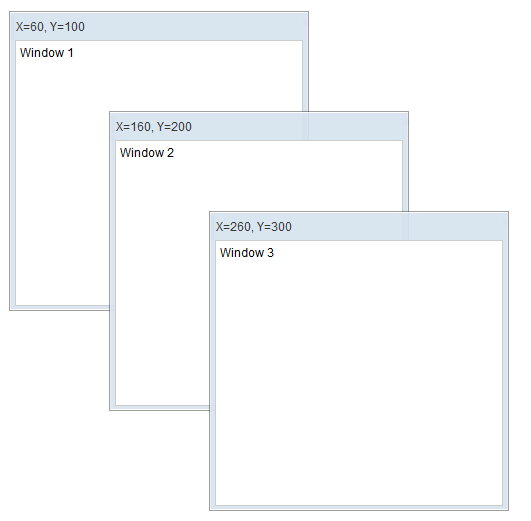
<?component name="window" extends="window" border="normal" width="300px" height="300px"?>
<zk>
    <absolutelayout>
        <absolutechildren id="w1" x="60" y="100">
            <window title="X=60, Y=100">
            Window 1
            </window>
        </absolutechildren>
        <absolutechildren id="w2" x="160" y="200">
            <window title="X=160, Y=200">
            Window 2
            </window>
        </absolutechildren>
        <absolutechildren id="w3" x="260" y="300">
            <window title="X=260, Y=300">
            Window 3
            </window>
        </absolutechildren>
    </absolutelayout>
</zk>
Common Use Cases
Overlapping Panels or Dashboards
Use absolutelayout when you need components positioned at exact pixel coordinates, such as a dashboard where widgets are placed at fixed (x, y) offsets. Each child must be wrapped in an absolutechildren element that carries the x and y attributes.
<absolutelayout width="400px" height="400px">
    <absolutechildren x="10" y="10">
        <panel title="Top-left" width="150px" height="100px"/>
    </absolutechildren>
    <absolutechildren x="200" y="150">
        <panel title="Center-right" width="150px" height="100px"/>
    </absolutechildren>
</absolutelayout>
Layering Components with z-index
Because children are absolutely positioned, you can control their stacking order with the zindex attribute on each absolutechildren.
<absolutelayout width="300px" height="300px">
    <absolutechildren x="20" y="20" zindex="1">
        <image src="/img/background.png" width="260px" height="260px"/>
    </absolutechildren>
    <absolutechildren x="60" y="60" zindex="2">
        <label value="Overlay text" style="color:white; font-size:1.2em"/>
    </absolutechildren>
</absolutelayout>
Supported Events
- Inherited Supported Events: XulElement