Group
- Demonstration: Group
- Java API: org.zkoss.zul.Group
- JavaScript API: zkex.grid.Group
Employment/Purpose
Adds the ability for single level grouping to the Grid.
Default getSclass(): the same as grid’s sclass.
Common Use Cases
Example
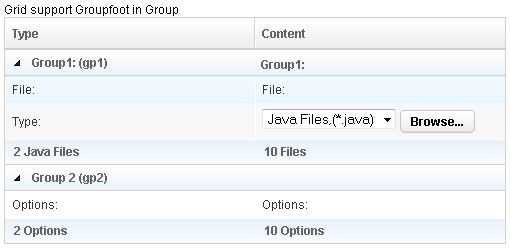
<?xml version="1.0" encoding="UTF-8"?>
 <zk>
     Grid support Groupfoot in Group

     <grid id="grid" width="500px">
         <columns id="h" sizable="true">
             <column id="col1" label="Type"/>
             <column id="col2" label="Content"/>
         </columns>
         <rows id="rows">
             <group id="gp1">
             <label value="Group1: (gp1)"/>
             <label value="Group1:"/>
             </group>
             <row>
                 <label value="File:"/>
                 <label value="File:"/>
             </row>
             <row id="row1">
                 <label value="Type:"/>
                 <hbox>
                     <listbox rows="1" mold="select">
                         <listitem label="Java Files,(*.java)"/>
                         <listitem label="All Files,(*.*)"/>
                     </listbox>
                     <button label="Browse..."/>
                 </hbox>
             </row>
             <groupfoot>
                 <label value="2 Java Files"/>
                 <label value="10 Files"/>
             </groupfoot>
             <group id="gp2" label="Group 2 (gp2)" onOpen='alert("Group is open: "+self.open);'/>
             <row>
                 <label value="Options:"/>
                 <label value="Options:"/>
             </row>
             <groupfoot>
                 <label value="2 Options"/>
                 <label value="10 Options"/>
             </groupfoot>
         </rows>
     </grid>
 </zk>
Properties
Label
Default Value: null
Sets the text label displayed in the group header row. If no child <label> exists yet, one is created automatically. Setting this attribute is the concise alternative to placing a <label> as the first child of <group>.
<grid>
  <columns>
    <column label="Type"/>
    <column label="Value"/>
  </columns>
  <rows>
    <group label="Section A"/>
    <row><label value="Item 1"/><label value="42"/></row>
  </rows>
</grid>
Open
Default Value: true
Controls whether the group is expanded (true) or collapsed (false). When collapsed, all child rows are hidden.
Note: When a
GroupsModelis used to supply data, do not useopento toggle visibility — control the model directly (for example, callGroupsModelArray.setClose()) to avoid lifecycle conflicts.
<grid>
  <columns>
    <column label="Type"/>
    <column label="Value"/>
  </columns>
  <rows>
    <group label="Collapsed Group" open="false"/>
    <row><label value="Hidden"/><label value="Row"/></row>
    <group label="Expanded Group" open="true"/>
    <row><label value="Visible"/><label value="Row"/></row>
  </rows>
</grid>
Supported Events
| Name | Event Type | Description |
|---|---|---|
onOpen |
org.zkoss.zk.ui.event.OpenEvent | Denotes user has opened or closed a component. Note: unlike onClose, this event is only a notification. The client sends this event after opening or closing the component. It is useful to implement load-on-demand by listening to the onOpen event, and creating components when the first time the component is opened. |
- Inherited Supported Events: Row
Supported Children
*ALL