Columnlayout
- Demonstration: Columnlayout
- Java API: org.zkoss.zkex.zul.Columnlayout
- JavaScript API: zkex.layout.Columnlayout
since 6.0.0
Employment/Purpose
A columnlayout is a layout which can have multiple columns while each column may have any number of panels placed vertically with different heights. When using Columnlayout, you have to assign width (either percent or pixel) on every Columnchildren, otherwise the result may depend on the browser and may not be as expected.
Common Use Cases
- Multi-column dashboard layout — Use
<columnlayout>with two or three<columnchildren>elements (each assigned an explicitwidth) to build a Pinterest-style dashboard where each column stacks panels of varying heights independently, avoiding the row-alignment constraint of a<grid>. - Resizable panel portals — Combine
<columnlayout>with<panel collapsible="true" closable="true">children so end users can collapse or close individual panels without affecting the other columns. - Mixed-content columns — Place any ZK component (windows, charts, forms) inside each
<columnchildren>to assemble content-rich side-by-side layouts; assign widths in percentages so the layout remains fluid as the browser window resizes.
Example
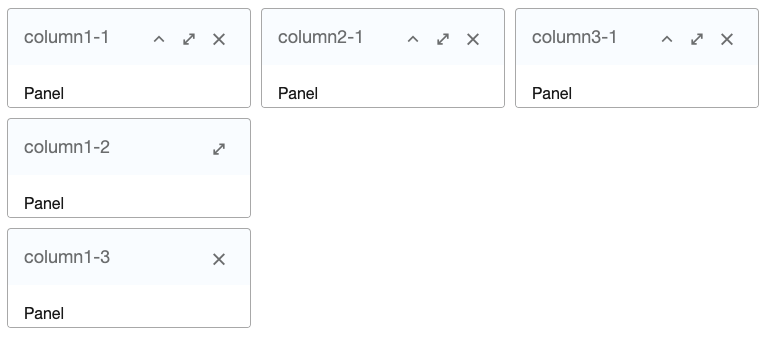
    <columnlayout>
        <columnchildren width="33%" style="padding: 5px">
            <panel height="100px" title="column1-1" closable="true" collapsible="true"
                   border="normal" maximizable="true" style="margin-bottom:10px">
                <panelchildren>Panel</panelchildren>
            </panel>
            <panel height="100px" framable="true" title="column1-2"
                   border="normal" maximizable="true" style="margin-bottom:10px">
                <panelchildren>Panel</panelchildren>
            </panel>
            <panel height="100px" title="column1-3" border="normal"
                   closable="true">
                <panelchildren>Panel</panelchildren>
            </panel>
        </columnchildren>
        <columnchildren width="33%" style="padding: 5px">
            <panel height="100px" title="column2-1" closable="true" collapsible="true"
                   border="normal" maximizable="true" style="margin-bottom:10px">
                <panelchildren>Panel</panelchildren>
            </panel>
        </columnchildren>
        <columnchildren width="33%" style="padding: 5px">
            <panel height="100px" title="column3-1" closable="true" collapsible="true"
                   border="normal" maximizable="true" style="margin-bottom:10px">
                <panelchildren>Panel</panelchildren>
            </panel>
        </columnchildren>
    </columnlayout>
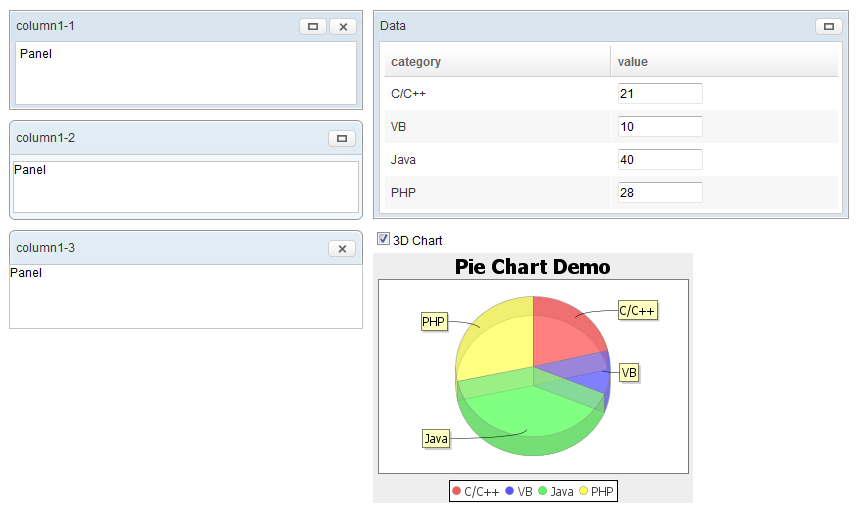
<columnlayout>
    <columnchildren width="30%" style="padding: 5px">
        <window height="100px" title="column1-1" closable="true"
            border="normal" maximizable="true" style="margin-bottom:10px">
            Panel
        </window>
        <panel height="100px" framable="true" title="column1-2"
            border="normal" maximizable="true" style="margin-bottom:10px">
            <panelchildren>Panel</panelchildren>
        </panel>
        <panel height="100px" title="column1-3" border="normal"
            closable="true">
            <panelchildren>Panel</panelchildren>
        </panel>
    </columnchildren>
    <columnchildren width="40%" style="padding: 5px">
        <window id="dataWin" title="Data" maximizable="true" border="normal"
            style="margin-bottom:10px">
            <grid fixedLayout="true" style="border:0px"
                height="100%">
                <columns>
                    <column label="category" />
                    <column label="value" />
                </columns>
                <rows>
                    <row>
                        <label id="c0" value="C/C++" />
                        <decimalbox id="v0"
                            value="21." constraint="no empty" onChange="update(0)" />
                    </row>
                    <row>
                        <label id="c1" value="VB" />
                        <decimalbox id="v1"
                            value="10." constraint="no empty" onChange="update(1)" />
                    </row>
                    <row>
                        <label id="c2" value="Java" />
                        <decimalbox id="v2"
                            value="40." constraint="no empty" onChange="update(2)" />
                    </row>
                    <row>
                        <label id="c3" value="PHP" />
                        <decimalbox id="v3"
                            value="28." constraint="no empty" onChange="update(3)" />
                    </row>
                </rows>
            </grid>
        </window>
        <vbox>
            <checkbox label="3D Chart" checked="true"
                onCheck="mychart.setThreeD(self.isChecked())" />
            <chart id="mychart" title="Pie Chart Demo"
                width="320px" type="pie" threeD="true" fgAlpha="128">
                <attribute name="onClick"><![CDATA[
                    String areaid = event.getArea();
                    if (areaid != null) {
                        Area area = self.getFellow(areaid);
                        alert("" + area.getAttribute("entity") + ":" + area.getTooltiptext());
                    }
                ]]></attribute>
                <zscript><![CDATA[
                    void update(int rowIndex) {
                        Window dataWin = self.getParent().getParent().getFellow("dataWin");
                        Label lb = (Label) dataWin.getFellow("c" + rowIndex);
                        Decimalbox db = (Decimalbox) dataWin.getFellow("v" + rowIndex);
                        model.setValue(lb.value, new Double(db.getValue().doubleValue()));
                    }
                    PieModel model = new SimplePieModel();
                    for (int j = 0; j < 4; ++j) {
                        update(j);
                    }
                    mychart.setModel(model);
                ]]></zscript>
            </chart>
        </vbox>
    </columnchildren>
</columnlayout>
Supported Events
- Inherited Supported Events: XulElement