Spinner
- Demonstration: Spinner
- Java API: org.zkoss.zul.Spinner
- JavaScript API: zul.inp.Spinner
Employment/Purpose
An edit box for holding a constrained integer.
Common Use Cases
Quantity Selector with Range Constraint
Use constraint with min/max and a custom step to build a bounded quantity input:
<spinner value="1" step="1" constraint="min 1 max 100: value must be 1–100" />
Hiding the Spin Buttons
When embedded in a compact layout, hide the buttons and let the user type directly:
<spinner buttonVisible="false" value="0" cols="5" />
In-place Editing
Spinner supports in-place editing, so the input only becomes active when clicked:
<spinner inplace="true" value="10" width="60px" />
Example
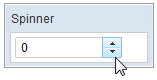
 <window title="Spinner" border="normal" width="150px">
     <spinner />
 </window>
Properties
Value
Default Value: null
Sets the current integer value of the spinner. The value is an Integer object and may be null unless a constraint (such as no empty) prevents it. Use the constraint attribute to restrict the accepted range.
<spinner value="10" />
To bind the value via MVVM:
<spinner value="@bind(vm.quantity)" />
ButtonVisible
Default Value: true
Controls whether the increment/decrement buttons on the right side of the spinner are rendered. Set to false to display the spinner as a plain numeric input field without buttons.
<spinner buttonVisible="false" value="0" />
Step
Default Value: 1
Sets the amount added to or subtracted from the current value each time the
user clicks an up or down spin button (or presses the arrow keys). The value is
an int; the setter stores it as-is and performs no range validation.
<spinner step="2" value="0"/>
Constraint
You could specify what value to accept for input controls by use of the
constraintproperty. It could be a combination of no empty and the
minimum and maximum to spinner.
To specify two or more constraints, use comma to separate them as follows.
<spinner constraint="no empty,min -2 max 6"/>
If you prefer to display different message to the default one, you can append the error message to the constraint with a colon.
<spinner constraint="no empty,min -2 max 6: between -2 to 6"/>
Notes:
- The error message, if specified, must be the last element and start with colon.
- To support multiple languages, you could use the 「l」 function as depicted in the Internationalization chapter.
<spinner constraint="no empty,min -2 max 6: ${c:l('err.msg.spinner')}"/>
Supported Events
- Inherited Supported Events: NumberInputElement
Supported Molds
Available molds of a component are defined in lang.xml embedded in zul.jar.
| Name | Screenshot |
|---|---|
| default |  |
| rounded |  |
since 5.0.0 rounded mold is available.
Supported Children
*None
Inherited Functions
Please refer to NumberInputElement for inherited functions.