Debugging
Overview
This chapter provides a basic guide on troubleshooting ZK application issues. When you interact with a component (e.g. clicking a button), but the expected result doesn’t occur. Please follow the steps below to check. It can help you solve most basic problems or at least give you some clues.
Whether the Expected ZK AU Requests are Sent
When an end user interacts with a component that has an event listener. That component will send an AJAX request to a server to invoke the corresponding event listener. You can observe that behavior through the developer tool. For example, in Chrome, press F12 to open it, and select the Network tab. When you interact with a ZK component and trigger an event, a request with the path ‘zkau’ will be sent as shown below:
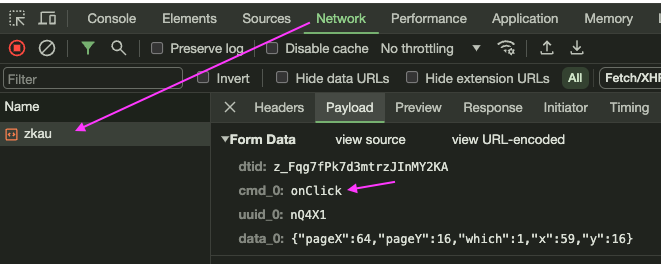
dtid: desktop IDcmd_0: event nameuuid_0: event target component’s UUID which is the DOM element’s IDdata_0: event-related data. Its content varies depending on an event.
Check Event Name
After confirming that the AU request has been sent, the next step is to check whether the event triggered is the one you expected. Based on the interaction between the user and the component, corresponding events should be generated. For example, clicking a button should trigger an onClick event, and opening a popup should trigger an onOpen event. If no event is fired, you should check for issues with the event listener registration.
Event Listener Execution
If an event triggered by a user has a corresponding listener method registered on the server side, ZK will call that method. To verify whether the method has been called, you can log messages or set breakpoints in the Java class using your IDE.
Expected Content in AU Response
After the event listener is executed, and calling the component API (mainly setters) will generate corresponding AU responses. These responses include commands for the client widgets. Hence, whether you are setting properties, adding or removing child components, the response content will include these commands. You can use the browser developer tool to inspect if the AU response content matches the implementation of your event listener.
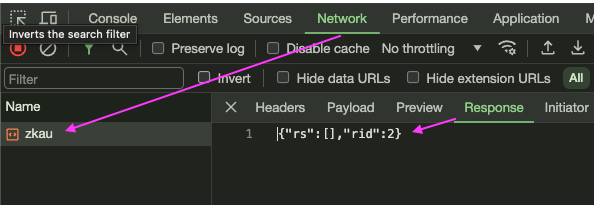
- The response above contains no commands for zk widgets. Nothing is updated.
Call a Setter
The most common case is to call a setter that produces a command called setAttr. Here is the example to call setValue().
{"rs":[["setAttr",[{$u:'p3TZ7'},"value","myvalue"]]],"rid":3}
valueis the property to set.$u: the uuid of a component to be set which is the DOM element id.
Add Components
Here is an example of adding components. The command is addChd.
{"rs":[["addChd",["k5iZ3",[
['zul.tab.Tab','k5iZh',{$onSelect:false,$onClose:true,label:'tab 2',iconSclass:'z\-icon\-book'},{},[]]]]],["addChd",["k5iZ4",[
['zul.tab.Tabpanel','k5iZj',{},{},[
['zul.wgt.Groupbox','k5iZk',{prolog:' ',open:false},{},[
['zul.wgt.Caption','k5iZl',{},{},[
['zul.wgt.Label','k5iZm',{value:'content'},{},[]]]],
['zul.inp.Textbox','k5iZn',{$$0onError:true,$onChange:true,$$1onChange:true,hflex:'1',multiline:true,rows:5},{},[]]],'3d'],
['zul.wgt.Label','k5iZo',{value:'\n\t\t\t\t\tothers fields\n\t\t\t\t'},{},[]]]]]]]],"rid":1}
Remove Components
The command is rm.
{"rs":[["rm",["k5iZj"]],["rm",["k5iZh"]]],"rid":2}
Re-render Components
If you call component.invalidate() or trigger some actions to cause re-rendering components, then you will see the outer command.
{"rs":[["outer",[{$u:'eMfP2'},[
['zul.tab.Tabbox','eMfP2',{width:'600px',prolog:' '},{},[
['zul.tab.Tabs','eMfP3',{},{},[
['zul.tab.Tab','eMfPh',{$onSelect:false,$onClose:true,label:'tab 1',iconSclass:'z\-icon\-book',selected:true},{},[]],
['zul.tab.Tab','eMfPq',{$onSelect:false,$onClose:true,label:'tab 2',iconSclass:'z\-icon\-book'},{},[]]]],
['zul.tab.Tabpanels','eMfP4',{},{},[
['zul.tab.Tabpanel','eMfPj',{},{},[
['zul.wgt.Groupbox','eMfPk',{prolog:' ',open:false},{},[
['zul.wgt.Caption','eMfPl',{},{},[
['zul.wgt.Label','eMfPm',{value:'content'},{},[]]]],
['zul.inp.Textbox','eMfPn',{$$0onError:true,$onChange:true,$$1onChange:true,hflex:'1',multiline:true,rows:5},{},[]]],'3d'],
['zul.wgt.Label','eMfPo',{value:'\n\t\t\t\t\tothers fields\n\t\t\t\t'},{},[]]]],
['zul.tab.Tabpanel','eMfPs',{},{},[
['zul.wgt.Groupbox','eMfPt',{prolog:' ',open:false},{},[
['zul.wgt.Caption','eMfPu',{},{},[
['zul.wgt.Label','eMfPv',{value:'content'},{},[]]]],
['zul.inp.Textbox','eMfPw',{$$0onError:true,$onChange:true,$$1onChange:true,hflex:'1',multiline:true,rows:5},{},[]]],'3d'],
['zul.wgt.Label','eMfPx',{value:'\n\t\t\t\t\tothers fields\n\t\t\t\t'},{},[]]]]]]]]]]]],"rid":1}