New Features of ZK 9.0.0
 Author: Hawk Chen, Manager, Potix
Introduction
“Easy”, “Ajax without Javascript” and “Rich Components” are the 3 top rated ZK values by the community since day one. ZK 9 carries on with the same drive and brings you 20+ new features and components such as Toast, Stepbar, Rangeslider, Drawer, Inputgroup, Anchornav, Linelayout, and more — making development even easier than ever.
ZK 9 requires Java 8 to compile, so please make sure you are with Java SE 8 or later versions. If you are coming from an older ZK version, remember to check out the Upgrade Tips at the end of the page.
For more information please refer to the Release Notes.
Upgrade to JDK 8
ZK Now Requires Java SE 8 or Later
The Java compiler source/target has been updated to Java 8, meaning the Java binary-compatible level is now Java 8 instead of Java 6. Please make sure to use Java 8 or later Java versions.
Support JDK 8 Date/Time API
Datebox, Calendar, Timebox and Timepicker components now support JDK 8
Date/Time API. Their constructors and setters now accept JDK 8 Date/Time
and the getters can return JDK 8 Date/Time type. For example Datebox
supports the following constructors:
org.zkoss.zul.Datebox#Datebox(java.util.Date)
org.zkoss.zul.Datebox#Datebox(java.time.LocalDate)
org.zkoss.zul.Datebox#Datebox(java.time.LocalDateTime)
org.zkoss.zul.Datebox#Datebox(java.time.LocalTime)
org.zkoss.zul.Datebox#Datebox(java.time.ZonedDateTime)
For details, please refer to the Javadoc: Datebox, Timebox, Calendar, Timepicker
Support CSS3 Flex
ZK 9 implements hflex/vflex in a whole new, more performant way — using CSS3 flexbox, which is natively supported by modern browsers. With this change, JavaScript size calculation is eliminated, improving client-side performance. This change should be transparent for developers.
However, if your application depends on the previous implementation, you
can fall back by adding the property below in zk.xml:
<library-property>
    <name>org.zkoss.zul.css.flex</name>
    <value>true</value>
</library-property>
For more details, see the configuration reference.
Embed ZK App into an External App
Instead of using an iframe, ZK 9 introduces a new way to embed your ZK application into an external application such as a NodeJS or Python-based web page. By using ZK Client Binding in JavaScript, you can also control ZK components from these external apps.
This feature makes it easy to combine ZK with other front-end frameworks and leverage the best of both worlds. For more details, see Embedded ZK Application.
New Input Components
Inputgroup
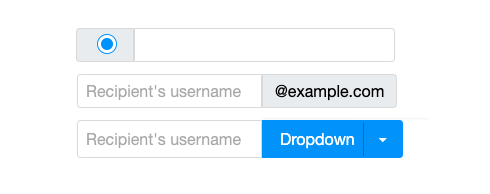
With the new Inputgroup component, you can prepend or append labels,
buttons, checkboxes, or radio buttons to your input components to create
a custom input group.
Tristate Checkbox
Since ZK 8.6, the indeterminate state of a checkbox could be displayed.
In ZK 9, users can now also set the indeterminate state, in addition to
checked and unchecked. Specify mold="tristate" to enable the tri-state checkbox.
Rangeslider
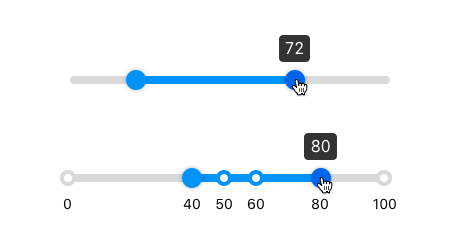
An enhanced slider that allows users to select a range between a specified upper and lower bound.
Multislider
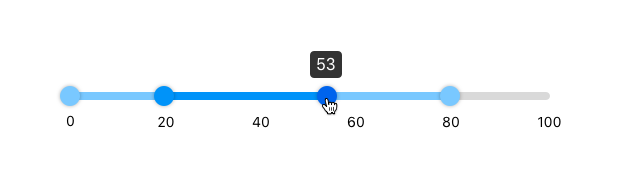
Multislider provides multiple handles for specifying the range and boundaries of multiple segments.
Searchbox
Searchbox allows users to select one or more entries from a list and filter the list to find the target entry.
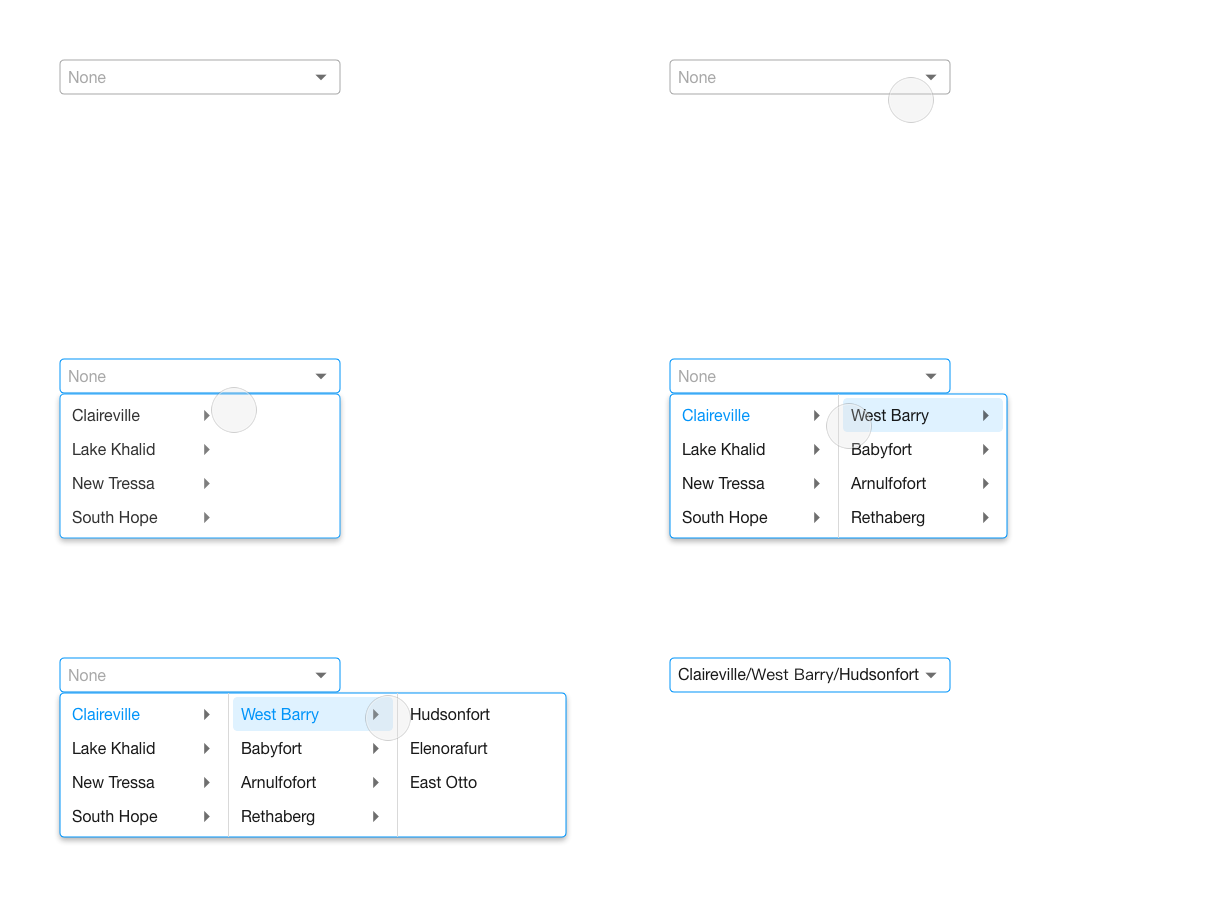
Cascader
Cascader is a cascading input control for multi-level input, such as an address input that allows users to drill down and select Country > State > City.
New Navigation Components
Anchornav
Anchornav allows you to navigate to desired ZK components on a page and highlights the current navigation link based on the current scroll position.
Stepbar
Stepbar displays the progress in a workflow and allows you to dynamically add or remove steps.
New Layout Components
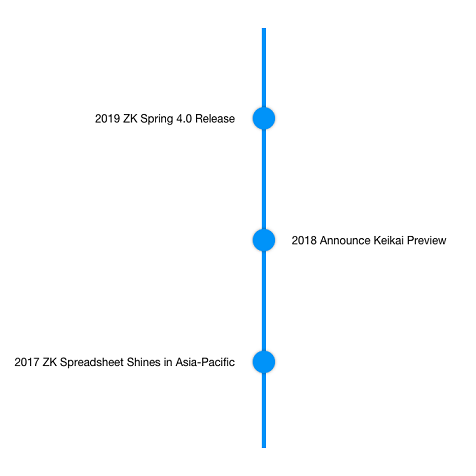
Linelayout
Linelayout is useful for presenting events that happen across different timelines. It is available in both vertical and horizontal orientations.
Drawer
Drawer is a panel that attaches to one of the four sides of your web page. Like a desk drawer, it can be collapsed to stay out of view or opened to display additional content.

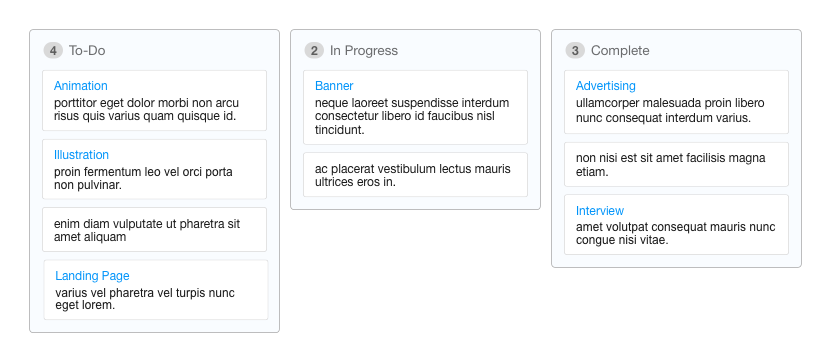
Kanban-style Portal Layout
Portal Layout now provides PortalChildren title and frame design, making
it easy to create a Kanban-style board layout.
More New Components
PDFViewer
PDFViewer lets users view PDF documents inside a ZK application without leaving the browser. It includes controls for zoom in/out, rotate, and page navigation.
Loading Bar
A modern, lightweight loading animation that indicates progress. It can be placed at the top or bottom of the page. You can configure its value (progress percentage), position, and whether to use an indeterminate animation.
Loading progress:

Indeterminate:

Toast
Toast is a stackable notification that can be pinned on the screen.
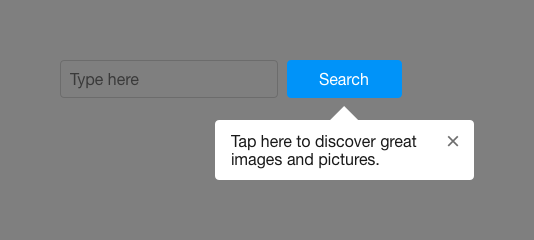
Coachmark
Coachmark guides users to focus on a specific component on the page. Using
the next attribute, it can lead to the next coachmark to walk users through
a sequence of steps. Coachmarks accept both text and ZK components as content.
Enhancements
New ZK Less Engine
The zkless-engine-maven-plugin has been replaced by the
zkless-engine npm module
(GitHub). It provides a
command-line interface (CLI) that significantly reduces theme build times
and improves development turnaround with an incremental watch compiler and
live browser reloading.
This CLI can be invoked directly or integrated into Maven or Gradle builds, making the older maven plugin obsolete. See the README for details.
When upgrading a theme to ZK 9, you need to escape ZK-specific syntax using the escape (e) function. See this commit for an example of upgrading ZK’s default styles.
Upgrade to jQuery 1.12.4
The underlying jQuery version is upgraded to 1.12.4 to include security fixes.
Upgrade Tips
- The Java binary-compatible level is Java 8 since ZK 9.
- ZK Databinding 1 is moved to a legacy module
zkplus-legacy. - ZK DSP Library is moved to a new module
zweb-dsp. SimpleLocalTimeConstraintis used by default instead ofSimpleConstraintin Timebox and Timepicker.- Use
Notification.showinstead ofClients.showNotification, as the former follows single responsibility principle. - Custom themes based on zkThemeTemplate need to merge the latest changes (see New ZK Less Engine).