Implementing the Widget
Widget Base Classes
Every widget class in ZK must extend from zk.Widget or one of its derived classes. ZK provides several skeletal implementations that serve as base classes for different types of widgets:
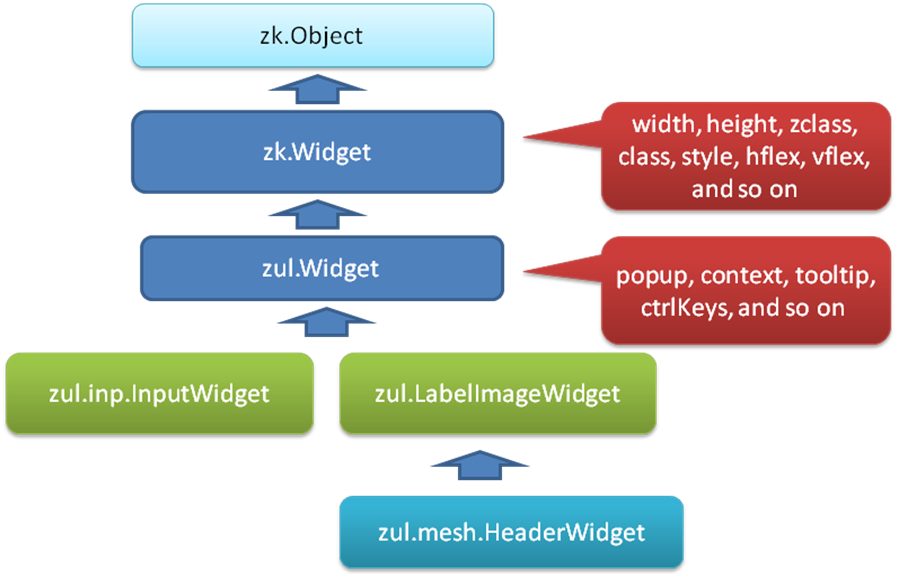
Widget Hierarchy Overview
The widget class hierarchy is structured as follows:
zk.Widget (base for all widgets)
├── zul.Widget (standard UI widgets)
├── zul.Label / zul.Button / ... (concrete ZUL widgets)
└── ... (other specialized widget classes)
zk.Widget - The base class for all widgets. Provides:
- Widget lifecycle methods:
bind_(),unbind_(),redraw() - Property management and event firing:
fire(),$define - DOM manipulation:
$n()(get root element) - Event listener management:
domListen_(),domUnlisten_()
zul.Widget - Most common base for standard widgets
- Extends
zk.Widget - Used for most custom widgets like buttons, labels, inputs
- Provides standard widget behavior and styling
For custom client widgets in this guide, use zul.Widget (or zk.Widget for low-level cases), and only extend a concrete zul.* class when you intentionally inherit that component’s behavior.
Basic Widget Class Structure
For this tutorial, we’ll implement a widget named com.foo.SimpleLabel that extends zul.Widget. Here’s the complete structure:
zk.$package('com.foo');

com.foo.SimpleLabel = zk.$extends(zul.Widget, {
    // 1. Property definitions
    $define: {
        value: null
    },

    // 2. Render HTML
    redraw: function(out) {
        out.push('<span', this.domAttrs_(), '>',
                 this.getValue() || '',
                 '</span>');
    },

    // 3. Lifecycle: Attach to DOM
    bind_: function() {
        this.$supers('com.foo.SimpleLabel', 'bind_', arguments);
        // Initialize event listeners here
    },

    // 4. Lifecycle: Detach from DOM
    unbind_: function() {
        // Clean up event listeners here
        this.$supers('com.foo.SimpleLabel', 'unbind_', arguments);
    }
});
Widget Implementation Components
A complete widget implementation typically includes these components:
1. Package Declaration
zk.$package('com.foo');
- Organizes your widgets into a namespace
- Prevents global namespace pollution
- Convention: matches server-side Java package
2. Class Definition
com.foo.SimpleLabel = zk.$extends(zul.Widget, {
    // implementation
});
- Use
zk.$extends(baseClass, members, staticMembers) - Choose appropriate base class:
zul.Widgetfor most widgetszk.Widgetfor low-level custom widgets- A concrete
zul.*widget class if you want to reuse its built-in behavior
3. Property Definitions
$define: {
    value: null,
    enabled: true,
    visible: null
}
Defines widget properties with automatic getters/setters. The $define keyword is processed by ZK to generate:
getValue()/setValue(value)isEnabled()/setEnabled(boolean)isVisible()/setVisible(boolean)
See Implementing a Widget Property for detailed property patterns.
4. The redraw() Method
redraw: function(out) {
    out.push('<span', this.domAttrs_(), '>',
             zUtl.encodeXML(this.getValue() || ''),
             '</span>');
}
Generates the HTML for the widget. Called by ZK framework to render the widget in the browser.
redraw() is the rendering entry point. If your widget supports molds, redraw()
typically delegates rendering to the active mold (selected by getMold()), while the
mold method contains the concrete HTML structure. If you only need one rendering style,
implementing redraw() directly is sufficient.
Key methods:
out.push()- Append HTML strings to outputthis.domAttrs_()- Generate standard DOM attributes (id, class, style, etc.)zUtl.encodeXML()- Safely encode values for HTML content
See The Redraw Method for more details, and Implementing Molds for mold-based rendering.
5. Lifecycle Methods
bind_() - Called when widget attaches to DOM
bind_: function() {
    this.$supers('com.foo.SimpleLabel', 'bind_', arguments);
    // Initialize event listeners
    this.domListen_(this.$n(), 'onClick', '_doClick');
}
Called after redraw() completes and widget is inserted into the DOM. Use this to:
- Register event listeners with
domListen_() - Initialize widget state
- Set up timers or resource bindings
unbind_() - Called when widget detaches from DOM
unbind_: function() {
    this.domUnlisten_(this.$n(), 'onClick', '_doClick');
    this.$supers('com.foo.SimpleLabel', 'unbind_', arguments);
}
Called when widget is removed from the DOM. Use this to:
- Clean up event listeners with
domUnlisten_() - Release resources
- Prevent memory leaks
See How we Implement the Event for event handling details.
6. Event Handlers
For widget events, you can use either custom handlers or override ZK’s built-in protected hooks.
Custom handler registered in bind_()
_doClick: function(evt) {
    // Handle the click event
    this.fire('onSimpleClick', {data: 'clicked'});
}
Private methods (starting with _) handle DOM events you register with domListen_() in bind_().
Override built-in protected hook (example: doClick_)
doClick_: function (evt) {
    // Custom behavior before/after default processing
    this.fire('onSimpleClick', {data: 'clicked'});
    this.$supers('doClick_', arguments); // keep default click handling
}
Common built-in protected hooks in zk.Widget include:
doClick_()doDoubleClick_()doRightClick_()doMouseDown_(),doMouseUp_(),doMouseOver_(),doMouseOut_()doKeyDown_(),doKeyUp_(),doKeyPress_()
Key points:
- Are called automatically when their registered event occurs
- Can update widget state
- Can fire custom events using
this.fire() - When overriding
doXxx_(), usually callthis.$supers('doXxx_', arguments)to preserve default behavior
Complete Widget Template
Here’s a template you can use as a starting point:
zk.$package('com.example');

com.example.MyWidget = zk.$extends(zul.Widget, {
    // Properties
    $define: {
        text: null,
        enabled: true,
        style: null
    },

    // Generate HTML
    redraw: function(out) {
        out.push('<div', this.domAttrs_(), ' class="my-widget">',
                 zUtl.encodeXML(this.getText() || ''),
                 '</div>');
    },

    // Setup when attached to DOM
    bind_: function() {
        this.$supers('com.example.MyWidget', 'bind_', arguments);
        // Register listeners
        this.domListen_(this.$n(), 'onClick', '_doClick');
        this.domListen_(this.$n(), 'onMouseover', '_doHover');
    },

    // Event handlers
    _doClick: function(evt) {
        this.fire('onMyClick', {});
    },

    _doHover: function(evt) {
        // Handle hover
    },

    // Cleanup when detached from DOM
    unbind_: function() {
        this.domUnlisten_(this.$n(), 'onClick', '_doClick');
        this.domUnlisten_(this.$n(), 'onMouseover', '_doHover');
        this.$supers('com.example.MyWidget', 'unbind_', arguments);
    }
});
Key Implementation Details
Using this.desktop to Check Widget State
Always check if the widget is attached before updating the DOM:
setValue: function(value) {
    this._value = value;
    if (this.desktop) {  // Only update DOM if attached
        this.$n().textContent = value;
    }
}
this.desktopis null if widget is not attachedthis.desktopis thezk.Desktopinstance if widget is attached- Used to prevent DOM updates before rendering
Using this.$n() to Access DOM Element
this.$n() // Returns the root DOM element of the widget
From a rendered widget like <span id="z_xyz_3">content</span>, $n() returns the <span> element.
Calling Parent Methods with $supers()
this.$supers('com.foo.SimpleLabel', 'methodName', arguments);
Always call parent class methods for lifecycle functions to maintain proper inheritance chain.
Widget Class Reference
The widget implementation framework is defined in zk.ts, providing:
zk.$extends()- Class definitionzk.Widget- Base widget class with lifecycle methods$define- Property definition processor- Lifecycle:
redraw(),bind_(),unbind_()
Related Documentation
- ZK’s JavaScript Extension - Class definition with
$extends() - Implementing a Widget Property - Property implementation and
$define - The Redraw Method - HTML generation with
redraw() - How we Implement the Event - Event handling with
bind_()andunbind_() - The Widget Package Descriptor - Widget registration and dependencies