Accelerate ZK Development with the AI Agent Skill: zul-writer
 Author: Hawk Chen, Manager, Potix
Modern AI coding agents like Claude Code and Gemini CLI are transforming how we write code, but they often lack the specialized knowledge like ZK. That’s where Agent Skills come in. Agent skills are specialized capabilities that can be added to AI coding agents to enhance their performance on specific technical tasks, providing framework-specific coding guidance and architectural best practices.
In this small talk, we introduce zul-writer, a powerful agent skill designed specifically for ZK developers to accelerate UI development and ensure code quality.
What Zul-writer Does
zul-writer is an AI agent skill designed to help ZK developers quickly transform UI ideas into working project templates. Instead of manually creating ZUL files and composer classes, zul-writer can generate them automatically based on either:
- Text (natural language) descriptions of your UI requirements, or
- UI screenshots or mockups
From these inputs, zul-writer generates:
- A ZUL file containing the UI structure built with ZK components
- A corresponding Composer template (with empty event handlers ready for business logic)
In addition to generating the files, zul-writer also performs basic validation checks, such as verifying that components exist and that syntax and structure are correct.
This structured workflow helps developers move quickly from an initial idea to a working ZK UI skeleton, so they can focus on implementing business logic rather than writing repetitive UI boilerplate.
Flexible Entry: Text or Image
The zul-writer is designed to be versatile. You can start with a simple text prompt describing your requirements, or leverage its Visual Analysis capability by providing a UI screenshot or mockup. When an image is provided, the skill analyzes the layout, identifies components, and plans a strategy for the ZUL implementation, mapping visual elements to ZK components (such as <borderlayout>, <vlayout>, or <grid>).
A Structured 4-Step Workflow
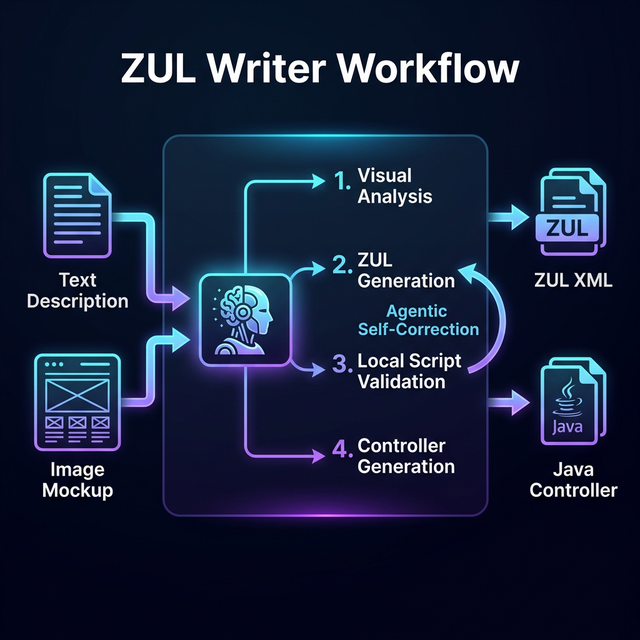
The skill follows a rigorous process to ensure the generated code meets your project’s needs:
- Clarify Requirements: Instead of guessing, the skill asks targeted questions about your ZK version, the page’s purpose (e.g., data entry form vs. dashboard), and your preferred design pattern (MVC or MVVM).
- ZUL Generation: Based on the clarified requirements, it generates a clean ZUL file, prioritizing ZK components over native HTML and using best practices for flexible sizing (
hflex/vflex). - Automated Validation: Code quality is enforced through an integrated validation script (
validate-zul.py). This script checks for XML well-formedness, XSD schema compliance, and common pitfalls like misplaced attributes or ZK 10 compatibility issues. - Controller Generation: Finally, it generates the corresponding Java controller class—a
ViewModelfor MVVM or a class extendsSelectorComposerfor MVC—ready to be wired to your UI.
Installation
This guide assumes you already have an AI coding agent installed in your development environment, such as Claude Code, Codex CLI, or Gemini CLI. You also need to install node.js and npm to run npx.
If you are new to AI coding agents, you may want to review their installation guides first before installing the zul-writer skill.
Installing zul-writer skill is straightforward via The Open Agent Skills Ecosystem. Run the following command in your terminal:
npx skills add zkoss-demo/agent-skill
This command will guide to install zul-writer into your AI coding agents. Suggest to install in a symlink way, so you can easily update the skill for multiple AI coding agents.
Usage in AI Coding Agents
Once installed, you can use the skill directly within AI coding agents. For example, in Claude Code:
Create zul from text
/zul-writer create a user profile form with validation in MVVM pattern
/zul-writer A centered login box with a logo, a decorative landscape image,
 and input fields for organization, username, and password.
 Includes "Forgot Password" and "Login" buttons.
If you don’t specify the pattern, it will ask you to choose one.
For developers who prefer composing UI in Java, you can instruct zul-writer to generate a minimal ZUL with only a root component, while all child components are created programmatically in the Composer:
/zul-writer a login form, write a zul with root component only
 and create other components in a composer, mvc pattern
Create zul from image
Just specify a screenshot:
/zul-writer @my-ui-screenshot.png
The assistant will then guide you through the 4-step workflow to produce your files.
Showcase Project
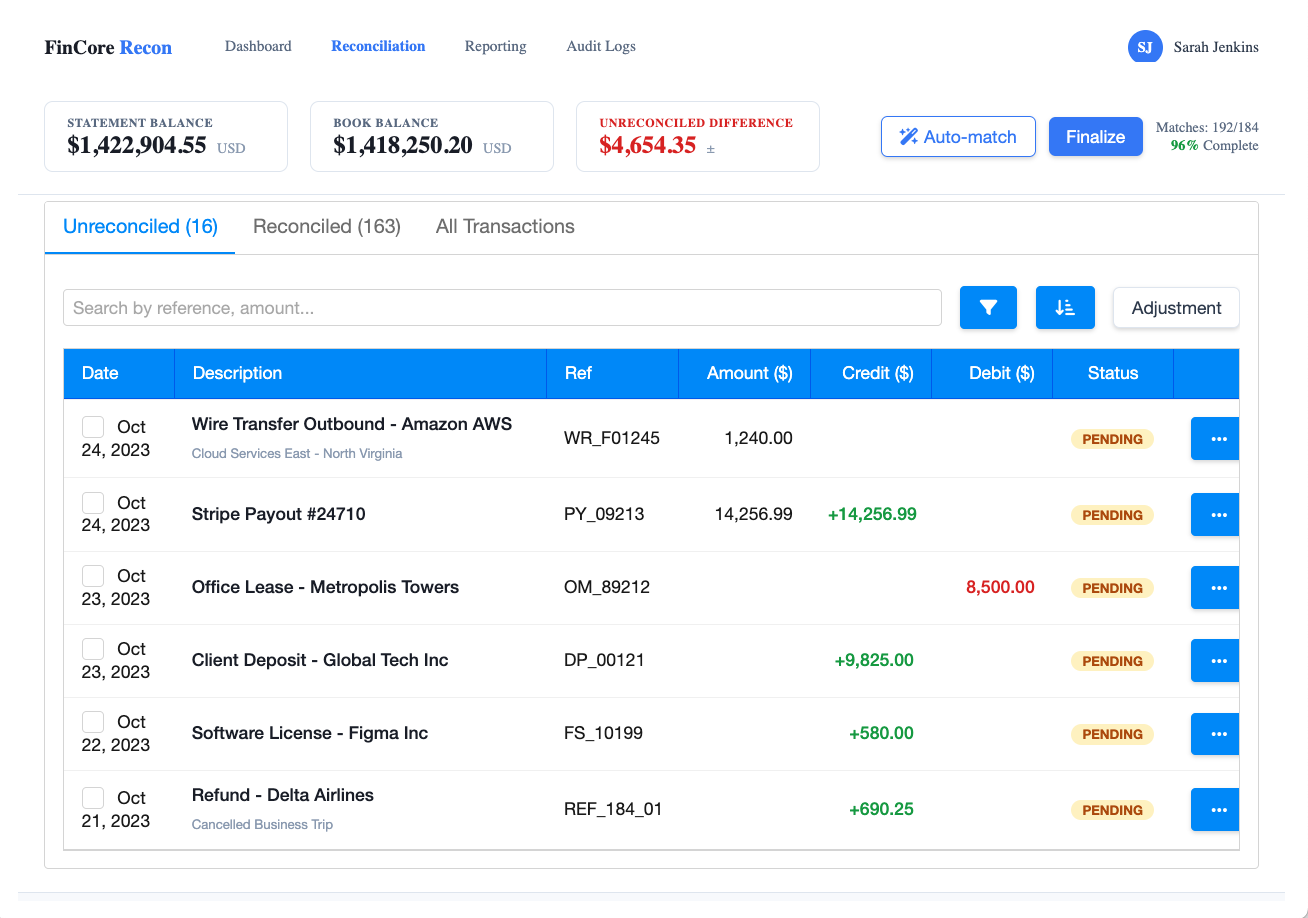
For demonstration purposes, we first use Google Stitch to generate UI mockups. We then provide these mockups to zul-writer, which generates the corresponding ZUL file and Composer templates based on the visual design. Below are a couple of examples showing how zul-writer converts UI mockups into working ZK UI structures.
To explore more examples, check out the Zul-writer Showcase repository. It contains a collection of real-world UIs generated entirely by the skill, demonstrating how zul-writer handles complex layouts, nested components, and various ZK patterns.
Bank Reconciliation Dashboard
Screenshot From Stitch
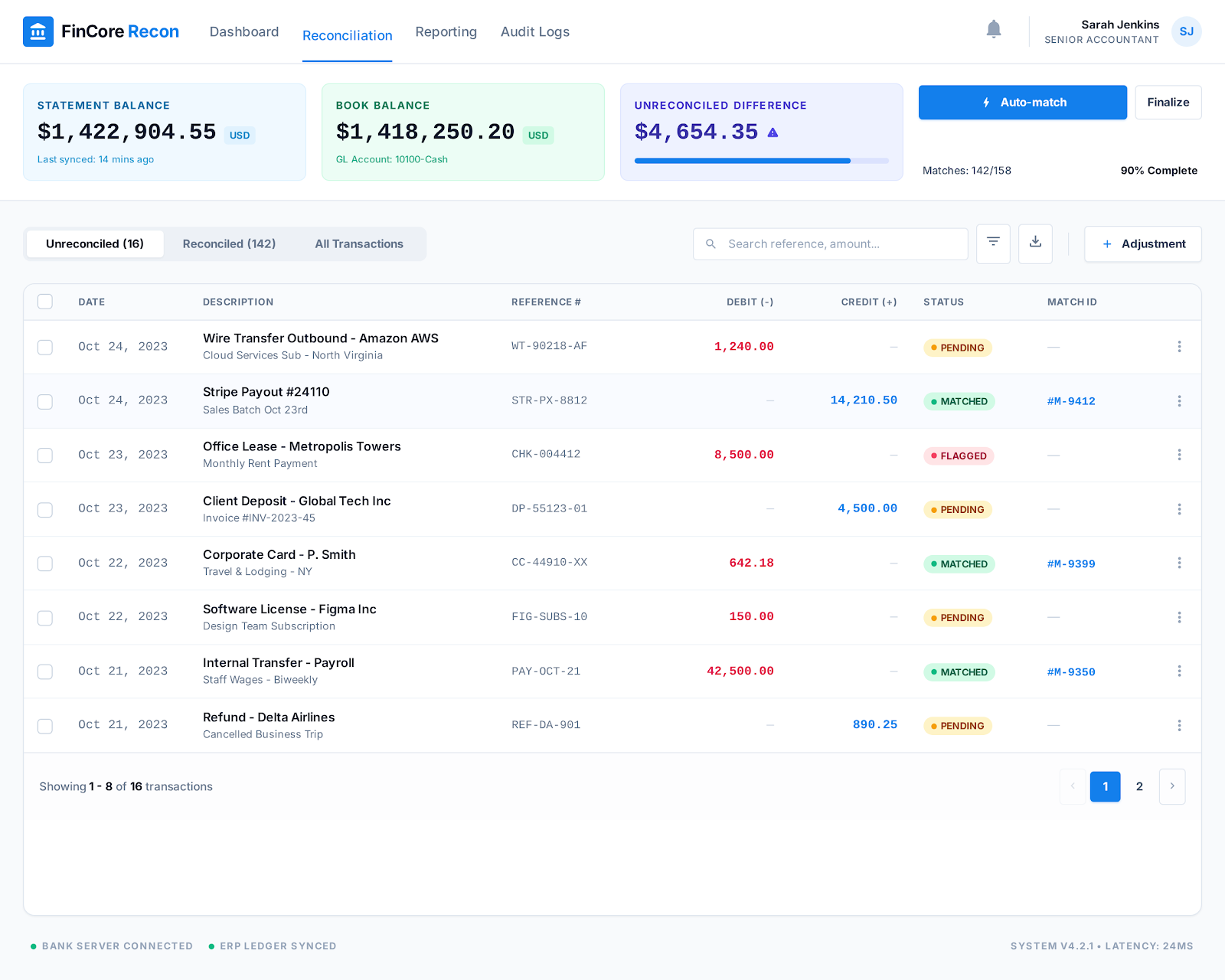
Generated ZUL
Check out the generated ZUL: bank-reconciliation.zul
Enterprise Kanban Board
Screenshot From Stitch
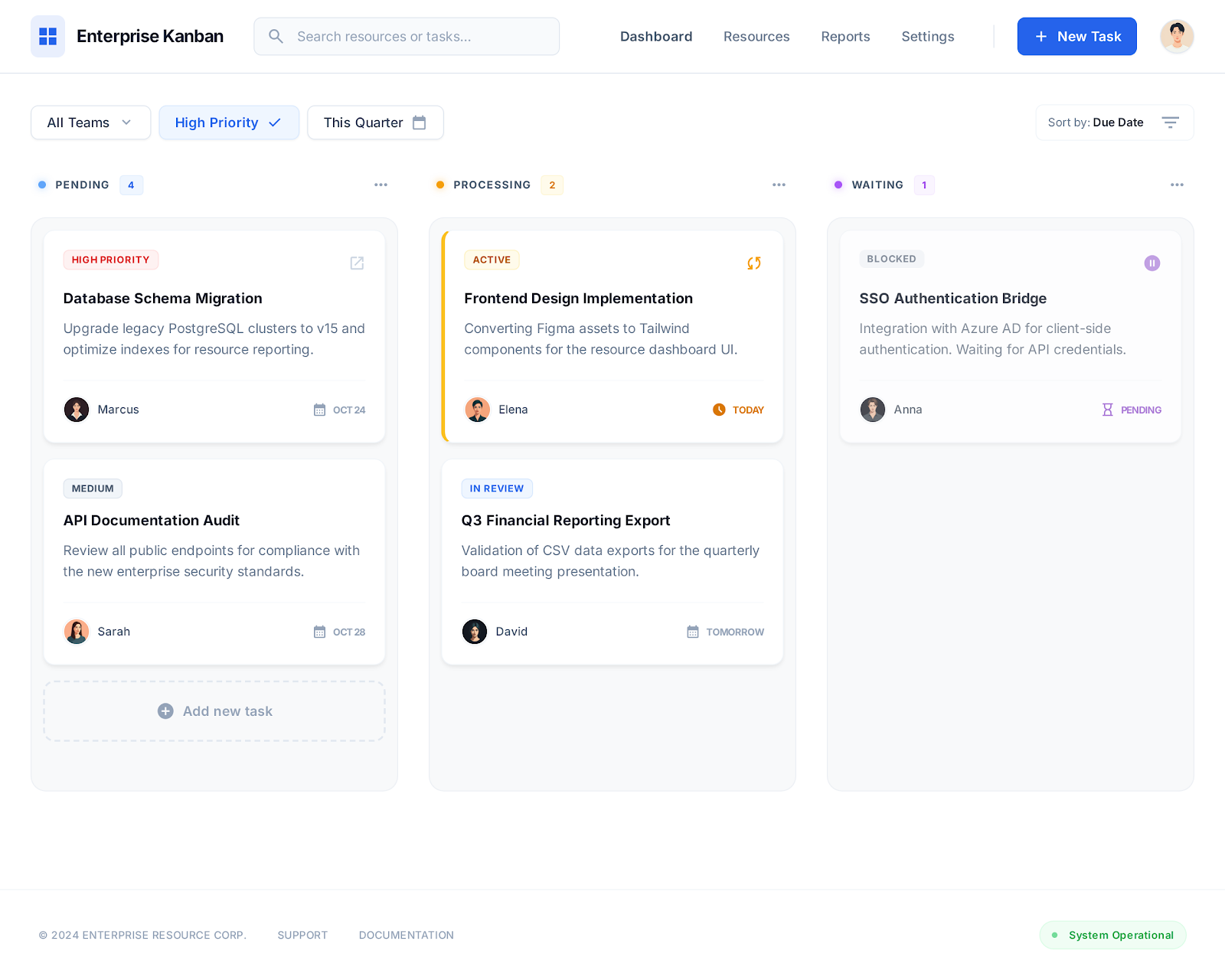
Generated ZUL
Check out the generated ZUL: kanban-board.zul
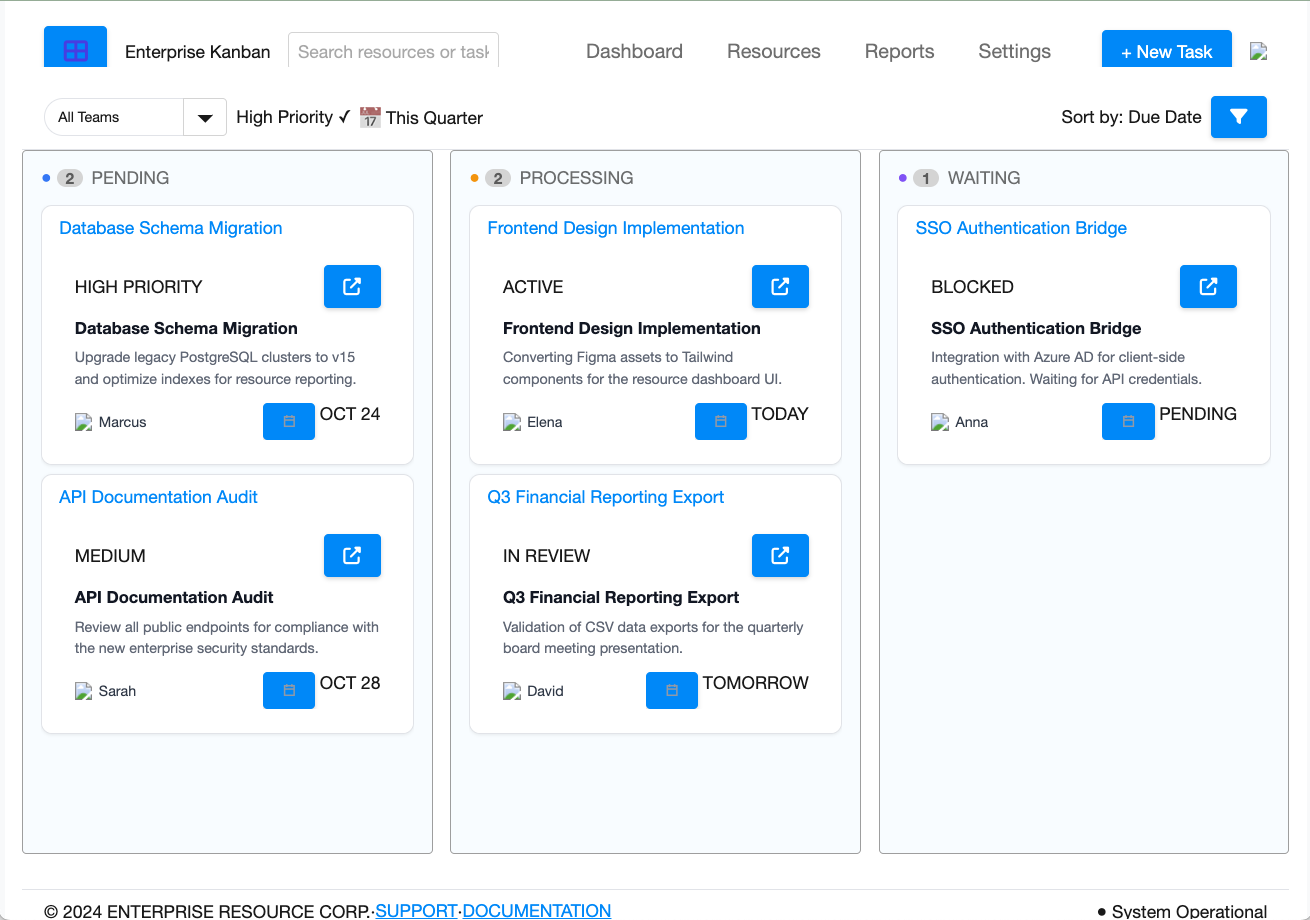
As you can see, the generated UI generally nicely resembles the original mockups. Instead of reproducing the layout as raw HTML, zul-writer maps the design to native ZK components and available resources such as built-in icons and layout containers.
Depending on the input design, the generated result may still require some level of refinement. However, it can serve as a solid starting point, allowing developers to spend less time on repetitive UI scaffolding and focus more on implementing business logic and application behavior.
Welcome Feedback
zul-writer is publicly available and can be installed directly from the Open Agent Skills Ecosystem. This is the first public version of the tool, and while it already works well for many UI generation scenarios, there may still be cases that require adjustments. We recommend reviewing the generated files to ensure they match your project requirements, as results may vary depending on the prompt or input design.
Looking ahead, we are exploring additional AI agent skills for ZK development, as well as the possibility of allowing developers to extend the workflow with their own project-specific rules or plugins.
If you try zul-writer, we would love to hear your thoughts and suggestions. We welcome you to start a discussion on the ZK Forum or you can create a GitHub issue to report bugs or suggest new features.